Basic Practice of 2D Codes 2D Code Implementation and Marking Size
Calculating the module size is as important as determining the data content. The module size is important for determining the reading allowance and selecting the code reader and printer or marker. The size of the quiet zone and the number of modules on one side of the code are important for determining the module size.
2D Codes and How They Differ from Barcodes
Barcodes have been used in various fields around the world from POS systems in supermarkets and convenience stores to production instructions in the manufacturing industry and order management between companies.
As barcodes became widespread, their convenience became widely recognized, and the needs for even greater convenience grew. Businesses wanted barcodes to have more information and carry all the information of an order slip. They wanted barcodes to be smaller and be able to be placed on electronic components.
From these demands, the 2D code was born. A 2D code can hold several hundred times more information than a barcode at one-tenth or less the size.
These advantageous characteristics have led to expanding applications in various fields.
Large data recording capacity
Whereas a barcode contains information in only one direction, a 2D code contains information in both the vertical and horizontal directions, enabling coding of several hundred times more data than a barcode.
| Barcode | 2D code | |
|---|---|---|
| Multiple digit code |
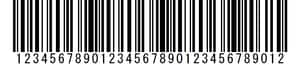
|
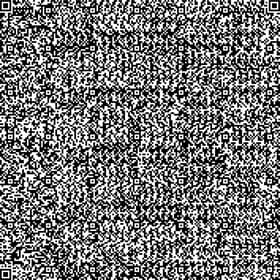
|
High data density
2D codes can hold the same amount of information as a barcode in a smaller size.
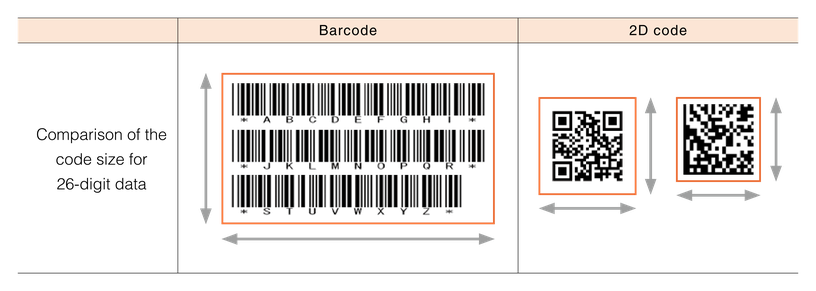
* The narrow bar width of a barcode and the 2D code module size are the same size.
Error correction (data restoration) capability
2D codes have a function to enable restoration of data if the code is damaged or smudged, allowing data restoration and reading even if up to 30% of the code is damaged.
Data restoration uses the Reed-Solomon mathematical error detection and correction method to restore data and prevent incorrect reading (reading of incorrect data).

Spot 
Stain 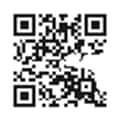
Damaged
Representative 2D Codes
QR codes
QR codes are classified into Model 1 and Model 2, which have three position detection patterns, and Micro QR, which has just one position detection pattern. The size of the quiet zones required in a QR code is four modules wide (two modules wide for a micro QR code).
DataMatrix ECC200
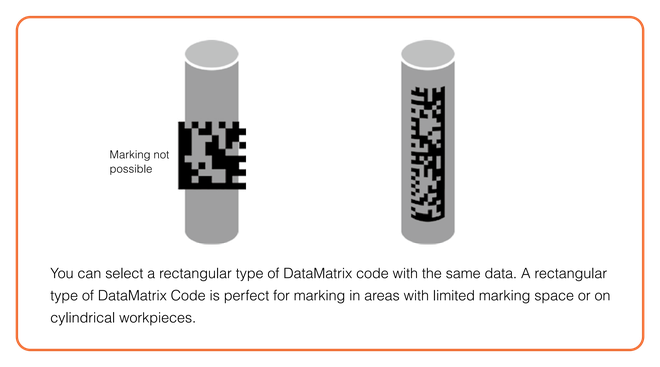
There are two types of DataMatrix (ECC200) codes: a square configuration and a rectangular configuration. The size of the quiet zones required in a DataMatrix code is one module wide.
Determining the Marking Data and Managing the Data Content
The first step to implementing a 2D code is to organize the data content. Organize the number of data items you want to manage. Let us use the following as an example.
Example of managed items
- Product No.: P123456
- Lot No.: 00219
- Serial No.: 0005365
- Manufacture date: 19/12/22
- Quantity: 100
- Location No.: 001
- etc.
The data format can be determined by clarifying the data (data to be included in the 2D code) to be managed.
Data Format
The next step is to determine the data format.
Careful consideration is required, as these items will determine the applications that can handle the data and the 2D code marking size.
Number of digits of the data items
The number of data digits (data length) can be expressed in “variable length”, where the number of digits changes, and “fixed length”, where the number of digits is a constant.
Careful consideration is required, as the method of expression determines the data processing method and the size and content of the 2D code.
Separating variable-length data
Because the number of data digits varies, if the variable-length data continues or exists in the data, a character (separator) indicating the delimiter of the variable-length data is required.
(Three items of variable-length data (blue, red, green))
Without a separator
12345ABCD9876
963ZYX877123654
There is no information indicating where to separate the variable-length data, so the computer cannot determine where to separate the data.
With a separator
12345 : ABCD : 9876
963 : ZYX877 : 123654
Here, a colon (:) is used as a separator. The separator makes it easy to see where to separate the data, so the computer can recognize three sets of data.
(The separator processing must be constructed on the computer.)
Effect of the variable-length data
The 2D code is generally created to be the smallest size possible. Therefore, if there is variable-length data, the size of the 2D code varies depending on the data content. If the marking area is limited, it is necessary to check the specifications of the 2D code with the maximum number of digits expected.
When non-numeric characters are included in the data
2D codes compress data to enable marking in a small space. However, because the compression method differs depending on the character type, number of characters and character order, the code size may change even though the number of data digits is the same.
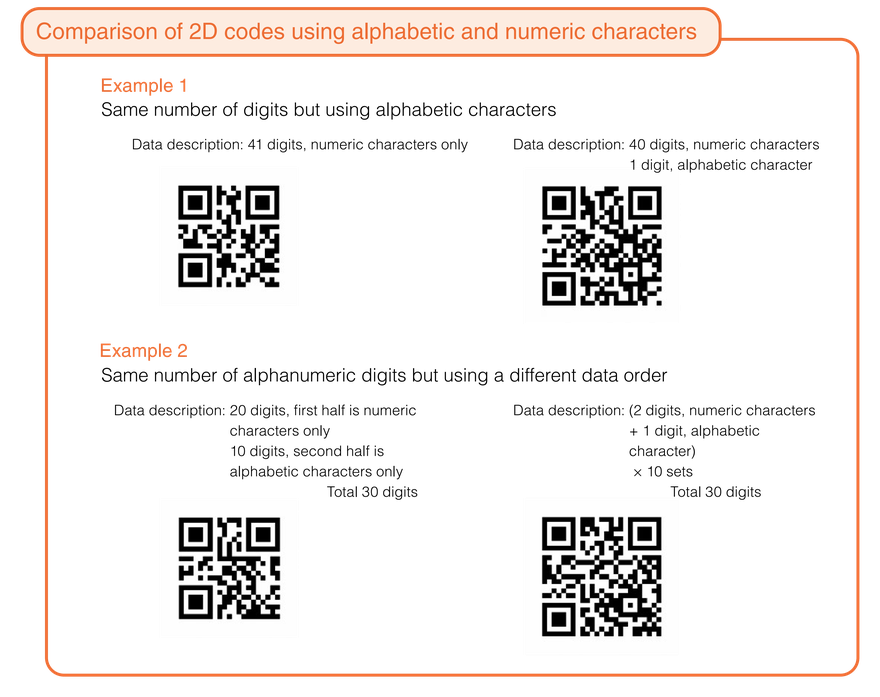
Four character expression modes of 2D codes
There are four character expression modes for 2D codes.
Each mode has different set of characters that can be expressed and a compression rate, and the modes are combined to create the smallest code size possible when creating a code.
-
Numeric mode
Only numeric characters can be expressed.
This is effective when there are two or more numeric characters in a row.
This has the feature of reducing the amount of information per character.
-
Alphanumeric mode
Alphanumeric characters and some symbols can be expressed.
The amount of information per character is greater than numeric mode but smaller than binary mode.
-
Binary mode
All single-byte characters (control code, etc.) can be expressed.
The amount of information per character is greater than alphanumeric mode, and control codes can be expressed.
-
Kanji mode
Double-byte characters, such as kanji, can be expressed.
The amount of information per character is the greatest of the four modes.
Calculating the Module Size
Module size
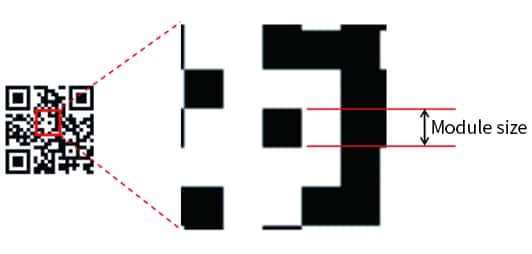
The smallest element (black or white square) of the 2D code is called a “module”.
The module size is the length of one module.
When the marking area for a 2D code is provided, use the following formula to calculate the module size.
Number of modules in 1 direction = Number of modules on 1 side + (number of quiet zone modules) × 2
Module size = Length on 1 side ÷ number of modules in 1 direction
Example: When a marking area of 30 mm × 30 mm 1.18″ × 1.18″ is provided
QR code
Calculate the module size using the number of modules on one side of the code and a quiet zone of four modules.
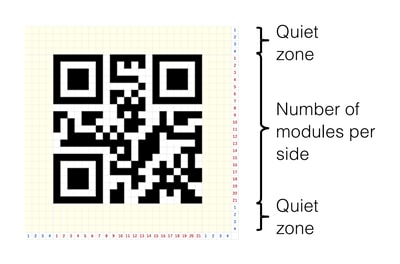
21 modules + 4 modules × 2 = 29 modules
30 mm 1.18″ ÷ 29 modules ≈ 1.03 mm/module 0.04″/module
DataMatrix
Calculate the module size using the number of modules on one side of the code and a quiet zone of one module.
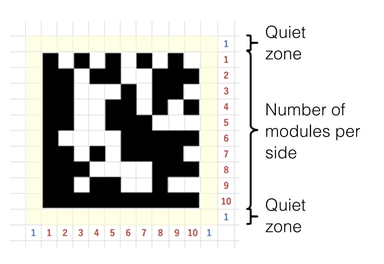
10 modules + 1 module × 2 = 12 modules
30 mm 1.18″ ÷ 12 modules ≈ 2.5 mm/module 0.10″/module
By determining the marking data and code size and marking area, it is possible to calculate the markable module size. Select the code reader and printer or marker based on the module size.
Maximum Number of Input Characters
QR code
Model 2
| Version (number of modules) | Numeric | Alphanumeric | Binary | Kanji | ||||||||||||
|---|---|---|---|---|---|---|---|---|---|---|---|---|---|---|---|---|
| L | M | Q | H | L | M | Q | H | L | M | Q | H | L | M | Q | H | |
| 1 (21) | 41 | 34 | 27 | 17 | 25 | 20 | 16 | 10 | 17 | 14 | 11 | 7 | 10 | 8 | 7 | 4 |
| 2 (25) | 77 | 63 | 48 | 34 | 47 | 38 | 29 | 20 | 32 | 26 | 20 | 14 | 20 | 16 | 12 | 8 |
| 3 (29) | 127 | 101 | 77 | 58 | 77 | 61 | 47 | 35 | 53 | 42 | 32 | 24 | 32 | 26 | 20 | 15 |
| 4 (33) | 187 | 149 | 111 | 82 | 114 | 90 | 67 | 50 | 78 | 62 | 46 | 34 | 48 | 38 | 28 | 21 |
| 5 (37) | 255 | 202 | 144 | 106 | 154 | 122 | 87 | 64 | 106 | 84 | 60 | 44 | 65 | 52 | 37 | 27 |
| 6 (41) | 322 | 255 | 178 | 139 | 195 | 154 | 108 | 84 | 134 | 106 | 74 | 58 | 82 | 65 | 45 | 36 |
| 7 (45) | 370 | 293 | 207 | 154 | 224 | 178 | 125 | 93 | 154 | 122 | 86 | 64 | 95 | 75 | 53 | 39 |
| 8 (49) | 461 | 365 | 259 | 202 | 279 | 221 | 157 | 122 | 192 | 152 | 108 | 84 | 118 | 93 | 66 | 52 |
| 9 (53) | 552 | 432 | 312 | 235 | 335 | 262 | 189 | 143 | 230 | 180 | 130 | 98 | 141 | 111 | 80 | 60 |
| 10 (57) | 652 | 513 | 364 | 288 | 395 | 311 | 221 | 174 | 271 | 213 | 151 | 119 | 167 | 131 | 93 | 74 |
| 11 (61) | 772 | 604 | 427 | 331 | 468 | 366 | 259 | 200 | 321 | 251 | 177 | 137 | 198 | 155 | 109 | 85 |
| 12 (65) | 883 | 691 | 489 | 374 | 535 | 419 | 296 | 227 | 367 | 287 | 203 | 155 | 226 | 177 | 125 | 96 |
| 13 (69) | 1022 | 796 | 580 | 427 | 619 | 483 | 352 | 259 | 425 | 331 | 241 | 177 | 262 | 204 | 149 | 109 |
| 14 (73) | 1101 | 871 | 621 | 468 | 667 | 528 | 376 | 283 | 458 | 362 | 258 | 194 | 282 | 223 | 159 | 120 |
| 15 (77) | 1250 | 991 | 703 | 530 | 758 | 600 | 426 | 321 | 520 | 412 | 292 | 220 | 320 | 254 | 180 | 136 |
| 16 (81) | 1408 | 1082 | 775 | 602 | 854 | 656 | 470 | 365 | 586 | 450 | 322 | 250 | 361 | 277 | 198 | 154 |
| 17 (85) | 1548 | 1212 | 876 | 674 | 938 | 734 | 531 | 408 | 644 | 504 | 364 | 280 | 397 | 310 | 224 | 173 |
| 18 (89) | 1725 | 1346 | 948 | 746 | 1046 | 816 | 574 | 452 | 718 | 560 | 394 | 310 | 442 | 345 | 243 | 191 |
| 19 (93) | 1903 | 1500 | 1063 | 813 | 1153 | 909 | 644 | 493 | 792 | 624 | 442 | 338 | 488 | 384 | 272 | 208 |
| 20 (97) | 2061 | 1600 | 1159 | 919 | 1249 | 970 | 702 | 557 | 858 | 666 | 482 | 382 | 528 | 410 | 297 | 235 |
| 21 (101) | 2232 | 1708 | 1224 | 969 | 1352 | 1035 | 742 | 587 | 929 | 711 | 509 | 403 | 572 | 438 | 314 | 248 |
| 22 (105) | 2409 | 1872 | 1358 | 1056 | 1460 | 1134 | 823 | 640 | 1003 | 779 | 565 | 439 | 618 | 480 | 348 | 270 |
Micro QR
| Version (number of modules) | Error correction | Numeric | Alphanumeric | Binary | Kanji |
|---|---|---|---|---|---|
| M1 (11) | — | 5 | — | — | — |
| M2 (13) | L | 10 | 6 | — | — |
| M | 8 | 5 | — | — | |
| M3 (15) | L | 23 | 14 | 9 | 6 |
| M | 18 | 11 | 7 | 4 | |
| M4 (17) | L | 35 | 21 | 15 | 9 |
| M | 30 | 18 | 13 | 8 | |
| Q | 21 | 13 | 9 | 5 |
Error correction level of QR code and micro QR
| Error correction level | Damaged area to entire code size |
|---|---|
| L | 7% |
| M | 15% |
| Q | 25% |
| H | 30% |
Note
The characters in the table above are the maximum number of characters that can be entered. However, the version (number of modules) can increase depending on the data component (e.g. a combination of figures and symbols or a combination of upper and lower case alphabetic characters), even when the data contains less characters than indicated in the table above.
DataMatrix ECC200
Square type
| Number of modules | Data capacity | Error correction rate | ||
|---|---|---|---|---|
| Numeric | Alphanumeric | Binary | ||
| 10 × 10 modules | 6 | 3 | 1 | 25% |
| 12 × 12 modules | 10 | 6 | 3 | 25% |
| 14 × 14 modules | 16 | 10 | 6 | 28 to 39% |
| 16 × 16 modules | 24 | 16 | 10 | 25 to 38% |
| 18 × 18 modules | 36 | 25 | 16 | 22 to 34% |
| 20 × 20 modules | 44 | 31 | 20 | 23 to 38% |
| 22 × 22 modules | 60 | 43 | 28 | 20 to 34% |
| 24 × 24 modules | 72 | 52 | 34 | 20 to 35% |
| 26 × 26 modules | 88 | 64 | 42 | 19 to 35% |
| 32 × 32 modules | 124 | 91 | 60 | 18 to 34% |
| 36 × 36 modules | 172 | 127 | 84 | 16 to 30% |
| 40 × 40 modules | 228 | 169 | 112 | 15 to 28% |
| 44 × 44 modules | 288 | 214 | 142 | 14 to 27% |
| 48 × 48 modules | 348 | 259 | 172 | 14 to 27% |
| 52 × 52 modules | 408 | 304 | 202 | 15 to 27% |
| 64 × 64 modules | 560 | 418 | 278 | 14 to 27% |
| 72 × 72 modules | 736 | 550 | 366 | 14 to 26% |
| 80 × 80 modules | 912 | 682 | 454 | 15 to 28% |
| 88 × 88 modules | 1152 | 862 | 574 | 14 to 27% |
| 96 × 96 modules | 1392 | 1042 | 694 | 14 to 27% |
| 104 × 104 modules | 1632 | 1222 | 814 | 15 to 28% |
| 120 × 120 modules | 2100 | 1573 | 1048 | 14 to 27% |
| 132 × 132 modules | 2608 | 1954 | 1302 | 14 to 26% |
| 144 × 144 modules | 3116 | 2335 | 1556 | 14 to 27% |
Rectangular type
| Number of modules | Data capacity | Error correction rate | ||
|---|---|---|---|---|
| Numeric | Alphanumeric | Binary | ||
| 8 × 18 modules | 10 | 6 | 3 | 25% |
| 8 × 32 modules | 20 | 13 | 8 | 24% |
| 12 × 26 modules | 32 | 22 | 14 | 23 to 37% |
| 12 × 36 modules | 44 | 31 | 20 | 23 to 38% |
| 16 × 36 modules | 64 | 46 | 30 | 21 to 38% |
| 16 × 48 modules | 98 | 72 | 47 | 18 to 33% |
Note
The characters in the table above are the maximum number of characters that can be entered. However, the version (number of modules) can increase depending on the data component (e.g. a combination of figures and symbols or a combination of upper and lower case alphabetic characters), even when the data contains less characters than indicated in the table above.
Extended rectangular DataMatrix (DMRE)
DMRE
| Number of modules | Data capacity | Error correction rate | ||
|---|---|---|---|---|
| Numeric | Alphanumeric | Binary | ||
| 8 × 48 modules | 36 | 25 | 16 | 21 to 36% |
| 8 × 64 modules | 48 | 34 | 22 | 21 to 36% |
| 8 × 80 modules | 64 | 46 | 30 | 20 to 35% |
| 8 × 96 modules | 76 | 55 | 36 | 21 to 38% |
| 8 × 120 modules | 98 | 72 | 47 | 20 to 36% |
| 8 × 144 modules | 126 | 93 | 61 | 18 to 34% |
| 12 × 64 modules | 86 | 63 | 41 | 18 to 34% |
| 12 × 88 modules | 128 | 94 | 62 | 18 to 33% |
| 16 × 64 modules | 124 | 91 | 60 | 18 to 34% |
| 20 × 36 modules | 88 | 64 | 42 | 19 to 35% |
| 20 × 44 modules | 112 | 82 | 54 | 19 to 34% |
| 20 × 64 modules | 168 | 124 | 82 | 17 to 31% |
| 22 × 48 modules | 144 | 106 | 70 | 17 to 32% |
| 24 × 48 modules | 160 | 118 | 78 | 17 to 31% |
| 24 × 64 modules | 216 | 160 | 106 | 15 to 28% |
| 26 × 40 modules | 140 | 103 | 68 | 18 to 32% |
| 26 × 48 modules | 180 | 133 | 88 | 16 to 30% |
| 26 × 64 modules | 236 | 175 | 116 | 15 to 28% |
Note
The characters in the table above are the maximum number of characters that can be entered. However, the version (number of modules) can increase depending on the data component (e.g. a combination of figures and symbols or a combination of upper and lower case alphabetic characters), even when the data contains less characters than indicated in the table above.