IM-X Series COMPLETELY NEW MEASUREMENT SYSTEM

MEASUREMENT EXAMPLES20 SELECTED VIRTUAL ELEMENT APPLICATIONS

The IM-X Series image dimension measurement system provides both incredible measurement speed and high measurement accuracy.
A RICH VARIETY OF VIRTUAL ELEMENTS

In actual dimensional measurement, not all required dimensions can be obtained by just measuring the dimensions between the edges of a measurement target. There are many dimensions specified using “virtual lines,” “virtual points,” and “virtual circles” on points where there is no edge in a captured image. The IM-X Series offers various virtual construction elements so that even the most complex measurements can be performed through the simple place-and-press operation. This document introduces virtual line tools popular among many customers, demonstrating just a few of the many tools the IM-X Series features to simplify your inspection.

A centerline is created between the profile lines on the right and left edges
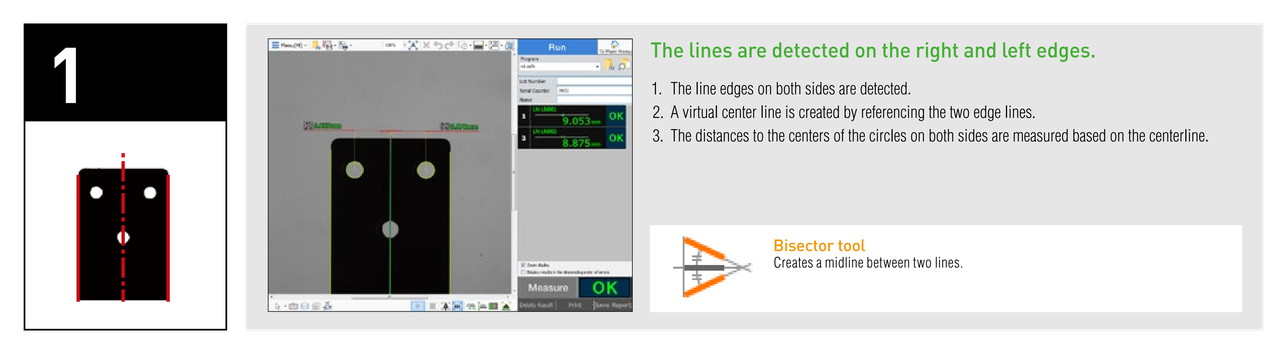
The lines are detected on the right and left edges. 1. The line edges on both sides are detected. 2. A virtual center line is created by referencing the two edge lines. 3. The distances to the centers of the circles on both sides are measured based on the centerline. Bisector tool: Creates a midline between two lines.

Measurement based on the centerline (based on circle centers)
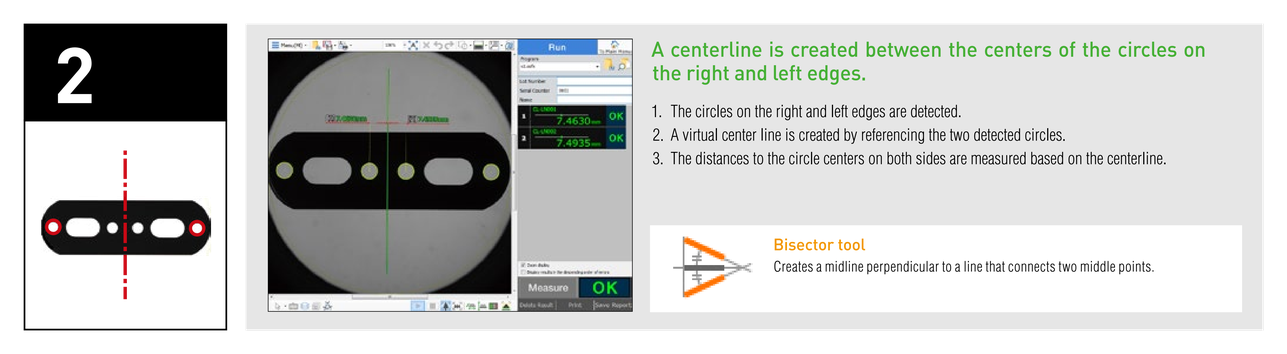
A centerline is created between the centers of the circles on the right and left edges. 1. The circles on the right and left edges are detected. 2. A virtual center line is created by referencing the two detected circles. 3. The distances to the circle centers on both sides are measured based on the centerline. Bisector tool: Creates a midline perpendicular to a line that connects two middle points.

Measurement by connecting divided lines
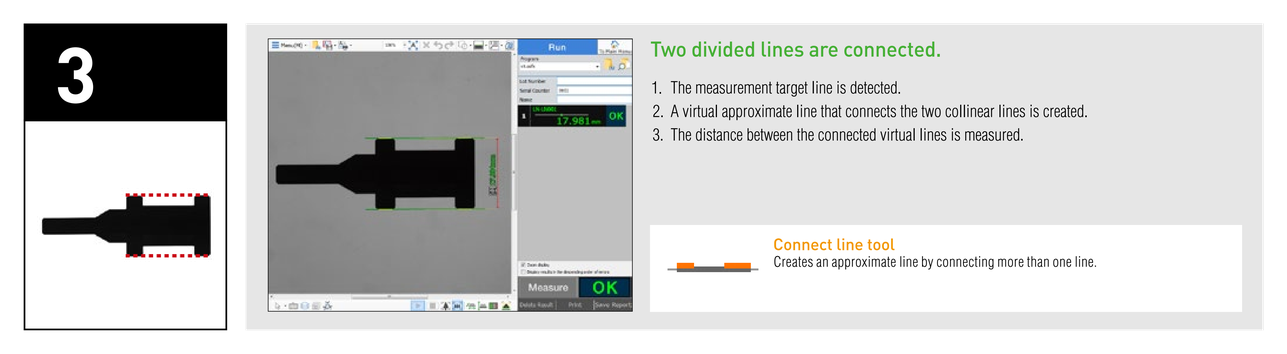
Two divided lines are connected. 1. The measurement target line is detected. 2. A virtual approximate line that connects the two collinear lines is created. 3. The distance between the connected virtual lines is measured. Connect line tool: Creates an approximate line by connecting more than one line.

Measuring a circle diameter created by connecting separate arcs
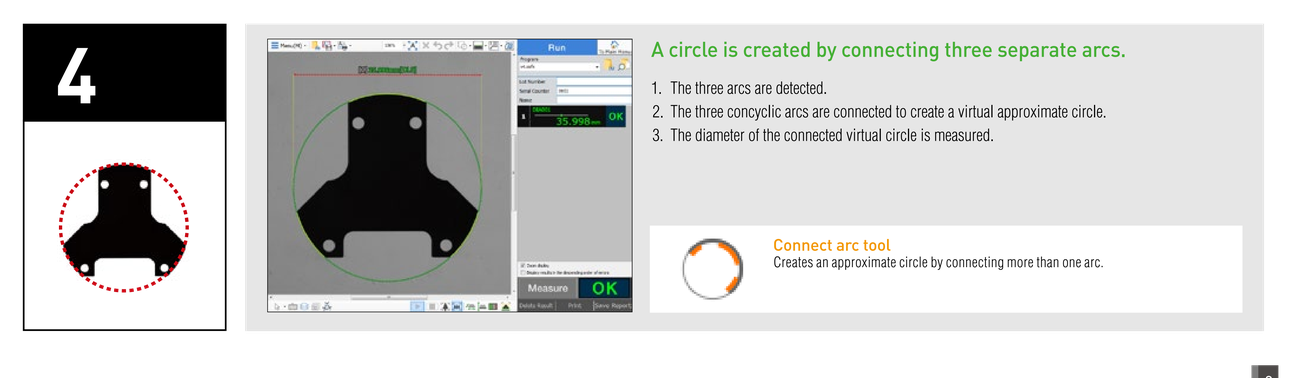
A circle is created by connecting three separate arcs. Connect arc tool: Creates an approximate circle by connecting more than one arc.

Measuring the length of a line

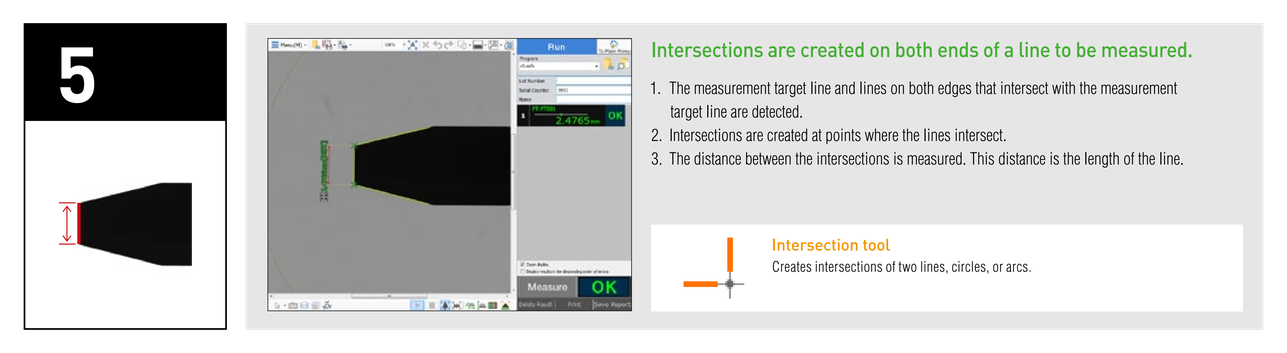
Intersections are created on both ends of a line to be measured. Intersection tool: Creates intersections of two lines, circles, or arcs.

Measurement based on a line connecting three hole centers
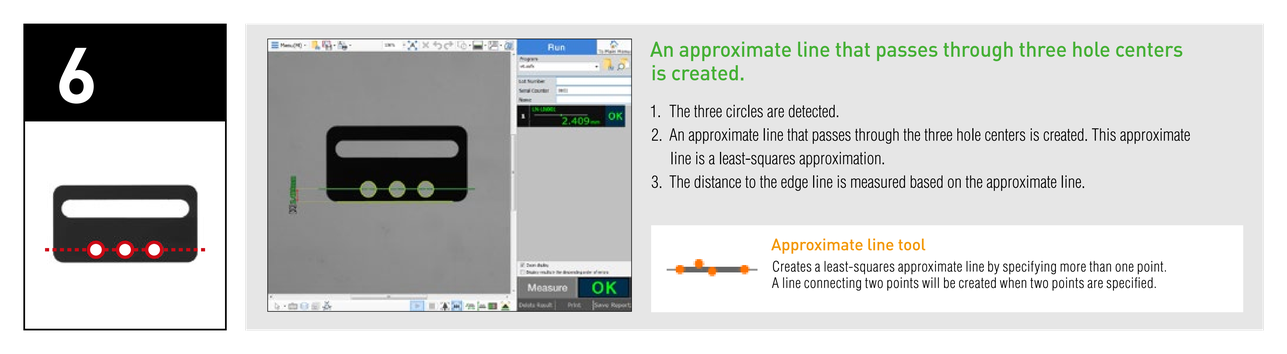
An approximate line that passes through three hole centers is created. 1. The three circles are detected. 2. An approximate line that passes through the three hole centers is created. This approximate line is a least-squares approximation. 3. The distance to the edge line is measured based on the approximate line. Approximate line tool: Creates a least-squares approximate line by specifying more than one point.

Measurement based on a line tangent to two holes
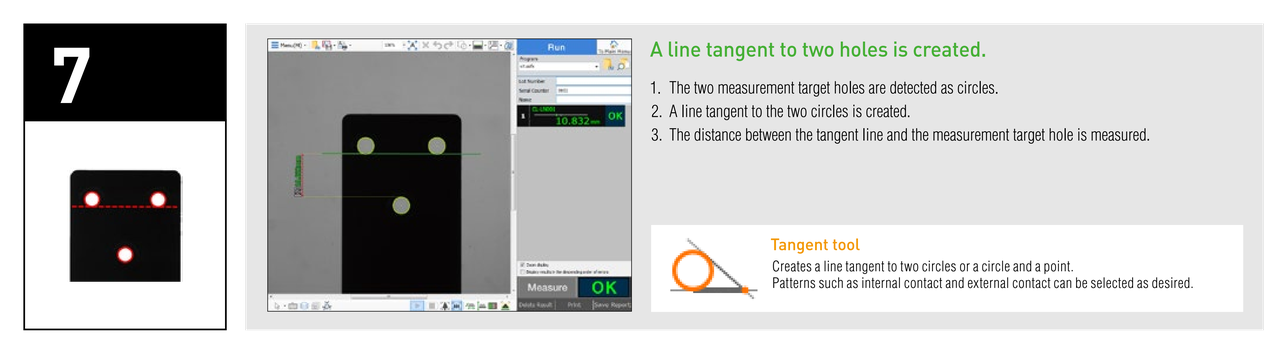
A line tangent to two holes is created. 1. The two measurement target holes are detected as circles. 2. A line tangent to the two circles is created. 3. The distance between the tangent line and the measurement target hole is measured. Tangent tool: Creates a line tangent to two circles or a circle and a point.

Measuring the center position of an oval
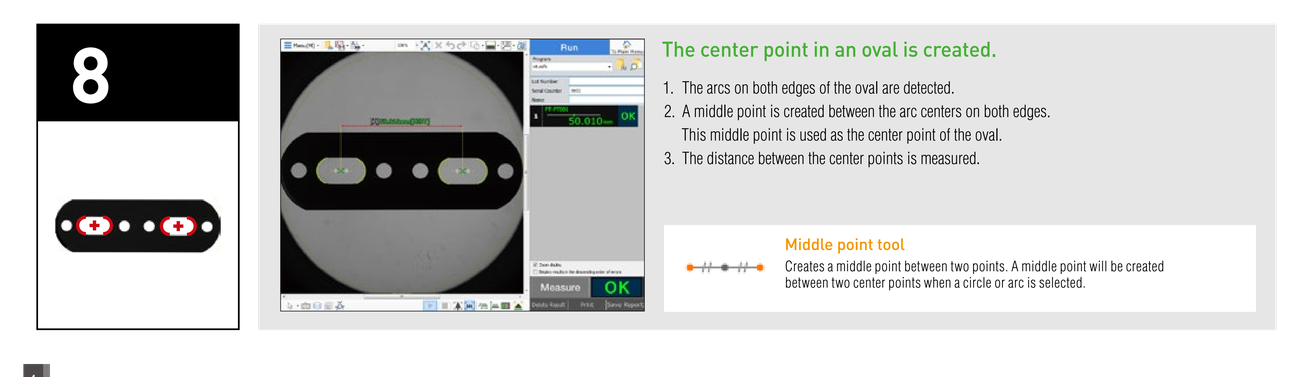
The center point in an oval is created. 1. The arcs on both edges of the oval are detected. 2. A middle point is created between the arc centers on both edges. This middle point is used as the center point of the oval. 3. The distance between the center points is measured. Middle point tool: Creates a middle point between two points.

Measuring the depth of a V-shaped groove
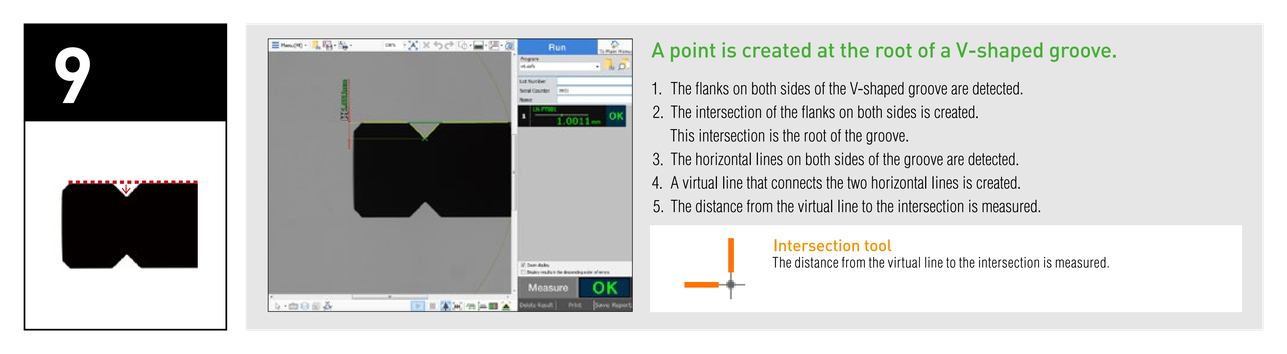
A point is created at the root of a V-shaped groove. 1. The flanks on both sides of the V-shaped groove are detected. 2. The intersection of the flanks on both sides is created. This intersection is the root of the groove. 3. The horizontal lines on both sides of the groove are detected. 4. A virtual line that connects the two horizontal lines is created. 5. The distance from the virtual line to the intersection is measured. Intersection tool: The distance from the virtual line to the intersection is measured.

Measuring the diameter of a circumcircle
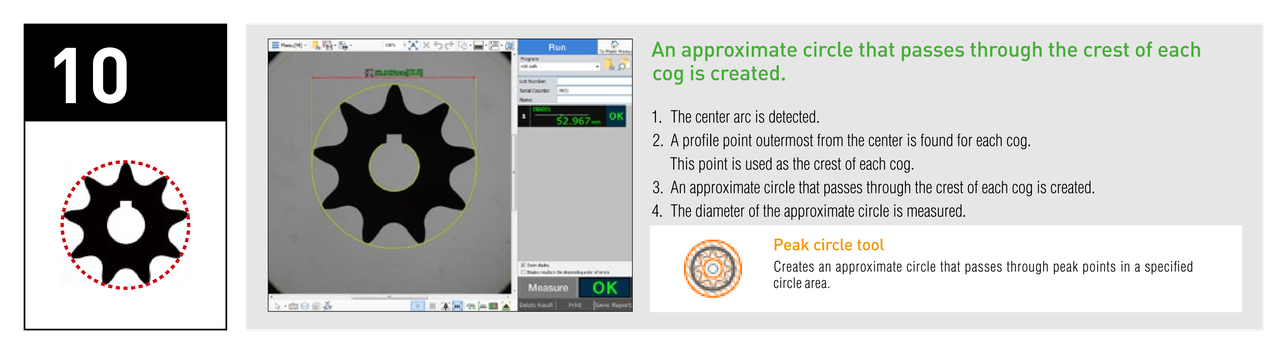
An approximate circle that passes through the crest of each cog is created. Peak circle tool: Creates an approximate circle that passes through peak points in a specified circle area.

Measuring the diameter of a pitch circle
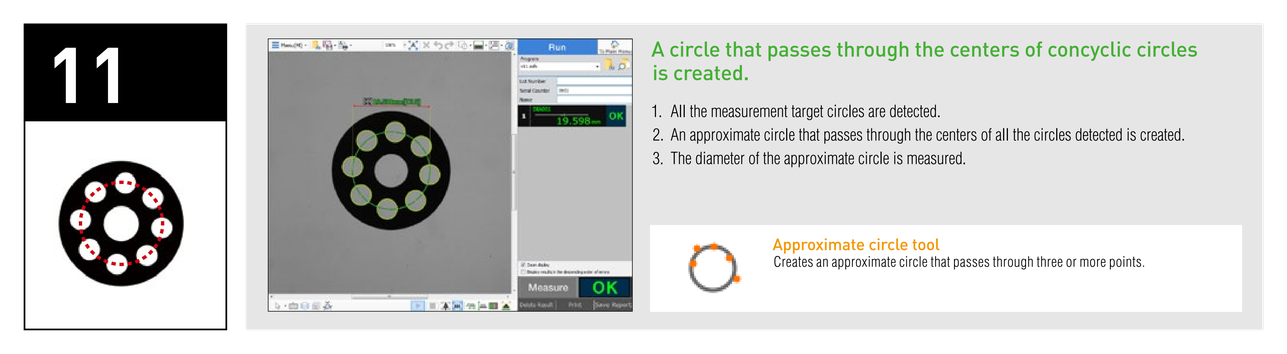
A circle that passes through the centers of concyclic circles is created. Approximate circle tool: Creates an approximate circle that passes through three or more points.

Measuring the pitch angle between holes
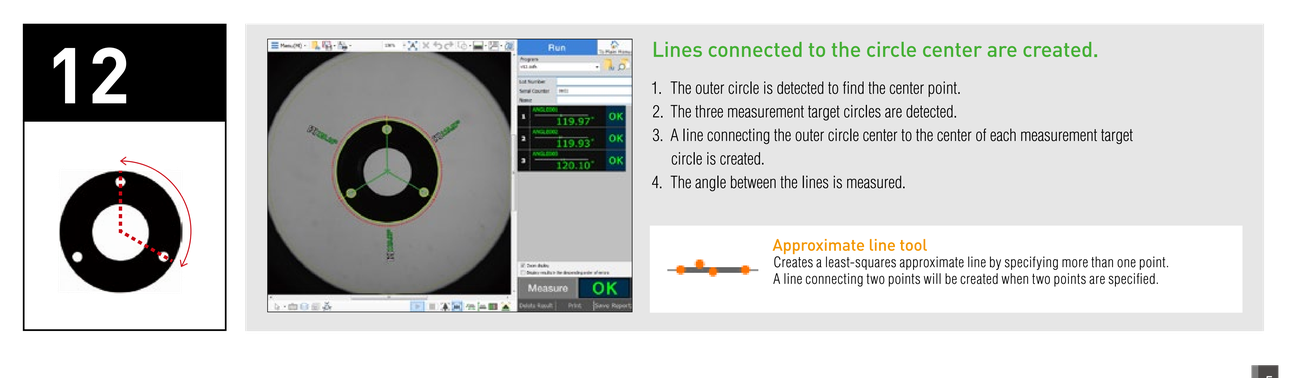
Lines connected to the circle center are created. Approximate line tool: Creates a least-squares approximate line by specifying more than one point.

Using a virtual line rotated by an angle from a specified line as a reference coordinate
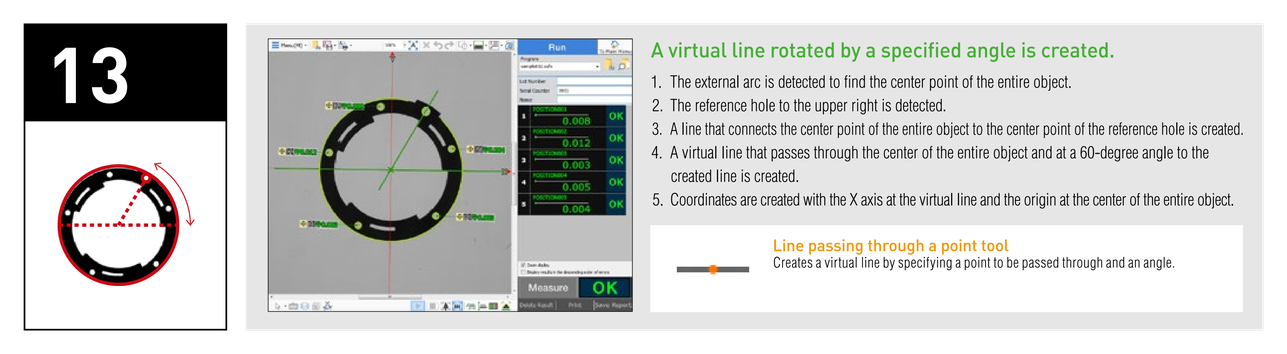
A virtual line rotated by a specified angle is created. 1. The external arc is detected to find the center point of the entire object. 2. The reference hole to the upper right is detected. 3. A line that connects the center point of the entire object to the center point of the reference hole is created. 4. A virtual line that passes through the center of the entire object and at a 60-degree angle to the created line is created. 5. Coordinates are created with the X axis at the virtual line and the origin at the center of the entire object. Line passing through a point tool: Creates a virtual line by specifying a point to be passed through and an angle.

Measuring the outer diameter of a spring
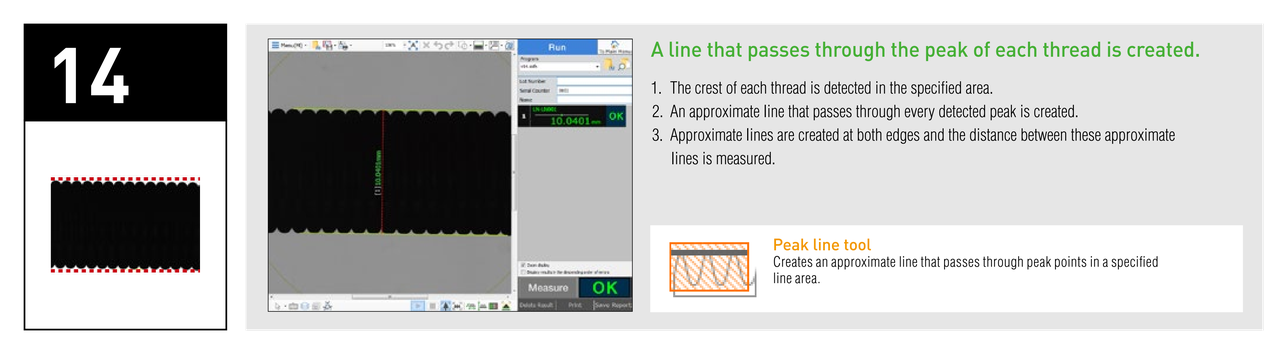
A line that passes through the peak of each thread is created. Peak line tool: Creates an approximate line that passes through peak points in a specified line area.

Measuring the pitch diameter of threads
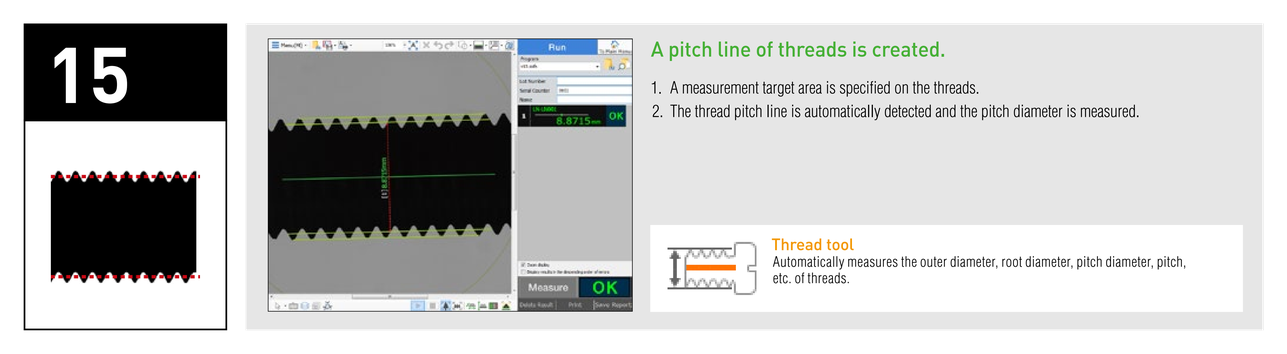
A pitch line of threads is created. Thread tool: Automatically measures the outer diameter, root diameter, pitch diameter, pitch, etc. of threads.

Measuring a position that has a specified width
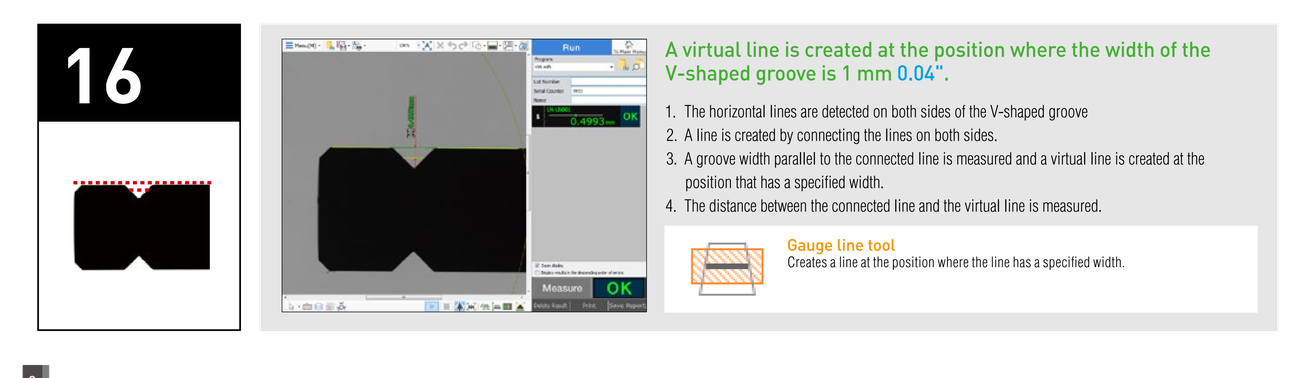
A virtual line is created at the position where the width of the V-shaped groove is 1 mm 0.04". 1. The horizontal lines are detected on both sides of the V-shaped groove. 2. A line is created by connecting the lines on both sides. 3. A groove width parallel to the connected line is measured and a virtual line is created at the position that has a specified width. 4. The distance between the connected line and the virtual line is measured. Gauge line tool: Creates a line at the position where the line has a specified width.

Measuring the intermediate diameter of a ring
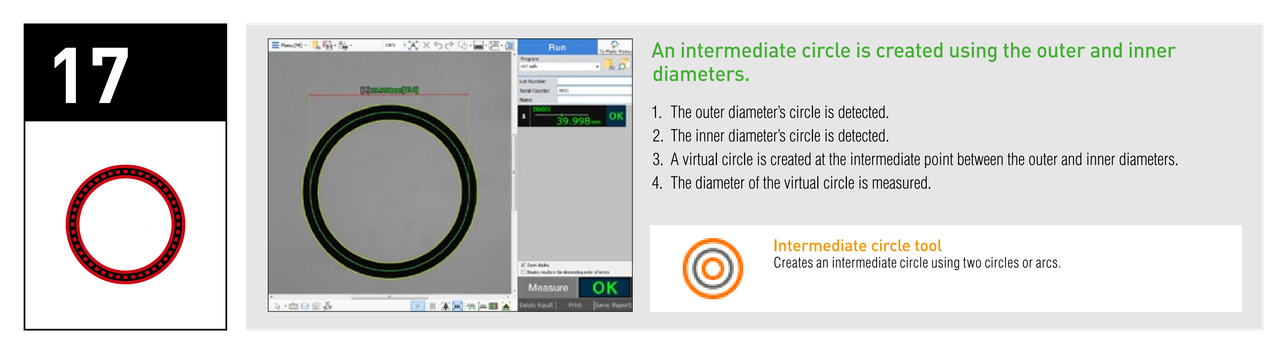
An intermediate circle is created using the outer and inner diameters. Intermediate circle tool: Creates an intermediate circle using two circles or arcs.

Measuring the width at a position 7 mm 0.28" outside the reference circle
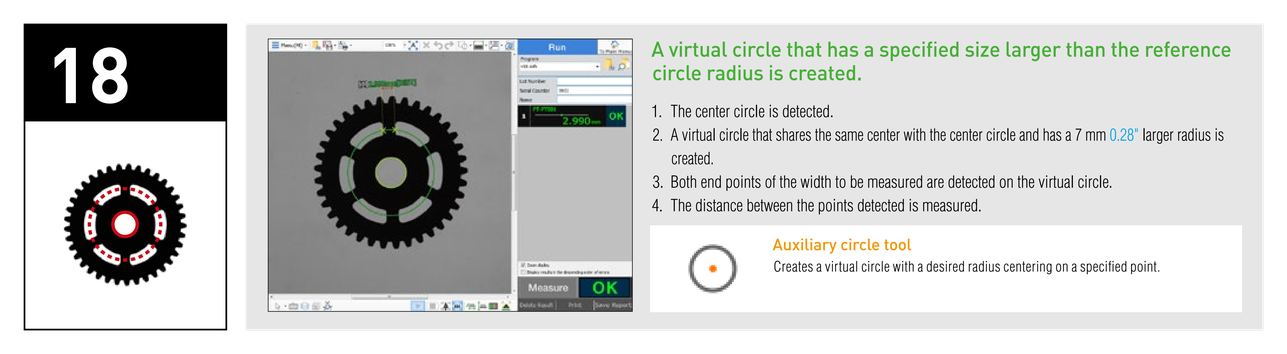
A virtual circle that has a specified size larger than the reference circle radius is created. Auxiliary circle tool: Creates a virtual circle with a desired radius centering on a specified point.

Measuring an intersection point of a line and a circle
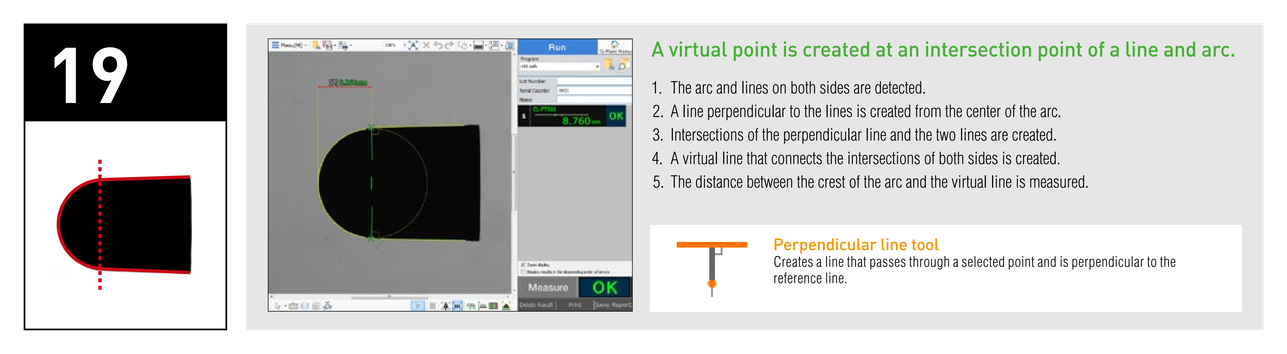
A virtual point is created at an intersection point of a line and arc. 1. The arc and lines on both sides are detected. 2. A line perpendicular to the lines is created from the center of the arc. 3. Intersections of the perpendicular line and the two lines are created. 4. A virtual line that connects the intersections of both sides is created. 5. The distance between the crest of the arc and the virtual line is measured. Perpendicular line tool: Creates a line that passes through a selected point and is perpendicular to the reference line.

Using a line with the origin at the circle center and parallel to the reference line as an X axis
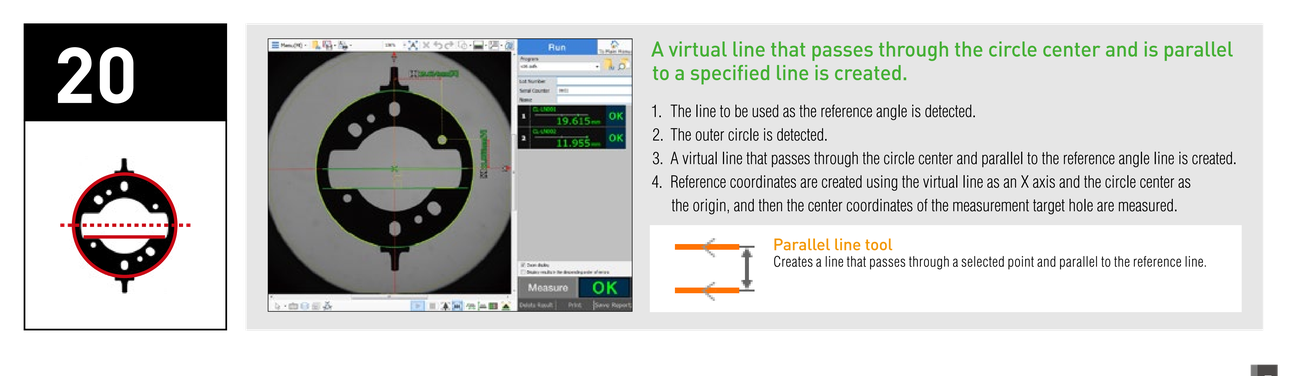
A virtual line that passes through the circle center and is parallel to a specified line is created. 1. The line to be used as the reference angle is detected. 2. The outer circle is detected. 3. A virtual line that passes through the circle center and parallel to the reference angle line is created. 4. Reference coordinates are created using the virtual line as an X axis and the circle center as the origin, and then the center coordinates of the measurement target hole are measured. Parallel line tool: Creates a line that passes through a selected point and parallel to the reference line.
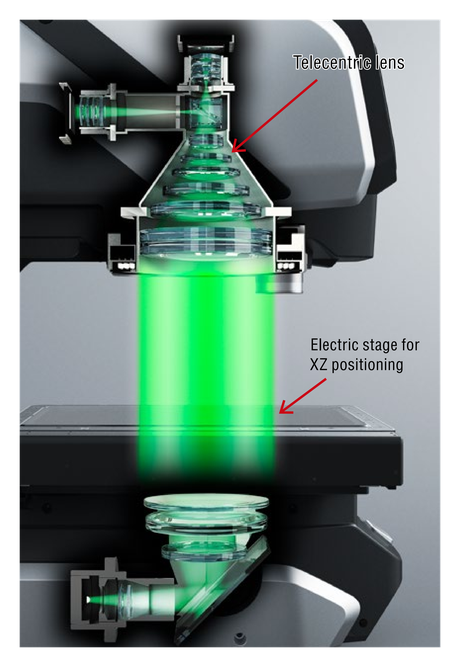
Telecentric lens at the top; Electric stage for XZ positioning below it, with the green light passing between them.

IMAGE DIMENSION MEASUREMENT SYSTEM IM-X Series

Image dimension measurement system features simple place-and-press operation

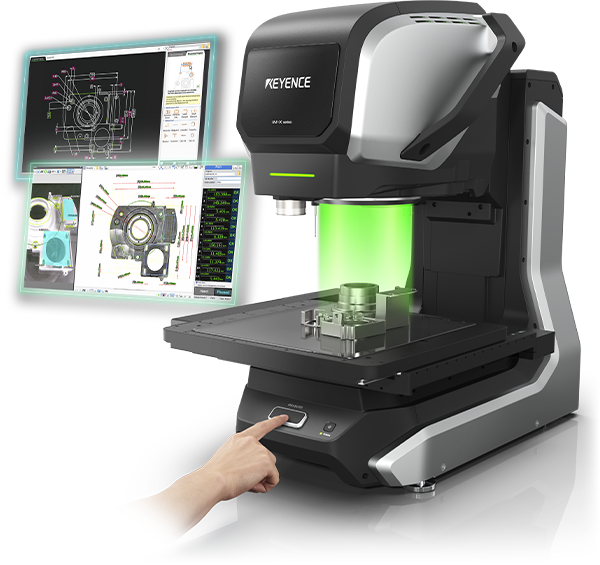
Simply place a target on the stage and press the measurement start button. The IM-X executes measurement of a number of points in the captured image in only seconds.
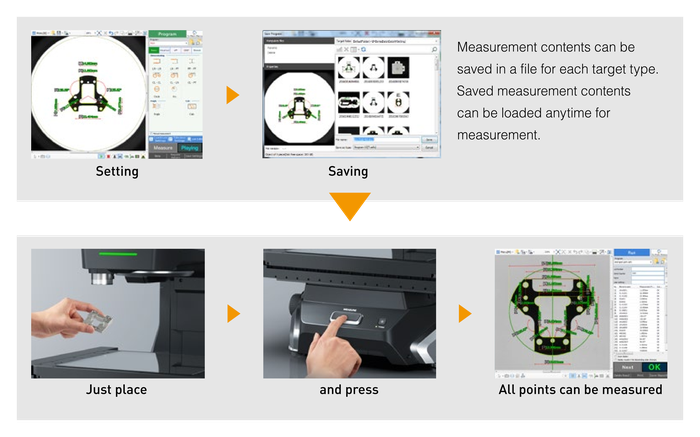

Measurement contents can be saved in a file for each target type. Just place, and press, All points can be measured

Contact us to learn more about how our advanced technology can help take your business to the next level.