Regression Testing to Prevent New Bugs
In embedded software development, troubles such as “fixing a bug causes another function to stop working correctly” often occur.
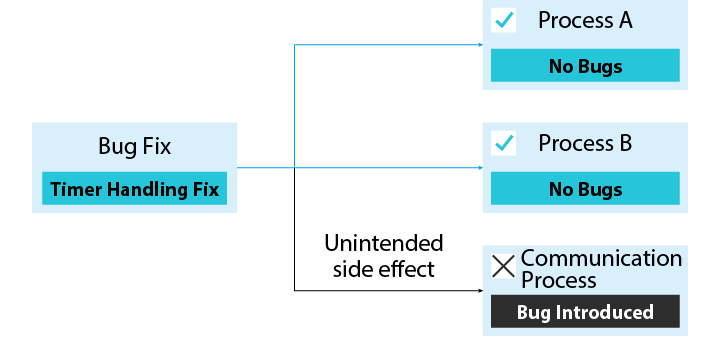
Cases such as “fixing timer processing caused communication to stop” or “changing sensor initialization caused motor control to malfunction” are not uncommon.
This introduction of a new bug in another location due to a fix or change is called “enbugging.”
This article explains the basics of enbugging and “regression testing” to prevent it.
- Why is Enbugging So Common in Embedded Software?
- Enbugging in Embedded Software Causes Serious Problems
- Effectiveness of “Regression Testing” to Verify “Whether It Works the Same as Before the Change”
- Difference Between Regression Testing and Confirmation Testing
- Three Points When Conducting Regression Testing
- Summary
Why is Enbugging So Common in Embedded Software?
Enbugging refers to unintentionally introducing a new bug in another location when fixing a bug or adding a new function. The English prefix “en-” means “to put in,” and it is used as the antonym of “debugging,” which means removing bugs.
In particular, because embedded software operates with limited memory and CPU resources, multiple functions are closely interrelated. For example, timer interrupts, communication processing, and sensor control often reference the same variables or use a common buffer. In such an environment, simply modifying a single function can have unexpected consequences elsewhere.
Enbugging has the characteristic of being “difficult to notice” because defects occur in unexpected places. As a result, such defects can take a long time to discover. The longer a defect remains undiscovered after it is introduced, the longer it takes to fix and verify. Therefore, a verification mechanism is needed to detect enbugging as early as possible.
For example, in the control software of a certain air conditioner, when the timer processing for temperature checks was changed from 10 ms to 5 ms, a bug occurred where infrared communication with the remote control became unstable. Upon investigating the cause, the increased frequency of timer interrupts shifted the execution timing of the communication processing, making it impossible to receive data correctly.
Although the timer and communication seem unrelated at first glance, this type of enbugging occurs because interrupt processing priorities and timings are closely related in embedded systems. When a function that worked in a previous version stops working correctly due to enbugging, it is called a regression (degradation).
Enbugging in Embedded Software Causes Serious Problems
Enbugging is a particularly serious problem in embedded software. While PC software can distribute updates via the Internet, many home appliances and industrial equipment do not have such mechanisms. If a defect caused by enbugging occurs in a product that has already been shipped, it may require a product recall or on-site repairs.
In addition, many operations in embedded systems can only be verified on actual devices, and it is not uncommon for debugging to take a long time. Therefore, if enbugging is discovered after shipment, it requires a significant amount of man-hours to identify the cause and fix it.
Although we discussed post-shipment issues first, early detection of enbugging is also important during development. Software quality is built up in stages: design, implementation, testing, and fixing. If enbugging introduced during the fixing stage cannot be found in testing, a fundamental question arises in building quality: “Is the testing being done correctly?” If the quality of testing is doubted, the impact on the development plan will be significant. For engineers, enbugging and the resulting regression are particularly feared.

Effectiveness of “Regression Testing” to Verify “Whether It Works the Same as Before the Change”
“Regression testing” is effective in preventing such enbugging that plagues engineers.
Regression testing is a test to confirm whether existing functions continue to operate correctly after software changes or fixes are made. “Regression” means returning to the original state, and it verifies whether the software operates the same as before the change.
The purpose of regression testing is to reconfirm not only the “changed parts” but also the “surrounding functions” and “functions that may be related.” Even if the changed function itself operates correctly, it checks whether the change has caused defects in other functions.
For example, if a function that reads the value of a temperature sensor is modified, you verify the correct operation of not only the part that directly calls that function, but also the parts that use that temperature data for control, the parts that display the temperature data, and so on.
Difference Between Regression Testing and Confirmation Testing
“Confirmation testing” is often confused with regression testing. Confirmation testing is a test to confirm whether a bug has actually been fixed. On the other hand, regression testing is a test to confirm whether the fix has affected other functions.
In other words, after fixing a bug, both “confirmation testing (to check if the corrected issue has been resolved)” and “regression testing (to check if other functions are affected)” are required.
Three Points When Conducting Regression Testing
To effectively perform regression testing in embedded software, it is important to take the following three steps.
1. Note the scope of impact of changes
The first thing to do is to identify the range that the changed parts could potentially affect. This is called “impact analysis.”
List the locations where the changed functions are called, where the changed variables are referenced, and the functions that interact with the changed modules, which could potentially be affected. Source code search functions and tools that visualize function call relationships are useful for this purpose.
For example, if you modify a sensor initialization function, you would note the following items.
- Locations directly calling the sensor initialization function
- Functions that read sensor values
- Functions that perform control using sensor data
- Functions that display the sensor status on the screen
This note serves as the basic reference for determining the scope of regression testing.
2. Start with unit tests that are easy to automate
Performing all regression tests manually is not realistic because it takes too much time and effort. Therefore, it is important to gradually automate starting from the parts that are easy to automate.
Unit testing is the easiest to automate. Testing at the individual function level has many parts that do not depend on hardware, making it relatively easy to automate. First, create unit tests for the changed functions and their surrounding functions so that they can be executed automatically.
3. Verify overall operation on the actual device
Unit testing alone cannot confirm coordination with hardware or the operation of multiple functions in combination. Therefore, testing on the actual device is ultimately required. However, executing all test cases every time is inefficient. Prioritize testing important functions identified in the impact analysis or functions where bugs have frequently occurred in the past. Performing regression testing on the actual device manually and repeatedly also takes effort and is inefficient. It is important to consider automation as much as possible, and also to prepare the test environment so that manual tests that cannot be automated can be performed efficiently.
Also, be sure to keep a record of the test results. By recording “which test cases were executed” and “what the results were,” you can check whether there were any missed tests when a problem occurs later.
Summary
By correctly understanding and practicing regression testing, you can prevent troubles such as “it was working fine before the change...” and stably release high-quality products. We hope you will understand the importance of regression testing, make a plan that allows you to conduct regression testing at the test planning stage, and utilize it in your daily development.