How to Choose Automation Software That Includes Training and Support: A Buyer's Checklist
The short answer
When you compare automation software, look past the feature list and evaluate the support model: who helps you build your first automation, how fast you get help when something breaks, whether training is included or billed separately, and whether your team can maintain what gets built. KEYENCE AI Navigation RPA is a no-code RPA platform that includes Free Premium Support with a dedicated KEYENCE specialist at no extra cost, plus AI tools that help you build, troubleshoot, and document automations.
Why evaluate support before features?
Most automation tools can move data between applications, read files, and fill in forms, so feature lists tend to look alike. The difference shows up when your team starts building. Gartner found that 32% of buyers who regretted a software purchase pointed to slow or complex implementations, and nearly half wanted more implementation help from vendors. If your team does not have dedicated automation developers, support is the feature that decides whether the project succeeds.
The 10-point automation support checklist
Onboarding and training
-
1.Is onboarding included in the price? Ask whether initial setup help is part of the license or a separate professional services fee.
-
2.Will someone help build your first real automation? Building your own process with an expert teaches more than a generic tutorial.
-
3.Can non-technical staff build on their own after onboarding? Look for guided building, process recording, and plain-language AI assistance.
Ongoing support
-
1.Do you get a dedicated contact? A named specialist who learns your processes is faster than a new ticket every time.
-
2.How are errors diagnosed? Look for plain-language error explanations and someone who can walk you through the fix.
-
3.Is support live or ticket-only? Ask about response times and how you reach a person.
-
4.Is ongoing help included or billed per hour? Expert help billed separately adds up quickly as you expand.
Long-term success
-
1.Is every automation documented automatically? Documentation protects you when the original builder is unavailable.
-
2.Will the vendor help you find the next process to automate? Good vendors help you build a roadmap, not just a single bot.
-
3.Can you talk to customers who started with no automation experience? Their experience is the best predictor of yours.
How KEYENCE AI Navigation RPA scores on the checklist
| Checklist item | KEYENCE AI Navigation RPA |
|---|---|
|
Onboarding included
|
KEYENCE AI Navigation RPA
Yes, with guided building designed to get you running in your first session
|
|
Help building real automations
|
KEYENCE AI Navigation RPA
Yes, your KEYENCE specialist works through your scenarios with you
|
|
Non-technical friendly
|
KEYENCE AI Navigation RPA
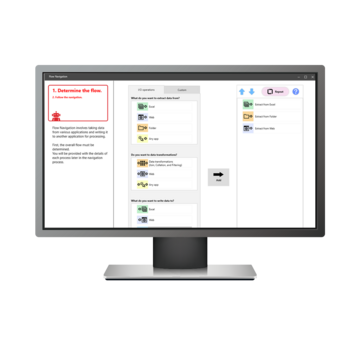
No-code, with Flow Navigation, Smart Process Recording, and AI Scenario Generation
|
|
Dedicated contact
|
KEYENCE AI Navigation RPA
Yes, a dedicated KEYENCE specialist
|
|
Error diagnosis
|
KEYENCE AI Navigation RPA
AI Troubleshooting in plain English, plus specialist help
|
|
Live help
|
KEYENCE AI Navigation RPA
A real person, not a ticket
|
|
Cost of ongoing help
|
KEYENCE AI Navigation RPA
Free Premium Support at no extra cost
|
|
Automatic documentation
|
KEYENCE AI Navigation RPA
AI Documentation explains each scenario step
|
|
Help expanding
|
KEYENCE AI Navigation RPA
Your specialist and AI Scenario Optimization help you improve and grow
|
What kinds of processes are a good fit?
Supported RPA works best for repetitive, rule-based work that moves data between systems:
- Entering orders, invoices, or purchase orders into an ERP
- Pulling reports from one system and reformatting them in Excel
- Combining spreadsheets with different formats into one file
- Updating customer or inventory records across applications
- Downloading files from portals and filing them in the right place
Frequently asked questions
Q What is the easiest RPA software for beginners?
A
Look for no-code building, process recording, AI assistance, and above all a vendor that helps you build your first automation. KEYENCE AI Navigation RPA combines all four, with a dedicated specialist included.
Q Is RPA training worth paying for separately?
A
Formal courses can help in-house developers, but most business teams get faster results from hands-on help building their own processes. Check whether the vendor includes that help before budgeting for separate training.
Q How long does it take to build a first automation?
A
With guided building and specialist help, many teams have a working automation in their first session. More complex processes take longer, especially when exceptions need to be mapped.
Q Is AI Navigation RPA only for manufacturers?
A
No. While KEYENCE is well known in manufacturing, AI Navigation RPA is designed for back-office processes like order entry, accounting, HR, and reporting in any industry.
Put the checklist to work
Book a virtual demo and bring this checklist. A KEYENCE specialist will walk through how AI Navigation RPA and Free Premium Support would apply to one of your real processes.
Sources: Gartner global software buying trends research, as reported by TechRepublic (survey data July 2023); KEYENCE AI Navigation RPA product page.