Tips on How to Maximize Microscope Usage
Digital microscopes offer imaging, measurement, documentation, and inspection capabilities that can support a wide range of research and industrial applications. This article will explain how users can maximize digital microscope usage by selecting appropriate magnification, optimizing lighting and focus, improving image capture, using measurement tools effectively, and following a consistent inspection workflow.
Key Takeaways
- Picking the right magnification helps balance field of view, resolution, and how much detail an inspection actually needs.
- Adjusting lighting, focus, and sample position can reveal surface details that would otherwise stay hidden.
- Built-in imaging and measurement tools help users capture, document, compare, and analyze samples with less manual effort.
- A repeatable inspection routine makes it easier to compare results across multiple samples or track changes over time.
- Knowing what a microscope can and can't do helps a user pick the right settings and features for each job.
Understanding Your Microscope's Capabilities
Every microscope has limits worth knowing before a project starts. Some are built for quick surface checks, others for detailed measurement work, and a few handle both reasonably well. Reading through a manufacturer's notes on the basic structure and principle behind microscopes is a fast way to understand what's actually happening inside the device, from the lens path to how light reaches the sensor.
It also helps to know how the field has changed. Looking back at the history of microscope technology shows how far imaging has come from simple optical lenses to today's sensor-driven systems and why so many labs and shop floors have shifted toward digital tools for everyday inspection work.
Choose the Right Magnification for Your Application
More magnification isn't automatically better. Pushing magnification too high shrinks the field of view, which can hide the very defect a user is trying to find. A wide view works well for scanning a whole part for obvious flaws, while higher magnification suits measuring a specific feature down to a fraction of a millimeter. Matching magnification to the actual task, rather than defaulting to the highest setting available, usually produces clearer and more useful results.
Thinking about depth of field alongside magnification is also useful. Higher magnification narrows the range of the sample that stays in sharp focus at once, so a heavily textured or uneven surface may need lower magnification just to keep the whole area readable in a single shot.
Optimize Lighting for Clearer Microscope Images
Lighting shapes an image more than most users expect. Coaxial or Brightfield illumination is good for flat samples as it hits a sample directly from above and reflects straight back through the lens. On the other hand, Ring or Darkfield light throws shadows that reveal scratches, edges, or surface roughness that would otherwise disappear. Ring lights work well for general viewing, while directional or coaxial lighting suits reflective metal parts. There is also transmitted lighting which is good for transparent samples as light is sent from beneath the sample through the sample to the lens.
Testing a few lighting methods on a known sample before starting a real inspection saves time later, since the right setup often changes from one material to the next.
Improve Focus and Image Quality
A blurry image usually points to one of three problems: vibration, an unstable mount, or a sample that isn't level. Bracing the sample and the microscope on a solid surface removes a lot of guesswork. A high-resolution digital microscope with autofocus can also correct small positioning errors that would otherwise ruin a shot, though even the best autofocus struggles if the sample itself keeps shifting during the capture.
For samples with a lot of topography, a digital microscope can image from the bottom to the top of the sample and remove the out of focus slices to build a fully-focused high-resolution image. This allows users to capture high resolution images at any magnification!
Use Digital Microscope Imaging and Measurement Features
Modern imaging tools built into these systems do far more than take a picture. Built-in measurement features can calculate length, area, and depth directly from a captured image, cutting out manual calipers for many routine checks. Some systems also support image stitching, which combines several shots into one wide view without losing resolution on any single section.
Exploring a manufacturer's full range of digital microscope systems can help a team find a model with the specific measurement and imaging tools their work actually requires, rather than paying for capability they won't use. This kind of comparison shopping matters more than it might seem, since two systems at a similar price point can differ quite a bit in imaging quality, analysis capabilities, software features, sensor quality, and how easily results are exported into a report.
Follow a Consistent Digital Microscope Inspection Process
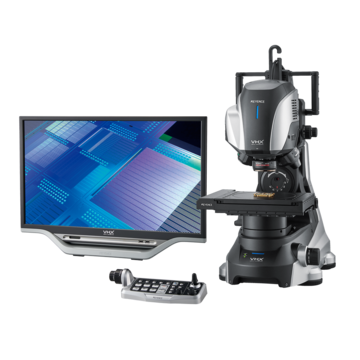
Repeatability matters as much as image quality. An inspection process that changes slightly every time makes it hard to trust a comparison between one sample and the next. Setting fixed lighting angles, a standard magnification for each check type, and a consistent sample position turns inspection from guesswork into something closer to a controlled test. Writing this routine down, even in a short checklist taped near the workstation, helps a whole team follow the same steps regardless of who's running a given check that day. With the VHX Series Digital Microscope, users can automatically save settings with an image and use the Quick Reply function to ensure images are captured with the same settings from user to user.
Capture and Document Images for Reliable Comparisons
Saving images with clear labels and consistent settings pays off later, especially when tracking a part over time or comparing a batch against a known good sample. Recording the magnification, lighting setup, and any measurement values alongside each image means a second person, or the same person months later, can understand exactly how a result was produced. Without that record, even a sharp image loses much of its value once memory of the original setup fades.
Common Digital Microscopy Mistakes to Avoid
A few habits show up again and again in digital microscopy work. Skipping calibration before measuring is one of the most common, since even a small drift in scale can throw off every reading that follows. Ignoring the type of microscope best suited to a task is another. Reviewing the main types of microscopes before buying or borrowing equipment can prevent a mismatch between the tool and the job.
Not finding focus, using the wrong lighting for a reflective surface, and failing to document settings round out the list of habits worth breaking early. None of these mistakes are hard to fix once someone notices them, but they tend to go unnoticed for a long time in a busy shop or lab where the same shortcuts get repeated from one shift to the next.
To fully optimize your inspection workflows and image quality, consider KEYENCE's advanced lineup of digital microscopes. Equipped with intuitive measurement software, automated focus and lighting controls, and high-resolution imaging capabilities, this equipment helps empower labs and manufacturing facilities to achieve unmatched precision and consistency across every inspection.
Frequently Asked Questions
Q How can I get better images from a digital microscope?
A
Stabilize the sample, match lighting to the material, and avoid pushing magnification higher than the task actually needs. Small adjustments to angle and light often matter more than the equipment itself.
Q How do I choose the right magnification on a digital microscope?
A
Start with a wide field of view to scan for general issues, then zoom in only on the specific feature that needs closer measurement or inspection. Jumping straight to maximum zoom often hides more than it reveals.
Q What lighting should I use for digital microscope imaging?
A
It depends on the surface. Coaxial/Brightfield lighting suits most general viewing and flat samples, while ring/darkfield light brings out texture, scratches, and edges on reflective or metallic samples. Transmitted light should be used for transparent samples.
Q How can I improve the accuracy of digital microscope measurements?
A
Calibrate the system regularly, keep the sample level and steady, and use a consistent magnification for repeated checks. Small setup differences between sessions are one of the most common sources of measurement error.