What Really Drives Warehouse Scanning Throughput: How Scan Range Supports Faster Dock Work
Key Takeaways
Choosing the right mobile computer for warehouse dock operations means looking past raw scan speed. Throughput depends on three practical factors: whether workers can scan from the right distance, whether the device can read varied label types, and whether it can reduce no-read events that interrupt freight movement.
- Scan range supports faster dock work: A device that can read both near and far codes helps reduce repositioning during pallet, rack, and receiving workflows.
- Depth of field improves consistency: Reliable reads across changing distances help workers move through dock tasks with fewer repeated scan attempts.
- Fast decoding supports higher throughput: Image-based scanning and onboard processing can help keep reads moving across near, far, and challenging codes.
- No-read prevention protects throughput: Strong illumination, effective aiming, and advanced decoding help reduce repeated scan attempts that slow dock operations.
- Rugged design helps limit downtime: For dock environments, device durability, wireless connectivity, and ergonomic attachment options can be just as important as scan performance.
For warehouse, logistics, and receiving teams, the fastest mobile computer is not simply the one with the quickest scan speed in ideal conditions. It is the device that keeps reads consistent across changing distances, varied code types, print quality issues, and the environmental challenges dock workers deal with every day.
Why Scan Range Matters More Than Raw Scan Speed
Read range refers to how far a worker can stand from a label and still get a successful scan. Dock operations often require both close-range and longer-range scanning as workers move between cartons, pallets, and rack labels. When range is limited, workers may need to move closer, shift pallets, or repeat scans, which adds time to receiving and putaway cycles.
Depth of field is the range of distances where a scanner can reliably decode a barcode. This is important for pallet label scanning and rack location scanning because the distance between worker and label changes throughout the task.
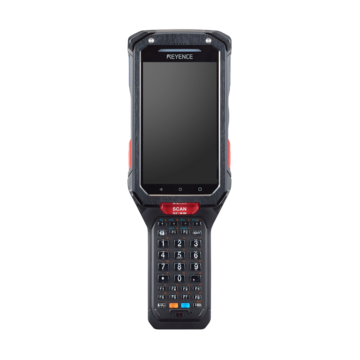
The KEYENCE BT-A600 supports this need with a full-range quad camera designed to capture both near and far codes at the appropriate focal point. That range flexibility helps support throughput by reducing extra movement and repeated alignment during dock scanning workflows.
Before selecting a device, compare manufacturer specifications against the actual labels used in your facility. Barcode size, print density, contrast, label condition, symbology type, and scanning angle can all affect read performance.
Label Variability Can Slow Throughput
Freight can arrive with several 1D and 2D code formats depending on supplier, carrier, and product type. The KEYENCE BT-A600 supports common formats such as JAN/EAN/UPC, CODE128, GS1-128, CODE39, QR code, DataMatrix, PDF417, GS1 DataBar, Composite, and Postal codes, helping reduce compatibility gaps that can lead to manual entry or rework.
Damaged or low-quality labels can also slow dock activity. Labels may be torn, smudged, faded, glossy, or partially covered by wrapping. Features such as strong illumination, visible aiming, and AI-based decoding can help workers target codes faster and read challenging labels with less repositioning.
How Field of View and Aiming Reduce Repeated Scans
Field of view refers to the physical area a scanner captures with each scan. For pallet and case scanning, this affects how easily workers can capture labels positioned at different angles or on uneven packaging.
The goal is not simply to scan from farther away. The goal is to help operators acquire the right code quickly without repeated alignment attempts. Effective aiming, strong illumination, and advanced decoding all contribute to smoother repetitive scanning.
Reducing No-Reads to Keep Freight Moving
A failed barcode read does not just slow one worker down. It can interrupt freight movement, trigger manual entry, or require a second scan attempt. In high-volume dock workflows, the most valuable scanner is the one that helps keep reads consistent when labels are damaged, wrapped, reflective, low contrast, or positioned at an awkward angle.
Several conditions at the dock cause these failures:
- Print quality degradation: Faded printing, inconsistent ink density, voids in codes, or bleeding ink
- Physical damage: Labels torn, smudged, or damaged during transit handling
- Environmental interference: Glare from glossy packaging, extreme lighting contrast at loading docks, condensation on cold-storage items
- Dimensional issues: Barcodes printed too small, improper aspect ratios, insufficient quiet zones
Image-based scanning can help in these conditions because it captures barcode images and processes them for decoding rather than relying on a single laser line. This matters on a dock where label quality is not always within your control.
In this context, the BT-A600 is one example of a device designed for difficult barcode conditions. Its AI filters are intended to support quick reading of challenging codes, while the quad camera and processing power help maintain scan performance across near, far, and difficult labels.
How the KEYENCE BT-A600 Applies These Throughput Principles
For high-volume dock operations, the mobile computer should support the full scanning workflow, not just the scan itself. That means reliable reads across distance, varied symbologies, damaged labels, awkward angles, and repetitive use throughout the shift.
The KEYENCE BT-A600 provides an example of how these throughput requirements can come together in a warehouse mobile computer. Its full-range quad camera supports near and far code reading, while the 8-core CPU and AI core process captured images for fast decoding. The scanner also includes high-intensity white LED illumination, a visible laser pointer, and support for common 1D and 2D codes used across warehouse and logistics environments.
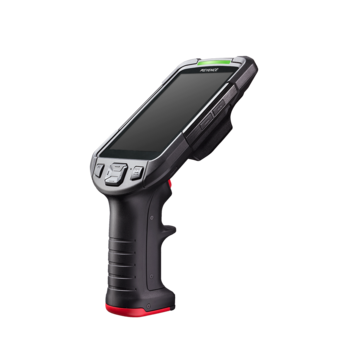
Attachment options, including a gun grip and ring trigger, help adapt the device to different scanning workflows. The large 4.3-inch screen and keyboard support usability when workers need to confirm entries, review scan results, or complete warehouse tasks on the device.
For dock teams evaluating mobile computers, the BT-A600 reflects the page's key considerations: range flexibility, decoding speed, support for varied labels, rugged construction, and workflow-friendly attachment options. These factors are useful to compare when selecting a device for receiving, putaway, pallet handling, and other high-volume scanning tasks.
FAQs
Q What type of mobile computer works best for warehouse dock operations?
A
A mobile computer that can read both near and far codes, support common 1D and 2D symbologies, and handle challenging label conditions is best suited for dock work. The KEYENCE BT-A600 uses a quad camera, high-intensity white LED illumination, a visible laser pointer, an 8-core CPU, and an AI core to support fast, reliable scanning across varied dock conditions.
Q Why do some warehouse scanners fail to read barcodes even though they work fine on clean labels?
A
Scanners may struggle with real-world dock conditions where labels arrive torn, smudged, faded, glossy, or partially covered from transit and handling. Print quality degradation, physical damage, environmental interference, and barcode sizing issues can all contribute to reading failures. Image-based scanning can help in these conditions because it captures and processes barcode images, which can support reads across varied orientations and label conditions.
Q How does read range affect warehouse scanning efficiency?
A
Read range determines how far workers can stand from labels while maintaining successful scans. When a device can handle both close and farther-away labels, workers spend less time repositioning pallets, moving closer to rack labels, or repeating scan attempts. The BT-A600's full-range quad camera is designed to support both near and far code reading.
Q What form factor should I choose for high-volume warehouse scanning?
A
Choose a form factor that matches how workers scan throughout the shift. The BT-A600 offers attachment options such as a gun grip and ring trigger, giving teams flexibility for repetitive dock scanning, hands-free-style workflows, or tasks that require frequent screen and keyboard interaction.
Q How do no-read events impact warehouse throughput?
A
No-read events can slow dock activity by forcing workers to rescan, manually enter data, or pause a workflow to resolve the issue. A scanner that reads challenging labels consistently helps protect throughput by reducing avoidable interruptions during receiving, putaway, and pallet handling.