Why Intuitive Mobile Computers Reduce Training Time in High-Turnover Warehouses
Intuitive, Android-based mobile computers shorten new-hire ramp-up in high-turnover warehouses because the interface already matches the smartphone workers use every day, so there's less to learn before they're productive.
High-turnover warehouses are often stuck in constant onboarding. The right mobile technology can help break that cycle. Replacing employees is expensive once recruitment, onboarding, lost output, and training are included. In many warehouses, training alone can take 6-8 weeks. High turnover makes this ramp time harder to absorb. For some facilities, onboarding shifts from an occasional task to a constant part of daily operations.
Ramp-up slows productivity further. New hires usually produce less and make more errors at first, while supervisors spend extra time managing turnover-related issues. Because labor is a major warehouse cost, turnover quickly adds pressure. Easy-to-use mobile technology can help new hires become productive faster.
Why Intuitive Mobile Computers Speed Up Onboarding
The onboarding problem largely comes down to familiarity. Most warehouse workers already use a smartphone every day, so warehouse handheld computers running Android feel immediately recognizable. There is no steep learning curve to climb before a new hire can start contributing. Many warehouses report a meaningful reduction in training time after switching to more intuitive mobile applications, with associates reaching independent, standard-pace work faster than they would on legacy RF terminals.
Older RF terminals were the real bottleneck. Those devices relied on complex menu structures and cryptic text commands that took weeks to learn. Modern industrial mobile computers work differently, touchscreens, recognizable icons, and gesture controls that behave exactly like a personal device. Better displays also give new hires more context about each task, so workers can follow voice instructions or review previous steps without tracking down a supervisor.
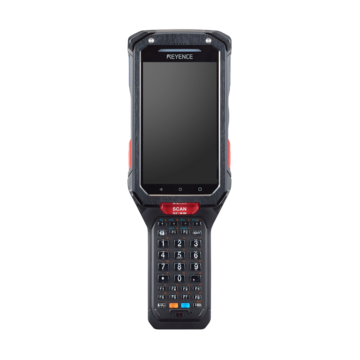
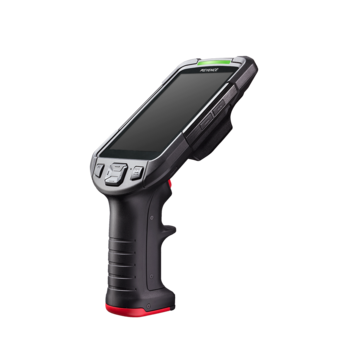
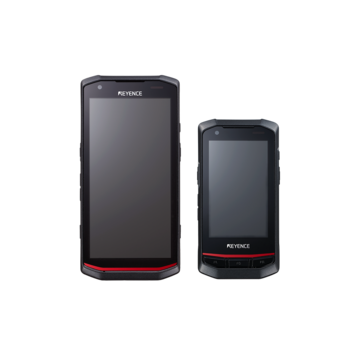
The KEYENCE BT-A600 is a practical example of this approach. The device runs Android 14, the same operating system many workers already know. Optional gun grip and trigger attachments make it well-suited for scan-intensive picking roles, and the 36-key physical keypad handles data entry in situations where a touchscreen is not practical.
Key Features That Reduce Learning Curves in Warehouse Operations
The interface is just the starting point. Several other design decisions built into modern mobile computers directly affect how quickly new employees settle into their roles.
Physical interface options matter more than most facilities anticipate. Touchscreens work well for WMS applications that rely on visual workflows, but not every warehouse environment suits them. Workers handling high-volume data entry often find physical keypads faster and more reliable, especially when accuracy and tactile feedback take priority over screen navigation. Some devices include both, which means a single unit can serve across different roles and conditions without requiring workers to switch equipment mid-shift.
Scan performance is another area that shapes the new hire experience. Purpose-built scan engines read barcodes quickly, even when a label is at an awkward angle or showing wear. Workers scan items and the system updates in real time over Wi-Fi or cellular, so there is no delay between the physical action and the record being created. Built-in cameras extend this further, allowing employees to photograph goods and capture condition details on the spot.
Communication features also reduce how often new hires need to stop and find a supervisor. Press-to-transmit functionality lets workers reach a supervisor, co-worker, or dispatcher without leaving their location. Full-screen product images on the device give workers a visual reference to confirm they have selected the right item, which cuts down on verification errors that typically spike during the first weeks on the job.
Ergonomics play a quieter but equally important role. Compact, lightweight designs allow one-handed operation across a full shift, which matters when workers are covering distance and handling goods simultaneously. Battery life that carries through a complete shift without recharging keeps workflows uninterrupted, something that affects both productivity and the consistency of the training experience itself.
How Easy-to-Use Mobile Computers Improve Productivity and Accuracy
The productivity impact shows up at the transaction level, not just during training. Workers eliminate unnecessary trips to fixed terminals and time spent searching for paper forms. Mobile systems direct workers to the right locations and walk them through each task step-by-step, so associates spend less time second-guessing and more time completing work.
Accuracy improves for a straightforward reason. Scanning a barcode is faster and less error-prone than typing item numbers by hand. Transposed digits, misread handwriting, and manual entry mistakes become far less common when the device does the reading. Inventory updates the moment a pick is completed, removing the lag that paper-based processes introduce.
Directed picking takes error prevention a step further. The device displays the item, quantity, exact location, and often a product image. A worker who scans the wrong item or pulls from the wrong bin gets an immediate alert. The correction takes seconds. Without this kind of real-time validation, the same mistake might only surface during packing, at which point fixing it costs considerably more time and effort.
Every transaction is also timestamped and tied to a specific user, which gives supervisors clear visibility into where work is getting done and where it isn't. Some facilities have seen labor productivity increase substantially after putting mobile warehouse technology in place.
Choosing the Right Mobile Computer for High-Turnover Warehouse Environments
Choose based on software compatibility: Start by confirming that the device works with your warehouse labor management system. Verify operating system and version requirements before comparing hardware.
- For standard indoor warehouses: Choose IP65 protection.
- For cold storage or washdown areas: Choose IP67 protection.
- For controlled floor-level work: Choose a 4-foot drop rating.
- For high-racking distribution centers: Choose 6-foot or 8-foot drop protection.
- For high-volume scanning: Choose a gun-style grip with a trigger.
- For lightweight, familiar use: Choose a touch mobile computer.
- For hands-free picking: Choose a wearable computer.
- For single-shift use: Choose battery capacity that exceeds the full shift by 25% under real warehouse conditions.
- For multi-shift facilities: Choose hot-swappable batteries to help prevent downtime.
The KEYENCE BT-A600 addresses high-turnover environments by pairing that same familiar Android interface with warehouse-ready hardware. Optional gun grip and trigger attachments support scan-intensive roles. The 36-key physical keypad handles gloved data entry, essentially combining familiar navigation with warehouse-specific functionality.
Contact us to identify devices matching your warehouse technology solutions requirements and labor management strategies in the warehouse.
FAQs
Q How long does it take to train new warehouse employees?
A
Traditional warehouse training may take 6-8 weeks to get new employees up to standard. However, with intuitive mobile computers featuring familiar interfaces, new hires can be trained and begin working independently in less than a day, reaching standard productivity rates within one to two weeks.
Q How do intuitive mobile computers reduce training time?
A
Modern mobile computers use familiar operating systems like Android that workers already understand from their personal devices. This familiarity, combined with touchscreens, intuitive icons, and gesture controls, can reduce training time by up to 75% and accelerate warehouse training by 80% compared to legacy systems.
Q What productivity level do new warehouse hires typically achieve?
A
New warehouse associates average 60-70% of standard productivity in their first month, with higher error rates during this initial period. The productivity gap during ramp-up significantly impacts operations, as new hires operate at a fraction of the rate of experienced workers.