A Complete Guide to Barcode Scanner Integration
Poor data quality and manual data entry can introduce errors, inconsistencies, and operational challenges. Industrial barcode integration helps automate data collection across production lines, inventory systems, and quality checkpoints.
Barcode technology is widely used for inventory tracking, sales transactions, and supply chain operations across many industries. What separates a functional deployment from a problematic one is implementation discipline. This guide covers barcode scanner integration strategies for manufacturing and warehouse environments, from selecting industrial barcode reader options and configuring barcode data collection systems to PLC connectivity and automated scanning workflows that deliver real-time visibility and sustained accuracy improvements.
Key Takeaways
- Match scanner type to workflow design: Handheld devices suit flexible picking operations and variable scan points; fixed mount scanners automate conveyor lines and production verification where items move through defined read zones.
- Barcode scanning can improve accuracy: Automated scanning helps reduce manual entry and supports more consistent data capture in high-volume environments.
- Real-time data flow tightens operational decisions: Automated scanning updates inventory, ERP, and WMS records quickly, giving purchasing and demand forecasting teams more accurate information than delayed manual entry.
- Purpose-built hardware carries the load consumer devices cannot: Industrial scanners are designed for demanding environments, damaged or low-contrast labels, and full-shift operation.
- Systematic planning determines deployment success: Evaluate integration requirements, configure data collection pipelines, test under real-world loads, and document operating procedures before full rollout.
Barcode System Integration Fundamentals
What integration actually does
Barcode system integration connects scanning hardware to business software through APIs or SDKs, transmitting captured data into connected systems after each scan. Three components make this work: a printer generating barcodes, scanners capturing them, and central software linking each identifier to specific product or transaction data. That central data source is non-negotiable; without it, the barcode is just a printed pattern with no operational value.
Scanner types and where they apply
Laser scanners are commonly used for reading 1D barcodes and are often selected for straightforward linear barcode applications. Charge-coupled-device (CCD) scanners use LED arrays to capture barcode images and are commonly used where closer-range scanning is acceptable. Linear imagers extend CCD technology through digital image processing, helping with applications where labels may be damaged or scanning conditions vary.
Area imager scanners are camera-equipped readers that decode both QR codes and Data Matrix formats and can scan from multiple orientations. The 1D vs. 2D distinction matters at the planning stage: 1D scanners can perform well in retail or simple inventory applications, while 2D imagers are often preferred wherever GS1 DataMatrix, unit-dose pharmaceutical labels, or variable-orientation scanning is required. AI-assisted filtering may be worth evaluating where label quality is unpredictable.
Fixed mount vs. handheld: a workflow decision, not a preference
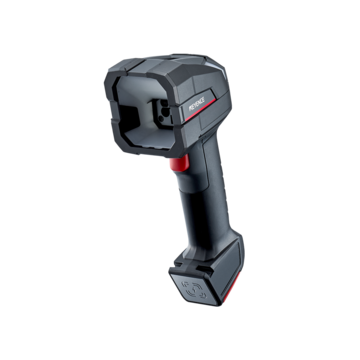
Handheld scanners suit environments where items vary in size, orientation, or location. Corded models connect through interfaces such as USB or keyboard wedge setups; cordless versions support mobile workflows through wireless connectivity.
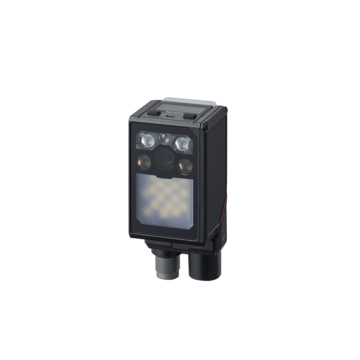
Fixed mount scanners install permanently on conveyor belts, assembly lines, or inspection stations, reading items automatically as they pass through the field of view without worker involvement. Fixed installations are a strong fit for high-volume sortation, package induction points, and production line assembly verification.
The decision hinges on workflow geometry. Handheld devices belong in receiving docks, picking operations, and retail environments where scan points shift. Fixed mount systems belong wherever items move consistently through defined read zones.
Software platforms that require integration
Manufacturing barcode solutions connect to multiple systems, and each integration point can add operational value:
- ERP systems synchronize inventory levels, sales orders, and financial data across business processes
- Warehouse management systems update bin and pallet locations as stock moves in and out
- Point-of-sale platforms process pricing, taxes, and inventory automatically at checkout
- Accounting software maintains real-time financial record alignment
- CRM systems capture product or customer ID scans to update service records
Mobile compatibility, including systems that extend scanning to smartphones and tablets, adds coverage across large shop floors where fixed workstations create dead zones.
Real-time data flow and what it eliminates
Each scan creates a time-stamped transaction record, such as transfers, cycle counts, and audit trails, without delayed entry or mistyped SKUs. Automated scanning helps reduce manual entry errors and improves data consistency across connected systems.
Supply chain visibility follows directly. Businesses updating procurement and inventory systems in real time maintain current data for purchase order placement, promotional decisions, and slow-moving stock management, decisions that deteriorate quickly when inventory records lag behind physical reality.
Integration approaches for different environments
Manufacturing barcode solutions and production lines
Fixed scanners mount at workstations to track components through every assembly stage. Each scan updates manufacturing execution systems with work-in-progress status and can help capture timestamps and operator IDs at routing steps. Food and beverage manufacturers can log raw material batches at intake, supporting faster backward traceability when quality issues occur. Production line barcode scanners also serve a verification role by confirming correct item counts in packaging operations and flagging mislabeled products before shipment reaches the customer.
Inventory management barcode systems for warehouses
Warehouse management systems assign unique barcodes to bins, racks, pallets, and containers. Workers scan labels during receiving to validate against purchase orders and update stock locations. Barcode scanning helps improve inventory accuracy and reduces the need for manual data entry. Cold storage environments may require ruggedized scanners that can withstand sustained moisture exposure and temperature fluctuations without degrading read performance.
Retail POS integration
Scanners connect to point-of-sale systems to process prices, taxes, and inventory updates automatically at checkout. Each scan closes the loop between physical stock movement and digital records in real time. Food service operations can extend this further by applying barcodes to track menu ingredients and table orders at the transaction level.
Healthcare and compliance requirements
Barcode medication administration (BCMA) systems verify patient wristbands against medication labels before each dose, helping confirm the right patient, medication, dose, route, and time. Compliance depends on label placement; BCMA workflows are most effective when barcodes are applied at the level required by the process. This is one environment where physical label application discipline matters as much as the scanning hardware itself.
Automated barcode scanning system setup
Production lines deploy presentation-mode scanners that detect items automatically as they pass through the read zone with no worker trigger required. Fixed installations support high-speed operations where manual scanning can create throughput bottlenecks. ERP integration closes the loop further: when scanned inventory falls below defined thresholds, the system can trigger automated restock requests without manual review.
Building Your Barcode Scanner Implementation Plan
Evaluating Your Integration Requirements
Start with a technical audit of operational conditions, not a software wishlist. Identify primary symbologies based on actual workflow demands: 1D UPC codes serve many retail and distribution applications, while 2D Data Matrix scanning covers unit-dose medications, patient wristbands, and DPM (Direct Part Marking) on manufactured components. Determine software environment compatibility next, including whether TWAIN-compliant drivers enable direct EHR integration or cloud-based interfaces better suit a mobile device fleet. Getting this sequence right helps prevent costly hardware swaps after deployment.
Selecting Industrial Barcode Reader Integration Options
Image-based readers support the protocol stack many plants run, including Ethernet, USB, RS-232, discrete I/O, EtherNet/IP, PROFINET, and Modbus TCP/IP. That protocol range can simplify reader-to-network integration for product tracking and archived image storage without custom middleware. Select readers that handle both 1D and 2D codes, including damaged or low-contrast ones, to avoid requalifying hardware when label quality degrades or symbology requirements change. Locking into a narrow-capability reader to save upfront cost can create re-scan issues and line stoppages later.
Configuring Barcode Data Collection Systems
Configure scanners as keyboard wedge devices to communicate directly with host software, allowing data to enter the active cursor field of an ERP or CRM interface without custom drivers. Set scanner configurations to match the barcode formats in active use, assign user permissions based on transaction responsibilities, then map workflows to ERP or WMS platforms before going live. Sequence matters here; connecting to platforms before permissions are defined can create audit trail gaps that compliance teams may flag.
Setting Up Network and Connectivity
Match connection method to facility layout: USB for fixed workstations, Bluetooth for mobile scanning applications, and Wi-Fi or Ethernet for distributed multi-cell operations. Power over Ethernet eliminates separate power runs for ceiling-mounted or forklift-mounted readers; one cable handles both data and power, which can reduce install labor and simplify future repositioning.
Testing and Validating Accuracy
Phased testing reduces integration risk: unit tests on individual developer devices first, integration tests validating the complete scan-to-system workflow second, then user acceptance testing under real operational conditions before full rollout. Test functional compatibility across environmental variables, including lighting, label condition, and conveyor speed, and verify data integrity through synchronization checks and performance under peak scan loads. Skipping user acceptance testing can surface problems after go-live rather than before.
Creating Standard Operating Procedures
Document label application standards, scanning workflows, and system update procedures before training begins. Establish maintenance schedules that reflect actual transaction volume and equipment type; a high-cycle conveyor reader requires different inspection intervals than a receiving dock handheld. SOPs help sustain first-scan performance over time; hardware alone does not hold accuracy without procedural discipline behind it.
Best Practices for Successful Integration
Ensuring data security and compliance
Encryption for data at rest and in transit is essential because scanned records moving between scanners, ERP systems, and WMS platforms may carry inventory, patient, or financial data. ISO 27001 certification can help validate that development practices meet international information security standards; treat this as a vendor evaluation factor rather than an afterthought. Access controls must align with operational role boundaries. Define incident response plans before deployment so detection protocols, coordination procedures, and post-incident analysis are already structured if an issue occurs.
Scaling for operational growth
Size the system with future growth in mind, including additional scanners, software licenses, and tier upgrades that may require planning. Flexible licensing models based on required capabilities, device counts, and scan volumes can better fit operations with seasonal or growth-driven variability. Cloud-hosted deployments can also add scanning capacity during peak periods without capital hardware investments.
Managing multiple locations and devices
Wireless infrastructure supports facility reconfiguration without cabling rework, provided access point coverage is adequate. Centralized data management maintains synchronization across distributed plants and work cells; without it, inventory positions can diverge between locations and reconciliation errors can compound.
Continuous monitoring and improvement
Regular audits should evaluate both technical components and procedural adherence because neither degrades in isolation. Review scan failure reports to identify patterns. Consistent errors in specific zones often trace to lighting, label condition, or a mismatch between imager type and application requirements. Front-line worker observations can surface practical issues that audit reports rarely capture, so build a structured feedback channel into standard operating procedures.
Choosing dedicated hardware over consumer devices
Purpose-built industrial scanners are designed to withstand repeated handling, moisture exposure, and demanding production conditions. Specialized optics can support more reliable reads on damaged labels and reflective surfaces than consumer-device cameras in many industrial applications. Battery systems support long-duration scanning with charging station accessories. The total cost of ownership argument should consider re-scans, worker ergonomics, scan-intensive task completion, and downtime risk rather than upfront device cost alone.
Conclusion
Barcode scanner integration transforms operational accuracy by reducing manual data entry across production, inventory, and retail environments. The technology works effectively when businesses match scanner types to specific workflows, whether handheld devices for flexible operations or fixed mount systems for high-volume lines.
Successful implementation requires careful planning around software compatibility, network infrastructure, and worker training. Organizations that follow systematic testing procedures and establish clear operating protocols can support smoother adoption and sustained accuracy improvements.
Start by evaluating your current processes, then select integration approaches that address your specific bottlenecks. The right barcode system delivers real-time visibility that strengthens decision-making across every operational level.
FAQs
Q What are the main steps to integrate a barcode scanner into my business system?
A
Barcode scanner integration involves several key steps: assess your current operational systems and workflows, prioritize which systems need integration based on business impact, select the appropriate scanner type for your environment, choose compatible barcode formats and software platforms, develop an implementation plan covering hardware setup and worker training, and create a testing plan to validate performance under real-world conditions before full deployment.
Q How do I set up and configure a barcode scanner?
A
Configure your barcode scanner by first setting it as a keyboard wedge device to communicate directly with your software systems. Next, program the scanner to recognize your specific barcode formats. Assign user permissions based on transaction responsibilities, then connect the scanner to your ERP, WMS, or POS platforms. Match the connection method to your facility needs, such as USB for fixed workstations, Bluetooth for mobile operations, or Wi-Fi/Ethernet for distributed operations. Test the configuration thoroughly before rolling out to production.
Q What causes barcode scanners to fail reading codes?
A
Barcode scanning failures typically stem from poor barcode quality, including insufficient contrast between black and white elements, incorrect dimensions, printing errors, or smudging and fading. Physical damage like torn or crinkled labels also creates read problems. Environmental factors such as inadequate lighting, reflective surfaces, or extreme temperatures can interfere with scanner performance. Regular monitoring of scan failure reports helps identify patterns and address issues through improved lighting, different scanner types, or better label materials.
Q Can barcode scanners function without additional software?
A
While barcode scanners can technically operate without specialized software by simply reading codes, software integration is essential for unlocking their full potential. Software enables automatic data entry into business systems, real-time inventory updates, workflow automation, and error reduction. Without software integration, scanned data remains isolated and requires manual processing, reducing the speed, accuracy, and operational control benefits that make barcode systems valuable for retail and manufacturing operations.
Q Why should I choose dedicated barcode scanners instead of using smartphones?
A
Dedicated barcode scanners are designed for industrial environments and can provide greater durability, scanning performance, and battery life than consumer devices. Purpose-built scanners feature ergonomic designs for scan-intensive tasks and specialized optics that support reliable code reading in demanding environments.