Flexible Field of View for Machine Vision Inspection with ZoomTrax
Key Takeaways
- Field of view is the most consequential setup decision in machine vision — it determines resolution, coverage, and detection capability for every inspection.
- Traditional cameras lock engineers into a fixed FOV at installation. Changing it later means swapping lenses, recalibrating, or physically repositioning the camera.
- ZoomTrax on the KEYENCE VS Series smart camera uses a 19-lens optical zoom assembly to cover a wide range of fields of view from a single fixed mounting position.
- Optical zoom preserves full sensor resolution at every FOV setting — no pixel interpolation, no resolution loss, no image quality trade-off.
- All FOV changes are made through VS Creator software. No physical access to the camera is required after it is mounted.
- The Capture Replication function automatically matches a saved field of view across multiple camera installations with a single click.
Why Field of View Is the Most Critical Variable in Vision Inspection
Every machine vision inspection starts with the same question: how much of the part needs to be visible, and at what level of detail? The answer defines the field of view — the physical area captured by the camera sensor in a single image. Get it right, and the system delivers reliable detection of defects, dimensions, and features. Get it wrong, and no amount of software tuning recovers what the optics cannot resolve.
In practice, field of view is a balancing act. A wider FOV covers more of the part but spreads the sensor's pixel count across a larger area, reducing the resolution available for fine detail. A narrower FOV concentrates pixels on a smaller region, improving resolution for tight tolerance checks — but risks missing features outside the inspection window. For manufacturers running multiple part sizes or inspection types on the same line, finding one FOV that works for every scenario is rarely possible with a fixed-lens camera.
The Traditional Trade-Off: FOV vs. Resolution vs. Setup Time
Conventional machine vision inspection cameras use interchangeable C-mount lenses to control field of view. Engineers select a focal length based on the working distance and the desired inspection area, then order and install the appropriate lens before the camera goes live. If the application changes — a new product, a different mounting height, a tighter tolerance requirement — the lens has to be swapped, the focus manually readjusted, and the system recalibrated from scratch.
This creates a hard dependency between FOV flexibility and labor. Any deviation from the original lens setup requires physical access to the camera, which is often mounted inside an enclosure, above an active conveyor, or at the end of a robot arm. Even when access is straightforward, the time required to identify, source, swap, and re-verify a lens across multiple cameras on multiple lines compounds quickly. The result is that many facilities lock in their initial lens selection and accept the limitations that come with it.
How ZoomTrax Delivers Full Optical Zoom Without Lens Changes
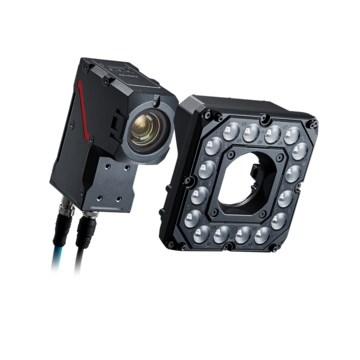
ZoomTrax is KEYENCE's integrated optical zoom system built directly into the VS Series smart camera body. Rather than a single fixed focal length element, ZoomTrax uses an assembly of 19 precision mechanical zoom lenses working in coordination to shift the field of view across a broad range — without any external lens changes, without moving the camera, and without sacrificing image quality.
The VS-L model handles standard mounting distances from 150 mm to 5,000 mm. The VS-S is optimized for short-range and space-constrained setups, covering 50 mm to 500 mm. In both cases, the user specifies the desired inspection area directly in VS Creator software. The camera automatically calculates and applies the correct zoom, focus, and exposure — no optical calculations required from the engineer.
This design eliminates the lens library for most applications. There is no inventory of focal lengths to maintain, no compatibility checks between lens format and sensor size, and no risk of a missing lens holding up a line change. For applications requiring specialty optics — such as a telecentric lens for tight tolerance measurement or minimal perspective distortion — KEYENCE also offers the VS-C C-Mount variant, which accepts standard C-mount lenses while retaining the full VS Series software environment. In either configuration, the VS Series smart camera adapts to the optical requirements of the application.
Full Resolution at Every Field of View
The most important distinction between ZoomTrax and digital zoom is what happens to resolution when the field of view changes. Digital zoom works by cropping the captured image and interpolating the remaining pixels to fill the frame — a process that degrades image quality and reduces the effective pixel count available for inspection. Optical zoom, by contrast, adjusts the focal optics themselves. The full sensor is still capturing at its rated resolution. No pixels are discarded or synthesized.
On the VS Series, this means a camera configured for a 300 mm wide-area presence check and then reconfigured to inspect a 10 mm connector pin delivers full 5 MP image quality in both cases — up to 15 MP depending on the selected model. For applications like OCR, barcode verification, scratch detection, and sub-millimeter dimensional measurement, this consistency is not optional. Detection reliability depends directly on pixel density, and ZoomTrax ensures that density does not erode as the inspection window narrows.
Changing FOV Without Moving the Camera
Once the VS Series camera is mounted, all imaging parameters — zoom level, focus, and exposure — are controlled through the VS Creator software on a connected PC. Users draw a region of interest on the live image. The camera applies the settings automatically. Nothing about the camera's physical position needs to change.
This is a meaningful operational difference from traditional setups. If a product changeover requires inspecting a different part of the assembly, or if a tolerance spec tightens and the system needs a narrower window to maintain detection confidence, the adjustment takes seconds from an operator station rather than requiring a maintenance team to access the camera housing. Multiple inspection programs with different zoom and focus configurations can be saved and recalled as part of a recipe-based workflow — no downtime, no physical access, no recalibration.
Multi-Product Lines and Tooling Changeover
For facilities running mixed-model production, the ability to change field of view through software rather than hardware is the difference between a flexible inspection system and one that bottlenecks every changeover. When part geometry shifts between production runs — different heights, different widths, different feature locations — ZoomTrax adjusts the FOV automatically as part of the recipe switch. The camera does not need to be re-aimed, re-focused, or physically modified.
In vision-guided robotics applications, this flexibility extends to varying pallet heights and part configurations across a work cell. A single VS Series camera with ZoomTrax can cover multiple target geometries that would otherwise require separate cameras or manual lens intervention between runs.
Capture Replication: Instant FOV Matching Across Lines
Deploying a vision inspection system across multiple lines introduces a consistency challenge: slight differences in mounting angle or distance between installations can produce different effective fields of view even when using the same nominal settings. Correcting these differences manually requires detailed optical knowledge and careful measurement at each installation point.
ZoomTrax solves this with Capture Replication. When a camera is configured at a verified reference location, the imaging parameters and a reference image are saved together. When deploying subsequent cameras on additional lines — or replacing a camera that was shifted or damaged — Capture Replication automatically adjusts the field of view, focus, and exposure on the new unit to match the reference image exactly, using a single click. What would otherwise require careful manual re-tuning at each location is handled in seconds, ensuring every camera on every line is operating with an identical effective field of view.
Contact KEYENCE to see how the VS Series smart camera with ZoomTrax can eliminate lens changes and simplify field of view management across your inspection lines.
Frequently Asked Questions
Q What is field of view and why does it matter for machine vision inspection?
A
Field of view (FOV) is the physical area captured by a camera sensor in a single image. In machine vision, it determines how much of the part is visible and at what resolution. A FOV that is too wide reduces pixel density for fine features. A FOV that is too narrow may miss portions of the part. Selecting and maintaining the right FOV is foundational to reliable inspection performance.
Q How does ZoomTrax change the field of view without swapping lenses?
A
ZoomTrax uses an integrated assembly of 19 precision mechanical zoom lenses built into the VS Series camera body. The user specifies the desired inspection area in VS Creator software, and the camera automatically adjusts the optics to match. No external lenses are involved, and no physical changes to the camera are required.
Q Does changing the field of view on the VS Series reduce image resolution?
A
No. ZoomTrax uses optical zoom, which adjusts the focal optics rather than cropping or interpolating a captured image. The full sensor resolution — up to 15 MP depending on the model — is preserved at every field of view setting. Resolution does not degrade as the inspection window narrows.
Q Can the VS Series camera adjust its FOV without being physically repositioned?
A
Yes. Once mounted, all zoom, focus, and exposure settings are controlled through VS Creator software on a connected PC. The camera does not need to be moved, re-aimed, or physically accessed to change the field of view. Different FOV configurations can be saved as inspection programs and recalled instantly during production changeovers.
Q What is Capture Replication and how does it help with multi-line deployment?
A
Capture Replication is a ZoomTrax feature that reproduces a saved lens configuration based on a reference image. When deploying cameras across multiple production lines, or replacing a camera after maintenance, Capture Replication automatically adjusts the field of view, focus, and exposure on the new installation to match the reference with a single click — eliminating manual re-tuning at each site.