How to Choose the Right Mobile Computer for Your Warehouse
Choosing a warehouse handheld computer starts with matching the device to your facility's real needs. Scan performance, battery life, ergonomics, ruggedness, and compatibility with existing WMS platforms determine whether a device supports your workflow or creates new challenges.
Start by confirming WMS integration, then compare each mobile computer against the needs of your daily warehouse workflows.
- WMS compatibility: The device should communicate reliably with your inventory platform.
- Scan range: Standard 2D imaging works for close-range barcodes, while long-range scanning supports forklift and pallet workflows.
- Battery life: Look for a device that can support a full shift of scanning and wireless communication.
- Ruggedness: Compare drop ratings and durability specs against the conditions workers face in your warehouse.
Consider Your Shift Length and Charging Needs
Before choosing a mobile computer, consider how long each device needs to run between charges and whether workers have time to recharge equipment between shifts. Single-shift operations may only need reliable full-day battery life, while 24/7 facilities may require extended batteries, spare devices, or hot-swap options.
- Full-shift battery life: Confirm the device can support the full expected work period without interrupting scanning tasks.
- Charging availability: Check whether devices can recharge between shifts or need to stay in service continuously.
- Backup power options: Evaluate whether spare batteries, extra devices, or hot-swap options are needed for longer shifts or 24/7 workflows.
How Important Are Scan Range and Reading Performance?
Scan range checklist:
- Can workers scan item barcodes at arm's length?
- Can forklift operators scan pallet or rack labels without dismounting?
- Can the device read damaged, poorly printed, or partially covered codes?
- Can it capture the barcode types used across your packaging and inventory workflows?
Scan range affects how often workers need to reposition themselves to capture barcodes. Standard-range scanners work well for close-range pick-face operations, especially when items are scanned at waist level. Extended-range scanners are better for high racks, pallet labels, and forklift workflows because they allow workers to scan from farther away without climbing, dismounting, or moving equipment as often.
In high-volume warehouses, decode performance helps prevent small scan delays from turning into larger bottlenecks. Devices that quickly read 1D and 2D barcodes keep workflows moving during peak periods, especially when labels are damaged, poorly printed, scratched, blurred, or partially covered. Reliable reading across barcode types, packaging materials, and hard-to-reach locations helps workers stay productive instead of spending time searching for a better scan angle.
Can the Battery Last Through Your Entire Shift?
Battery checklist:
- Will the device last through a full shift?
- Can workers see battery health before starting a task?
- Does the battery still meet runtime needs as it ages?
- Are hot-swap or extended battery options available for 24/7 operations?
Scan performance means little if a device runs out of power before the shift ends. Battery capacity directly determines whether workers can complete their tasks without stopping to search for a replacement unit or a charging station.
Battery performance changes over time, so compare both new-battery runtime and expected performance as batteries age.
- New battery: A full-capacity battery typically supports a full shift.
- Aging battery: Runtime decreases as capacity drops, leaving less room for scan-heavy workflows.
- Fleet planning: Larger teams should monitor battery health before performance issues interrupt work.
For most warehouse operations, a mobile computer should support a full shift of scanning and wireless communication on a single charge. Facilities with 24/7 workflows should also compare higher-capacity batteries and hot-swap options, which allow workers to replace batteries without powering the device down.
The bigger concern is battery degradation over time. Workers picking up a device at the start of a shift may not know its actual remaining capacity unless they check battery health. A battery that appears ready can still lose power mid-task, forcing workers to find another unit and interrupting productivity. For larger device fleets, monitoring battery condition helps teams identify aging batteries before they cause delays.
Battery management systems address this directly. Rather than waiting for failures to surface during a shift, these systems flag underperforming batteries before they become a problem, ensuring every worker starts their shift with a fully charged, reliable device.
Is the Device Rugged Enough for Your Warehouse Environment?
Warehouse environments are hard on equipment. Mobile computers face concrete drops, dust buildup, moisture exposure, and temperature swings, sometimes all within the same shift. Ruggedness specifications tell you how much punishment a device can handle before it stops working.
Drop resistance is one of the most immediate concerns. General warehouse picking may only need protection against common drops onto concrete, while high-rack storage, forklift workflows, and elevated platforms may benefit from higher drop ratings. When comparing devices, look for ruggedness testing that reflects repeated real-world handling rather than relying only on a single controlled drop specification.
IP ratings describe how well a device resists dust and water. Higher IP ratings may be important in food processing facilities, cold storage environments, washdown areas, or other locations where equipment is exposed to moisture. For dry distribution centers with limited moisture exposure, a lower IP rating may be sufficient, but teams should compare the rating against the actual cleaning procedures and environmental conditions in the facility.
Cold storage is a separate category entirely. Freezer and sub-freezing environments may require devices designed for low-temperature operation, since standard mobile computers can experience screen, housing, battery, or condensation-related issues in these conditions. Cold-rated models are designed to address these risks, and devices tested to recognized military or environmental standards can provide a more reliable basis for comparison than manufacturer claims alone.
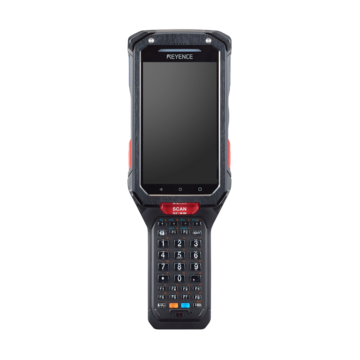
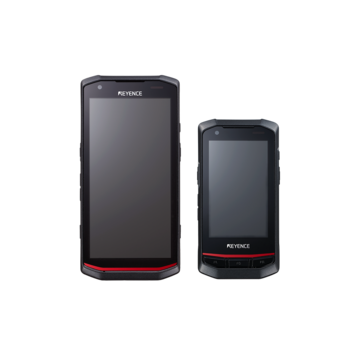
How Does the BT-A600 Compare Against Common Warehouse Requirements?
The BT-A600 addresses each warehouse mobile computer criterion directly.
- Scan performance reaches from 1 inch to 30 feet using a quad-camera system with AI processing, eliminating repositioning across high-bay storage and close-range picking.
- Battery capacity stands at 6270mAh, delivering approximately 32 hours of runtime, exceeding single-shift requirements and supporting extended operations without hot-swaps.
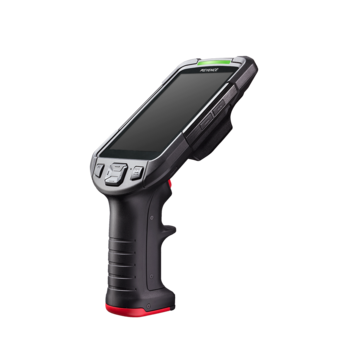
- Ergonomics favor productivity through 444-gram handheld weight, rising to only 600 grams with pistol grip attachment.
- Ruggedness specifications include IP67 sealing, a 3.1-meter (10-foot) drop rating, and 20,000-tumble testing.
- Operating system support spans Android 14 through Android 18, matching enterprise upgrade cycles.
AI capabilities extend beyond standard barcode reading. The eight-core processor plus dedicated AI core enables OCR for serial numbers, date codes, and container markings, supporting traceability workflows without barcode dependencies. Cold storage operations benefit from sub-freezing performance validation, whereas the physical keyboard accommodates gloved operators.
Single-shift distribution centers gain immediate deployment readiness with overnight charging between operations. Cross-dock facilities running 24/7 workflows benefit from extended battery duration that reduces mid-shift equipment rotation.
Schedule a demonstration with KEYENCE to evaluate scanning performance, ergonomics, durability, and battery life before making a purchasing decision.
See how a major 3PL provider used KEYENCE handheld computers to support warehouse operations in this related case study.
FAQs
Q What features should I prioritize when selecting a mobile computer for warehouse operations?
A
Prioritize five core factors: WMS compatibility, scan performance at your required working distances, battery life for a full shift, ergonomic design for daily use, and ruggedness specifications that match your warehouse environment.
Q How far should a warehouse scanner be able to read barcodes?
A
Standard-range scanners read from contact distance to approximately 18 inches, which works well for pick-face operations. However, extended-range models can read barcodes from 40 to 70 feet away, mitigating the need for workers to climb ladders or dismount forklifts to scan labels on high racks or distant pallets.
Q How long should a warehouse mobile computer battery last?
A
A warehouse mobile computer should support the expected work period without interrupting scanning or wireless communication. Facilities with longer shifts or 24/7 workflows may need higher-capacity batteries, spare devices, or hot-swap options.
Q What level of ruggedness do warehouse mobile computers need?
A
The right ruggedness level depends on the warehouse environment. Compare drop resistance, IP ratings, temperature specifications, and durability testing against common risks such as concrete drops, forklift workflows, dust, moisture, washdown procedures, and cold storage conditions.
Q What makes the BT-A600 suitable for warehouse environments?
A
The BT-A600 offers a scan range from 1 inch to 30 feet and beyond, 6270mAh battery providing up to 32 hours of continuous runtime, lightweight design at 444 grams, IP67 sealing with 10-foot drop rating, and Android 14-18 compatibility. It also includes AI-powered OCR capabilities and performs reliably in cold storage conditions.