Machine Vision Troubleshooting Guide: How to Diagnose Inconsistent Inspection Results
A vision inspection that passes one hour and fails the next is frustrating, but the cause is usually found in a short list of places. This machine vision troubleshooting guide walks through them in the order that rules out causes fastest, from the image itself to lighting, focus, part presentation, and finally inspection settings.
Key Takeaways
- Most machine vision problems trace back to a small set of causes: lighting, focus and field of view, part presentation, trigger timing, and inspection settings.
- The fastest way to troubleshoot is to start with the image. If the image is not consistent, no amount of tool tuning will make the result consistent.
- Change one variable at a time and record what changed. Stacking adjustments makes it impossible to know which one worked.
- Stored pass and fail images turn troubleshooting from guesswork into evidence, because the exact conditions of a failure can be reviewed after the fact.
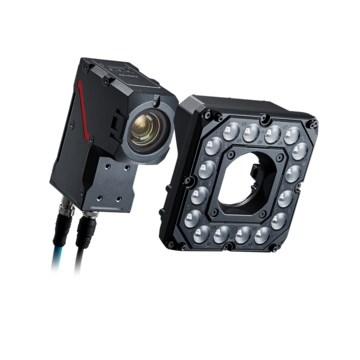
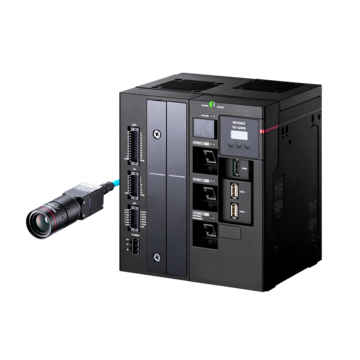
- The KEYENCE VS Series smart camera and VS-G Series controller include ZoomTrax optical zoom, an Image Database, and Settings Verification to make these checks faster and safer.
Start With the Symptom, Not the Settings
When a vision inspection starts giving bad results, the instinct is often to open the inspection program and adjust thresholds. That is usually the wrong first move. Thresholds are the last link in a chain that begins with light, optics, and part position. If an earlier link has changed, adjusting the threshold only hides the problem for a few shifts.
A better approach is to sort the problem into one of three symptoms. The first is false rejects, where good parts fail. The second is missed defects, where bad parts pass. The third is unstable results, where the same part gives different answers. Each symptom points toward a different set of likely causes, and the steps below follow the order in which causes are most efficiently ruled out.
Step 1: Check the Image Before Anything Else
Open a live image at the station and compare it with a saved image from when the inspection was working. Look for differences in brightness, contrast, sharpness, and part position. A side-by-side comparison often shows the cause within a minute.
If the two images look different, the vision tools are not at fault. The cause is in the physical setup. If the images look the same but the results differ, the issue is more likely in the inspection settings or in the logic that handles the result. This single comparison separates hardware problems from software problems and saves a great deal of time.
Step 2: Look at Lighting First
Lighting is the most common source of inconsistent results. Small changes in angle, distance, or intensity can change how a feature appears. Light sources age and lose output over time, and a light mount that has been bumped may no longer point where it did.
Ambient light is the other frequent culprit. Sunlight through a dock door, overhead lights that cycle during a shift, or a new fixture nearby can all alter the image. Inspections that pass in the morning and fail in the afternoon often point to ambient light. Shielding the station with a simple enclosure or shroud is a common and simple remedy.
Also consider whether the lighting method suits the feature. Shiny, curved, or textured surfaces may produce glare or shadows that change with small shifts in part position. A different lighting angle or diffusion can make a feature easier to see and a result more stable.
Step 3: Verify Focus and Field of View
A camera that has drifted out of focus can still produce an image that looks acceptable to the eye. Edges soften slightly, and measurement and pattern-matching tools become less repeatable. Vibration, temperature changes, and accidental contact with the camera or lens can all cause drift.
Field of view matters just as much. If the part does not fill the image as intended, each pixel covers more of the part than planned, and small defects may fall below the detectable size. This often happens after a changeover, when a new part sits at a different height or position than the one used to set up the inspection.
Cameras with fixed lenses usually need physical adjustment in these cases. The KEYENCE VS Series smart camera uses ZoomTrax, an integrated optical zoom that adjusts the field of view through software. A technician can correct the field of view without changing a lens, and because the zoom is optical rather than digital, full sensor resolution is preserved.
Step 4: Confirm Part Presentation and Trigger Timing
Vision tools are only as consistent as the parts presented to them. Check whether parts arrive in the same position, orientation, and height every time. Loose fixtures, worn guides, and changes in upstream equipment can all introduce variation that did not exist during setup.
Trigger timing is another frequent cause of unstable results. If the camera captures an image before the part has settled, or while it is still moving, the result will vary. Review the delay between the sensor signal and the image capture. For moving parts, confirm that exposure time is short enough to avoid motion blur.
Intermittent problems often come from mechanical sources such as a sticky sensor, a vibrating conveyor, or a part that occasionally rotates. Reviewing stored images from failed inspections is the quickest way to identify these patterns.
Step 5: Review Inspection Settings Last
Only after the image, optics, and part presentation have been confirmed should the inspection settings be adjusted. At this point, the cause is typically one of three issues: a threshold that is too tight for normal part variation, a region of interest that no longer covers the feature, or a tool that was built from too few example parts.
When adjusting, change one parameter at a time and test against a range of known good and known bad parts. A change that fixes one failure can easily create another. A threshold loosened to stop false rejects may let a real defect through, which is why changes should be tested against a broad set of examples rather than a few recent failures.
The VS-G Series controller supports this with Auto Parameter Tuning, which derives thresholds from designated example images instead of manual trial and error. Settings Verification then replays stored images against a proposed change before it goes live, so the effect on every previously inspected part is known in advance.
Build a Habit of Storing Evidence
The hardest troubleshooting cases are the intermittent ones, because the failure is gone by the time anyone arrives at the station. Saving images of failed and borderline inspections solves this. With the original image available, the team can see exactly what the camera saw rather than guessing from a description.
The VS-G Series Image Database stores pass and fail images directly in the controller. This creates a record that can be reviewed after a problem has occurred, shared across shifts, and used to confirm that a fix worked. Over time the same archive also becomes a library of real part variation that can be used when building or updating inspections across multiple lines.
Pairing stored images with a short log of changes, including what was adjusted, when, and by whom, makes later troubleshooting much faster. It also helps teams standardize their approach across lines. More information on machine vision systems and industry applications is available for teams building a consistent inspection process.
Contact KEYENCE to discuss troubleshooting an existing inspection or building a more stable one with the VS Series and VS-G Series.
Frequently Asked Questions
Q Why does a machine vision inspection pass in the morning and fail in the afternoon?
A
The most common cause is changing ambient light, such as sunlight or overhead lighting that varies through the day. Temperature shifts that affect focus or light output can also contribute. Comparing a morning image with an afternoon image usually shows the difference immediately.
Q What causes false rejects in machine vision?
A
False rejects usually come from inconsistent lighting, part position variation, or thresholds set too tightly for normal part variation. Reviewing the images of rejected good parts shows which of these applies.
Q Why is a vision system missing real defects?
A
Common causes include resolution that is too low for the defect size, lighting that does not highlight the defect, or thresholds that were loosened to stop false rejects. Confirming the defect is visible in the image is the first step.
Q How do you troubleshoot an intermittent vision problem?
A
Capture and store images of every failure or borderline result, then look for patterns in position, lighting, or timing. Intermittent problems often come from mechanical causes such as unsteady parts, loose fixtures, or trigger timing.
Q Should inspection thresholds be adjusted first?
A
No. Thresholds should be reviewed last. Lighting, focus, field of view, part presentation, and trigger timing should be confirmed first, since adjusting thresholds to compensate for a physical change only hides the cause.
Q How can teams prevent the same problem from returning?
A
Store pass and fail images, document every settings change, and validate changes against previously stored images before deployment. Standardizing on one platform and one process across lines makes problems faster to diagnose and fix.