OCR vs. 2D Code Reading
When a Data Matrix or QR code won't read reliably in-line, many manufacturers add optical character recognition (OCR) as a workaround, reading the human-readable text next to the code instead of the code itself. OCR has no error correction, no checksum, and no grading standard, which means it trades no-reads for something far worse: silent misreads in your traceability database.
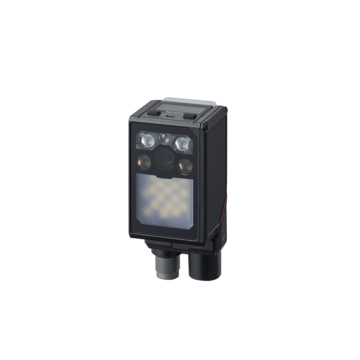
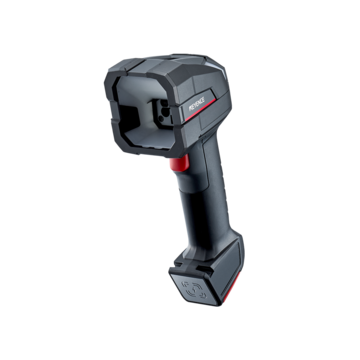
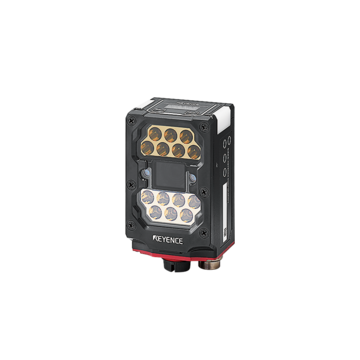
The better fix is a code reader that can actually decode low-quality codes. The KEYENCE SR-X300 Series pairs a built-in AI chip trained on a database of over 100,000 code images with the SR-X Link System's linked decoding, reading damaged, stained, low-contrast, and partially hidden 2D codes that conventional readers and OCR cannot.
The OCR Fallback: A Familiar Pattern on the Plant Floor
The sequence is almost always the same. A part comes through with a direct part mark (DPM), such as a dot-peen, laser-etched, or ink-jet Data Matrix code. The fixed-mount code reader hits it. Sometimes it reads. Sometimes it doesn't. Read rates sit at 96%, then 92%, then engineering gets called because the line is stopping.
Someone notices the part also carries a human-readable serial number, printed or marked right next to the code. And so the workaround is born: add a vision system running OCR to read the text characters instead. Or worse, station an operator to key the number in manually when the code fails.
This feels like a solution. It is not. It's a decision to abandon the single most valuable property of a 2D code, its built-in ability to prove it read correctly, and replace it with a technology that has no such property at all.
What OCR Actually Gives Up
Optical character recognition is a legitimate machine vision tool. It is the right tool when there is no code to read, such as verifying a printed lot code, an expiration date, or a human-readable field required by regulation. Used as OCV (optical character verification), where the system checks whether expected text is present and legible, it earns its place.
Used as a substitute for decoding a 2D code, OCR gives up four things that matter enormously in traceability applications.
1. Error correction
Data Matrix ECC200, the symbology behind virtually every industrial 2D code, encodes data with Reed-Solomon error correction. A meaningful portion of the symbol can be physically destroyed and the decoder can still reconstruct the original data with mathematical certainty. Scratched, stained, partially obscured, worn: the code carries redundant information specifically so it survives a manufacturing environment.
OCR has zero error correction. A character is either recognized or it isn't, and there's no redundancy in the string to recover from a bad guess.
2. Self-validation
A decoded 2D code is verified against checksum and error-correction math before the decoder outputs anything. If the data doesn't validate, the reader reports a no-read rather than passing corrupt data downstream. The failure mode is loud and safe.
OCR outputs its best guess with a confidence score. There is no mathematical check that "8XR-4471" is a real, valid part identifier, only that the classifier scored those characters higher than the alternatives.
3. Immunity to character confusion
Every OCR deployment eventually meets the same enemies: 0 vs. O, 1 vs. I vs. l, 5 vs. S, 8 vs. B, 2 vs. Z, 6 vs. G. Add a dot-peen font on a machined casting, a slight rotation, some oil, and a quenching process that flattens contrast, and the confusion rate climbs. Character-level errors compound across a string. A 16-character serial read at 99.5% per-character accuracy fails as a complete string roughly 8% of the time.
A 2D code has no fonts and no ambiguous glyphs. A module is dark or light.
4. A quality standard you can measure and enforce
2D codes can be graded against published international standards, including ISO/IEC 29158 (AIM DPM), ISO/IEC 15415, ISO/IEC 15416, ISO/IEC 16022, SAE AS9132, and SEMI T10-0701. That means marking quality is a number you can trend, specify to a supplier, and act on before it becomes a no-read.
There is no equivalent grading standard for OCR legibility. When OCR performance drifts, you find out from the reject bin.
The failure mode that should decide the argument
A no-read is an operational problem: the line stops, an operator intervenes, throughput drops. Annoying, visible, fixable.
A misread is a quality and compliance problem: the wrong serial number enters your traceability database, attached to the wrong part, and nobody knows. It surfaces months later during a recall investigation, a warranty claim, or an audit, when you discover you cannot prove which parts went into which assemblies.
Code reading with error correction is engineered to fail toward no-reads. OCR, by design, fails toward confident misreads. In a traceability system, that difference is the whole argument.
OCR vs. 2D Code Reading: Side-by-Side
| Capability | 2D Code Reading (Data Matrix / QR) | In-Line OCR |
|---|---|---|
|
Error correction
|
2D Code Reading (Data Matrix / QR)
Reed-Solomon ECC built into the symbology
|
In-Line OCR
None
|
|
Data validation
|
2D Code Reading (Data Matrix / QR)
Checksum + ECC verified before output
|
In-Line OCR
Confidence score only
|
|
Typical failure mode
|
2D Code Reading (Data Matrix / QR)
No-read (safe, visible)
|
In-Line OCR
Misread (silent, dangerous)
|
|
Character ambiguity
|
2D Code Reading (Data Matrix / QR)
None, since modules are dark or light
|
In-Line OCR
0/O, 1/I, 5/S, 8/B, 2/Z, 6/G
|
|
Quality grading standard
|
2D Code Reading (Data Matrix / QR)
ISO/IEC 29158, 15415, 15416, 16022, AS9132, SEMI T10
|
In-Line OCR
No equivalent standard
|
|
Tolerance to damage/stains
|
2D Code Reading (Data Matrix / QR)
High, designed for it
|
In-Line OCR
Low
|
|
Data density
|
2D Code Reading (Data Matrix / QR)
High (full serial, lot, date, supplier in one symbol)
|
In-Line OCR
Limited to printed characters
|
|
Orientation tolerance
|
2D Code Reading (Data Matrix / QR)
Omnidirectional
|
In-Line OCR
Requires controlled orientation
|
|
Setup and maintenance
|
2D Code Reading (Data Matrix / QR)
Auto-tuning, parameter banks
|
In-Line OCR
Font training, per-variant retraining
|
|
Marking area required
|
2D Code Reading (Data Matrix / QR)
Small (a 2D code holds far more in less space)
|
In-Line OCR
Large (text needs room)
|
|
Read speed in-line
|
2D Code Reading (Data Matrix / QR)
Milliseconds, multi-code capable
|
In-Line OCR
Slower, string-dependent
|
The Real Problem Isn't the Code — It's the Reader
Here's what gets missed in the OCR conversation: teams almost never switch to OCR because 2D codes are inadequate. They switch because their code reader couldn't handle the codes their process actually produces.
Real manufacturing degrades codes in entirely predictable ways:
- Hairline metal surfaces on battery cases, magazines, and trays create reflections that wash out the mark
- Water droplets on crankshafts after a cleaning process obscure modules
- Dot smearing on cylinder blocks as the marking pen tip wears, thickening the dots
- Quenching on gears flattens contrast to near-nothing
- Heat treatment of lead frames produces color irregularities and gradation across the mark
- Flux on PCBs creates glare; silkscreen timing deviations misalign the marking
- Low-contrast laser marks on IC chip resin molds fade toward invisibility
- Deflections and reflections on pouches, vinyl coverings, and curved test tubes and bottles
- Blurred or scuffed printing on cardboard from poor ink adherence
- Partially hidden codes where installation constraints block part of the symbol
None of these are code-format problems. They're imaging and decoding problems, and modern code readers solve them directly.
How the SR-X300 Series Reads the Codes That Force OCR Workarounds
The SR-X Series AI-powered code reader was built specifically for the codes that break conventional readers. Four capabilities do the heavy lifting.
Built-in AI filter: a world's first for code reading
The SR-X300 Series includes a dedicated inference AI chip (NPU) optimized specifically for code reading, developed through learning on a database of over 100,000 code images. The AI filter reconstructs codes degraded by stains, scratches, rough backgrounds, and uneven cell color, reconditioning the image before decoding so the symbol becomes readable rather than being handed off to a fallback technology.
This is a meaningful architectural distinction. The AI runs on a dedicated core inside a 6-core parallel processing system (SR-X100 Series: 5-core), alongside the conventional decoding CPU and the SR-X Drive decoding CPU. Every captured image is processed by multiple decoding paths simultaneously, roughly double the cores of conventional models, so AI processing improves read rates without adding tact time.
SR-X Drive and the heat map search algorithm
Damage frequently lands on the finder and alignment patterns, the structures a reader uses to locate the code in the first place. Wear, stains, cylindrical distortion, and partial occlusion all attack exactly the features conventional search algorithms depend on.
KEYENCE's SR-X Drive decoding algorithm uses a heat map search algorithm that emphasizes regions of the image with significant black-to-white variation, rather than scanning from the top of the frame. It finds codes faster and finds codes conventional search methods miss entirely.
Built-in 3-way lighting with automatic selection
Lighting is the single biggest determinant of whether a marginal DPM code reads. The SR-X300 Series integrates direct, polarized, and diffused lighting in one unit and automatically selects the optimal condition for the target.
The difference is stark: pin-stamp marking on a cast surface succeeds under direct lighting and fails under polarized and diffused. Black resin succeeds under polarized and fails under the other two. A hairline metal surface succeeds only under diffused. One target, three lighting modes, three completely different outcomes. That is exactly why a reader with fixed lighting appears to "not work on our parts," and why teams conclude the code is unreadable when it simply wasn't lit correctly.
Polarizing filters are included as standard, and the reader selects the right one automatically. An integrated lens, lighting, and high-resolution CMOS design eliminates the conventional selection burden. Lighting, lens, CMOS, F-stop, and filter no longer have to be specified and adjusted by hand.
SR-X Link System: linked decoding across the line
This is the capability with no real equivalent anywhere else. With linked decoding, cell information from a code that was successfully read by a designated reader earlier on the same network is used to help downstream readers decode the same code after it has degraded, such as after oil staining, physical damage, or partial occlusion.
Practically: the code is read cleanly at the marking station, and that known-good cell pattern assists readers further down the line where the same code is now covered in coolant or scratched from handling. The 2D code's pattern is broken down into elements for matching, so a code that a standalone reader would reject can still be resolved with certainty.
For the "partially hidden code" case, where installation restrictions physically block part of the symbol, linked decoding makes reading possible where no single reader could succeed. That is precisely the scenario that most often triggers an OCR workaround.
Fix the Root Cause: Verification and Traceability Tools
The most durable answer to the OCR question isn't just a better decoder. It's catching marking degradation before it produces no-reads at all.
Code verification grades marking quality against ISO/IEC 29158:2020, ISO/IEC TR 29158 (AIM-DPM-1-2006), ISO/IEC 15415, ISO/IEC 15416, ISO/IEC 16022, SAE AS9132, and SEMI T10-0701, with total grade judgment plus per-parameter results. That turns "the marker seems to be getting worse" into a documented trend and a supportable conversation with a supplier or a maintenance schedule.
Matching level scores every read on a 1–100 scale. Two codes can both read at a 100% read rate while one scores 75 and the other 43. The 43 is on its way to becoming a no-read next month. That's a predictive maintenance signal a pass/fail reader simply cannot give you.
The Web Traceability Tool, part of the SR-X Link System, joins barcode data to statistical information so you can monitor every reader on the network from a browser and see, per reader, the focal distance, installation angle, bank number, lighting type, contrast method, read time, and matching level side by side. When one reader in a chain underperforms, the cause, such as incorrect focal distance, wrong installation angle, or wrong lighting settings, is visible in a comparison table instead of requiring a line shutdown and a reader-by-reader investigation. SR Web Tool adds browser-based setup (Web Navigator), analysis, and multi-unit monitoring (Web Multi Monitor) with no software installation required.
Where OCR Still Belongs
Being honest about this strengthens the case rather than weakening it. In-line OCR/OCV is the right choice when:
- There is no code, such as legacy parts, incoming material from suppliers who don't mark, or components where marking a code isn't feasible
- The text itself is the requirement, such as regulatory human-readable expiration dates, lot codes, and country-of-origin statements that must be verified as printed
- You're verifying print quality of text, not identifying a part
- Label content validation, confirming the right label went on the right product
The distinction is simple: use OCR when text is what you need to verify. Use code reading when identity and traceability are what you need to establish. Substituting the first for the second is where operations get into trouble.
Practical Checklist Before You Add OCR
If your 2D codes aren't reading reliably, work through this before reaching for character recognition:
-
1.Grade the code. Run code verification against ISO/IEC 29158 or 15415. If the mark is failing, the fix is at the marker, not the reader.
-
2.Check your lighting options. If your reader has one lighting mode, that alone may explain the failures. Test direct, polarized, and diffused.
-
3.Check resolution against cell size. The SR-X300 reads 2D cells down to 0.024 mm (0.0009″), and 0.010 mm (0.0004″) with the SR-XHR high-resolution lens attachment. If PPC (pixels per cell) is too low, no algorithm rescues it.
-
4.Evaluate AI-based decoding. Codes rejected by conventional decoders are frequently readable after AI filtering.
-
5.Consider linked decoding where the same code is read at multiple stations and degrades along the way.
-
6.Trend matching level so degradation is caught as a warning rather than a stoppage.
Conclusion
OCR is not a substitute for reading a 2D code. It's a way of removing error correction, checksum validation, and gradable quality from a traceability system precisely when that system is already under stress, converting safe, visible no-reads into silent misreads that surface during a recall.
The problem worth solving is the unreadable code, not the missing character reader. With a built-in AI chip trained on over 100,000 code images, the SR-X Drive heat map search algorithm, automatic 3-way lighting selection, and the SR-X Link System's linked decoding, the KEYENCE SR-X300 Series reads the low-quality codes that drive teams toward OCR in the first place in an IP67-rated, ultra-compact housing that fits where conventional readers won't.
Frequently Asked Questions
Q Why do manufacturers use OCR when a 2D code won't read?
A
Because most parts carry a human-readable serial or lot number alongside the code, OCR looks like an easy fallback when read rates drop. The underlying issue is almost always the reader's imaging and decoding capability rather than the code itself. Degraded DPM codes on cast, machined, quenched, or reflective surfaces defeat conventional readers but remain readable with AI-based decoding, proper lighting selection, and adequate resolution.
Q Is OCR more reliable than barcode or 2D code reading?
A
No. 2D codes like Data Matrix ECC200 include Reed-Solomon error correction and checksum validation, so a damaged code still decodes correctly or reports a no-read. OCR has no error correction and no checksum. It outputs a best guess with a confidence score. OCR is also vulnerable to character confusion (0/O, 1/I, 5/S, 8/B), and character-level errors compound across long strings.
Q What's the difference between a no-read and a misread, and why does it matter?
A
A no-read means the reader could not decode and says so. The line stops and an operator intervenes. A misread means wrong data was accepted as valid and written into your traceability database. No-reads cost throughput; misreads cost traceability integrity and surface during recalls, warranty claims, and audits. Error-corrected code reading fails toward no-reads; OCR fails toward misreads.
Q Can a code reader read damaged, stained, or low-contrast 2D codes?
A
Yes. The KEYENCE SR-X300 Series uses a built-in inference AI chip trained on a database of over 100,000 code images to filter out stains, scratches, rough backgrounds, and uneven cell color before decoding. The SR-X Drive heat map search algorithm locates codes whose finder and alignment patterns are damaged, and automatic selection among direct, polarized, and diffused lighting handles reflective, dark, and hairline-metal surfaces.
Q What is the SR-X Link System and how does linked decoding work?
A
The SR-X Link System connects SR-X Series readers across a network so they share information. With linked decoding, cell data from a code successfully read by a designated reader is used to help other readers decode that same code after it has been degraded by oil stains, damage, or partial occlusion. The linked Web Traceability Tool also compares focal distance, installation angle, lighting type, read time, and matching level across every reader on the network, so error causes are identified without shutting the line down.
Q How small a 2D code can the SR-X300 read?
A
The SR-X300 reads 2D code cells down to 0.024 mm (0.0009″) and barcodes down to 0.082 mm (0.0032″), across a reading distance of 70 to 1000 mm (2.76″ to 39.37″). With the SR-XHR high-resolution lens attachment, minimum 2D cell size drops to 0.010 mm (0.0004″), or 10 µm — enough for miniaturized IC components.
Q When should I use OCR instead of code reading?
A
Use OCR or OCV when text is what you need to verify: human-readable expiration dates, lot codes, and country-of-origin statements required by regulation; label content validation; or parts that carry no code at all. Use 2D code reading whenever the goal is establishing part identity and traceability. That's what error correction and code grading standards exist to protect.
Q How do I know whether the problem is my marking process or my reader?
A
Run code verification against ISO/IEC 29158 (AIM DPM) or ISO/IEC 15415 and grade the mark. A failing grade points at the marking process, such as worn dot-peen tips, laser parameters, or surface prep. A passing grade with poor read rates points at the reader: insufficient resolution, wrong lighting, or a decoder that can't handle real-world degradation. Trending matching level (1–100) on codes that currently read at 100% gives you early warning either way.