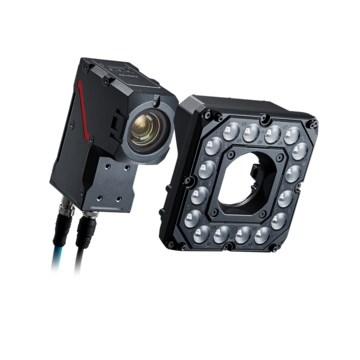
VS-G Series Image Database: Built-In Vision Storage for Smarter Inspection
In automated manufacturing, every inspection generates image data — but capturing that data is only half the story. The ability to store it efficiently, retrieve it quickly, and act on it intelligently is what transforms a machine vision system from a pass/fail detector into a genuine process improvement tool. The KEYENCE VS-G Series addresses this challenge with the world's first built-in vision storage — an integrated Image Database that lives directly inside the controller.
Key Takeaways
- VS-G Series is the world's first vision controller with built-in dedicated image storage — no external hardware required.
- 100x compression reduces a 12 MB image to 0.1 MB while maintaining quality sufficient for re-inspection.
- Image Database Search lets users filter by date or serial number to locate specific images instantly.
- Analyze mode reveals defect trends over time — enabling data-driven yield improvement.
- Utilize mode lets engineers adjust inspection settings using real saved images, not new test samples.
- Settings Verification Function prevents unintended regressions before parameter changes go live.
- Auto Parameter Tuning uses Image Database images to find optimal inspection settings automatically.
- UPS-Free design protects all stored data during sudden power interruptions.
- Standard storage: 240 GB (up to 4 TB); High-capacity models: 480 GB (up to 4 TB).
The Challenge of External Vision Storage
Traditional machine vision systems were not designed with large-scale image archiving in mind. When manufacturers needed to retain inspection images, the standard approach involved connecting an external PC or network-attached storage (NAS) device. This created a series of practical problems that compounded as production volumes grew.
Network congestion slows data transfer during peak production, creating gaps in the image record. Device compatibility issues require time-consuming troubleshooting. External servers and PCs consume rack space, require their own maintenance, and introduce potential points of failure. Most significantly, because storage costs were high relative to image file sizes, many operations archived only NG (defect) images — discarding the OK images that are often most valuable for trend analysis and system verification.
The VS-G Series was engineered to eliminate all of these constraints by integrating storage directly into the controller hardware.
Introducing the World's First Built-In Vision Storage
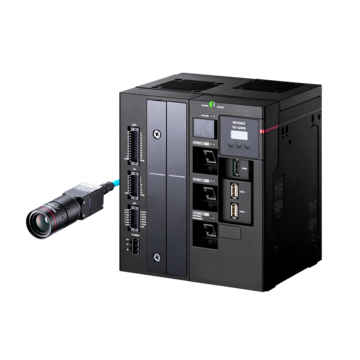
The VS-G Series controller is the first machine vision system in the industry to incorporate dedicated storage hardware directly on-board the controller — no external server, no network path, no compatibility negotiation required. The Image Database is a core component of the controller architecture, supported by dedicated storage cores that operate in parallel with the inspection and compression cores.
Standard models (VS-G2000 through VS-G2500) include 240 GB of built-in data storage, expandable up to 4 TB using the optional CA-ST4T storage module. High-capacity models (VS-G2800 and VS-G2900) start at 480 GB, also expandable to 4 TB. Both OK and NG images are stored automatically — for the first time giving manufacturers a complete picture of every inspection cycle, not just the defective ones.
100x Compression That Preserves Inspection Quality
Storing every inspection image in an uncompressed format would quickly exhaust any practical storage budget. The VS-G Series applies proprietary 100x compression — reducing a typical 12.0 MB image to approximately 0.1 MB — while maintaining the image quality that matters for inspection purposes.
KEYENCE validation testing demonstrates that re-inspecting compressed images against the original inspection criteria produces results that are virtually indistinguishable from the original. Scratches, stains, dimensional defects, and other features critical to pass/fail determinations remain clearly visible and accurately detected. The compression is optimized for inspection data — not general photography — so image fidelity is preserved exactly where the system needs it.
Search: Find Any Image Instantly
With potentially millions of images archived over months or years of production, fast retrieval requires more than raw storage capacity — it requires intelligent indexing. The VS-G Image Database Search function allows users to filter the entire archive by inspection date, time range, or individual serial number.
This makes it straightforward to pull up every image from a specific production shift, locate the inspection record for a particular serialized part, or review all images from the hour preceding a quality event. For traceability applications — where a customer return must be traced back to its original inspection state — this capability alone can save hours of manual investigation and provide defensible documentation of inspection history.
Analyze: Turn Stored Images Into Process Intelligence
Beyond individual image retrieval, the VS-G Image Database Analyze function enables trend-level insight across inspection history. Users can view defect instances grouped by time period — hourly, daily, or over any custom range — to identify patterns that would not be visible from individual inspection results alone.
If a particular defect type spikes during a specific production window, the Analyze function surfaces that pattern immediately. Engineers can then drill down into the contributing images to understand whether the issue correlates with a shift change, a material lot, a tooling cycle, or an environmental condition. This transforms the Image Database from a passive archive into an active yield improvement tool — enabling faster root cause identification without requiring additional data infrastructure.
Utilize: Improve Inspection Programs With Real Production Data
The Utilize function closes the loop between stored image data and inspection program development. Rather than creating new test samples or relying on a limited set of reference images, engineers can draw directly from the Image Database when adjusting inspection settings.
Selecting a set of saved images — spanning both normal and defective examples encountered in actual production — provides a far more representative basis for tuning than any synthetic test set. When settings are adjusted based on real production images, the resulting inspection program reflects the actual variation the system will encounter on the line.
Settings Verification: Confidence Before Going Live
One of the most significant risks in inspection system management is parameter drift — a settings change that solves a new problem while inadvertently causing previously correct judgments to fail. The VS-G Series Settings Verification Function directly addresses this risk.
Before any parameter change is committed, engineers can run the proposed new settings against the entire stored image archive — or any selected subset — and observe how the adjusted parameters would have judged every historical image. If the new settings would have caused a previously-accepted part to be rejected, the system flags it immediately. This provides quantitative confirmation that an adjustment improves detection performance without degrading accuracy on known-good parts — a level of confidence that was previously impossible without running live production trials.
Auto Parameter Tuning and Auto Image Selector
The Image Database is directly integrated with the VS-G Series Auto Parameter Tuning function. Engineers select images from the database, designate specific regions as defect examples or false positive examples, and the system automatically calculates the optimal inspection parameters to correctly classify all designated images.
The complementary Auto Image Selector function further automates the process by analyzing the stored image set and automatically identifying the optimal combination of training images — ensuring that edge cases and rare defect types are represented in the tuning set without requiring manual curation. Together, these features reduce the time and expertise required to optimize inspection programs, while the Image Database ensures that optimization is always grounded in real production data.
Reliable Storage Without Network Dependency
The VS-G Image Database is designed for the reliability demands of industrial production environments. The UPS-Free design means that a sudden loss of power — whether from a facility event, a tripped breaker, or an emergency stop — does not result in data loss or storage hardware failure. Conventional hard drives used in external servers are vulnerable to head crashes and data corruption under abrupt power cuts; the VS-G storage architecture eliminates this risk entirely.
For operations that do require external server output — for ERP integration, enterprise data lakes, or long-term offsite archiving — the VS-G Series supports 2.5 GbE image output at 1.5 to 2 times the speed of previous-generation KEYENCE systems. If that external output fails for any reason, the controller automatically saves an internal backup, ensuring no inspection record is lost.
The 32-core processor architecture further supports this reliability model: dedicated cores handle inspection, compression, and storage independently and in parallel, so high inspection throughput never competes with image archiving for processing resources.
Contact KEYENCE to learn how the VS-G Series Image Database can improve your inspection process.
Frequently Asked Questions
Q How much storage does the VS-G Series Image Database provide?
A
Standard models (VS-G2000–VS-G2500) include 240 GB of built-in storage, expandable to 4 TB with the optional CA-ST4T module. High-capacity models (VS-G2800 and VS-G2900) start at 480 GB, also expandable to 4 TB. For most production environments, this provides months to years of complete inspection image history.
Q Does image compression affect the quality of stored inspection images?
A
No. The VS-G Series uses proprietary 100x compression optimized for machine vision data. Testing confirms that re-inspecting compressed images against the original criteria produces results virtually identical to the originals. Critical features such as scratches, stains, and dimensional variations remain clearly detectable.
Q Can I search for a specific part image by serial number or date?
A
Yes. The Image Database Search function supports filtering by inspection date, time range, and serial number. Results are displayed in a filmstrip view with All/Pass/Fail/Tag filter options, making it straightforward to locate specific records for traceability or quality investigations.
Q How does the Settings Verification Function work?
A
When a parameter change is proposed, the Settings Verification Function replays the stored image archive against the new settings before any change is committed. Engineers can see immediately how the adjusted parameters would have judged every historical image, confirming that the change improves detection without degrading accuracy on previously accepted parts.
Q What happens to stored images if the controller loses power suddenly?
A
The VS-G Series uses a UPS-Free design that protects stored data against sudden power interruptions. Unlike external hard drives that can suffer head crashes under abrupt power loss, the VS-G storage architecture is designed to handle power events without data corruption or loss.
Q Do I need a separate PC or NAS to use the Image Database?
A
No. The Image Database is fully self-contained within the VS-G controller. No external PC, server, or NAS is required for storage, search, or analysis. Optional 2.5 GbE output is available for organizations that want to also feed images to an external system, but it is not a requirement.
Q How does the Image Database support Auto Parameter Tuning?
A
Auto Parameter Tuning draws directly from the Image Database — engineers select stored images, designate defect and false positive regions, and the system calculates optimal inspection parameters automatically. The Auto Image Selector can also analyze the stored set and identify the best training image combination without manual curation.