Machine Vision
Precision Position Detection Systems for Automation
Key Takeaways
- Vision-based position detection supplies real-time coordinate data to guide motion and alignment.
- Geometry search (shape/edge-based) increases stability for precision position detection.
- Tune search sensitivity and accuracy to reduce false matches and improve final position estimates.
- Use position correction (coordinate axes, rotation angle, correction source/target) for moving-line inspection.
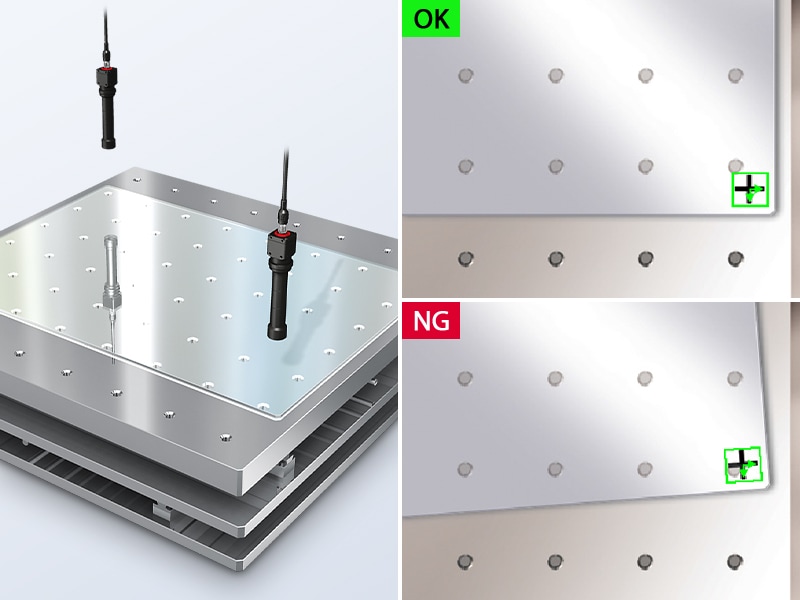
Vision-based position detection allows automation systems to locate and align parts without having to rely on fixed tooling or manual adjustments. As production lines become more automated and less dependent on operators, systems need a reliable way to locate and align parts before they move downstream. Position detection provides that reference point and allows machines to understand where a part is and whether it is ready for the next step in the production process.
In automated environments, position detection is not and should not be an isolated inspection task. It functions as an input that guides motion and alignment across the line. Vision-based position detection systems support this role by converting visual data into actionable data that automation equipment can use in real time.
Understanding the Role of Position Detection in Industrial Automation
In industrial automation, position detection connects what is seen with what needs to be done. Automated equipment depends on accurate positional data to determine how far to move and whether a part is in the correct position before manufacturing begins. Without this reference, even high-performing robotics and motion systems have issues operating consistently.
Vision-based position detection systems capture an image of parts or assemblies as they move through the production line and compare them to known references. The system identifies positional offsets and angular deviation to communicate that information to controllers or mechanical equipment. Corrections can then be applied immediately, keeping the process aligned without interrupting throughput. As manufacturing environments shift toward higher speeds and greater product variation, these automated position detection systems provide a stable method for handling these changes.
Pattern Search Mode Algorithm
What Is Pattern Search?
Pattern search finds one or more patterns that are similar to a reference image (pattern) in the entire image and output the located position, angle and match percentage (degree of coincidence).
The Pattern search mode of KEYENCE vision systems (VS, CV-X, XG-X Series) uses the following algorithm.
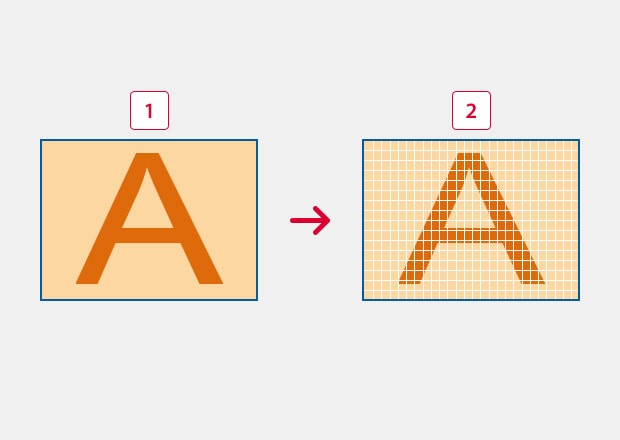
Process 1: Compress the pattern image and search image to reduce the amount of data.
Pattern matching (normalized correlation) involves an enormous amount of processing, and calculating all the information for an input image requires a tremendous amount of time. Consequently, limit the number of pixels used for the calculation to reduce the amount of data and save processing time. This process is called decimation or compression.
-
1Input image pattern window
-
2Decimated pattern window (illustration)
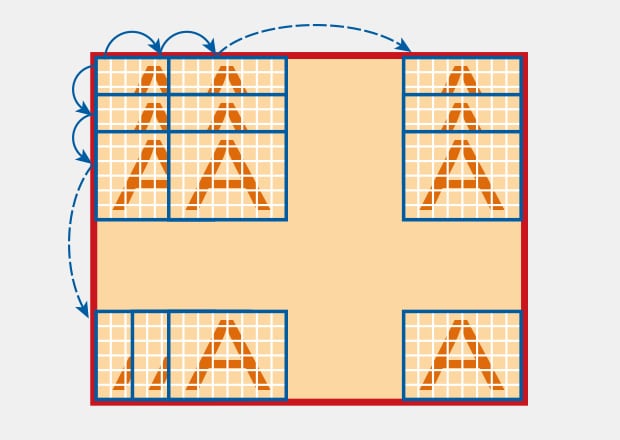
Process 2: First search
Move the window within the search area at a specific interval to find the position where the correlation value is the highest. This interval is called step width or skip. When rotation correction has been set, the window is rotated by the necessary angle to search for the position in the same way.
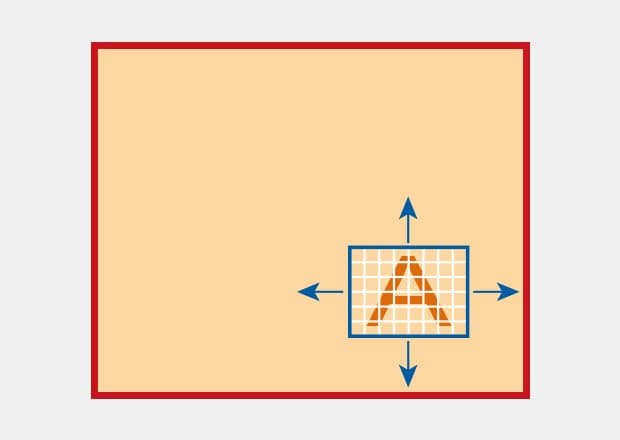
Process 3: Second search
Search a narrower area around the position found in the first search by using a pattern compressed at a lower ratio to find the position where the correlation value is the highest.
* Sometimes this process may be repeated using several lower compression ratios.
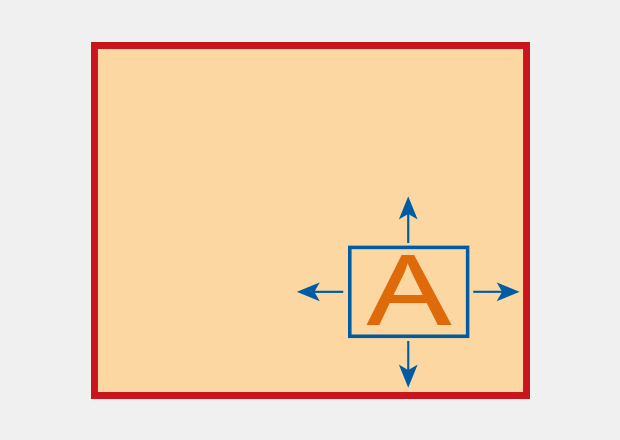
Process 4: Final detection
Search the area around the position found in Process 3 using a non-compressed pattern and then perform sub-pixel processing.
Typical Examples of Inspection Using Search Mode
Positioning of Glass Substrates
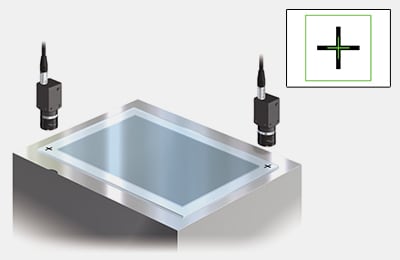
Before glass substrates are laminated, the positions of the markings at the diagonal points of the substrates are measured for alignment.
Inspection for Misaligned Labels on Bottles
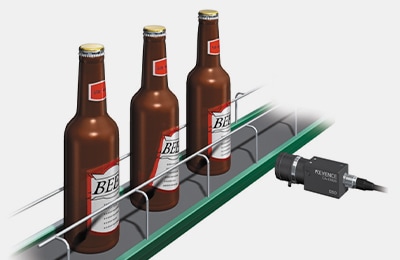
Misalignment of labels pasted on bottles is measured. Since 100% inspection is possible even on high-speed production lines, this prevents defective workpieces from being sent to the next process.
Checking IC Orientation
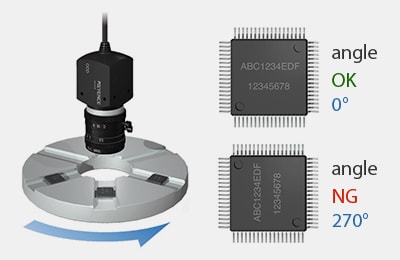
The orientations of ICs on an index table are determined based on the angle detected by the search for the marking on the ICs. This requires processing capability that can keep up with high-speed production lines.
Points to Prevent Search Failure
Cause of Search Failure
As explained in the algorithm section, the first search detects the approximate position by using a compressed image of the reference pattern for faster processing.

The major cause of search failure is that a pattern that should not be detected (candidate 2 in the figure below) is detected as a candidate in the first search when a compressed image is used.

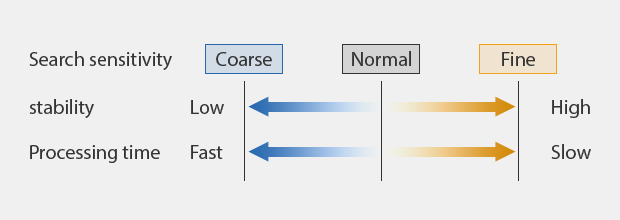
Search sensitivity
Points on Preventing Search Failure (Changing the Compression Ratio)
With the pattern search tool, you can set various search parameters (such as compression ratio), which previously required expert knowledge, by selecting a group of items predefined for each purpose. Compression ratio is defined through the setting item Search sensitivity. It can be set to seven levels from Low to High.
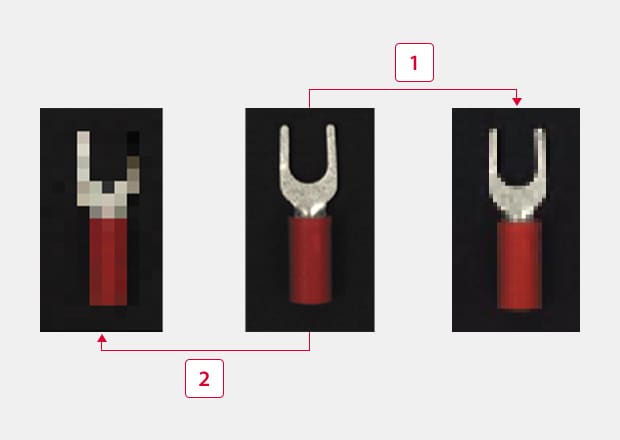
In the terminal example, the image looks like those on the right, depending on the search sensitivity (compression ratio). Using an image closer to the reference image for the first search prevents incorrect detection of a similar image.
-
1Search sensitivity High
-
2Search sensitivity Low
Points on Stabilizing Search (Improving Result Accuracy)
You can prevent most search failures by taking the measures described in Points on preventing search failure. Sometimes, one additional factor is required for search: Accuracy. You need to suppress variations in the values. In terms of the algorithm described above, accuracy is the level of precision that can be achieved in the final process. This section explains methods for improving the accuracy of final results.
What measures are effective in improving the accuracy of results?
- Increase the number of times the final process is repeated (fine search).
- Use the continuous capture function.
- Use the image enhance filters.
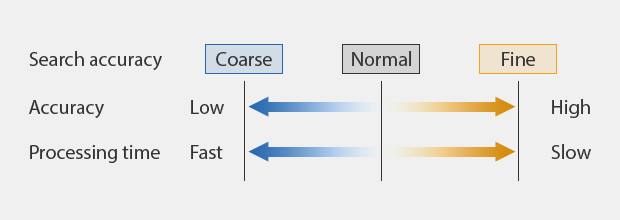
Search accuracy
(1) Increase the number of times the final process is repeated (fine search).
In addition to using search sensitivity to change the compression ratio, there is another parameter called search accuracy. This parameter sets the number of steps in the search, which can be set from Coarse to Fine (five levels).
If you want to obtain more accurate measurement results, set a finer Search accuracy to increase the number of times that the processes for the second and final searches are repeated. This can improve the accuracy of the final result.
(2) Use the continuous capture function.
The continuous capture function is a function that repeats an image capture and image processing several times for a single trigger input and measures the average, maximum and minimum values of the results. It can suppress variations in measured values compared to the values obtained with a single capture.
Next Generation Search: Geometry Search
In addition to the Pattern search that uses a normalized correlation method, there is the Geometry search that searches for targets based on profile information. The pattern search tool has ShapeTrax™3A for this purpose.
Since ShapeTrax™3A uses profile information, even when a part of the target is missing, it ensures accurate search based on the remaining shape information. This function can also address size fluctuations or black/white inversion of targets. Detection is stable regardless of the change in surface treatment conditions.
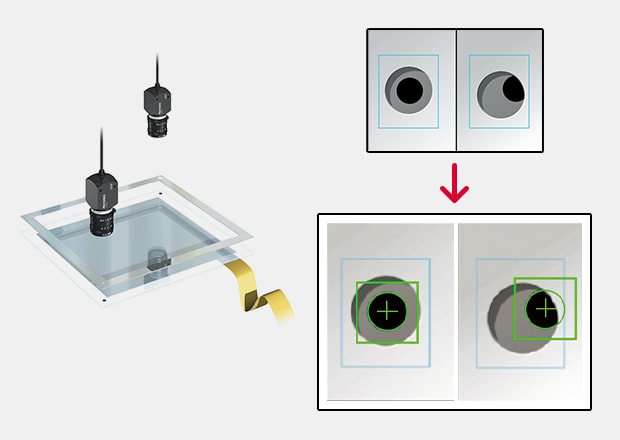
Positioning for Glass Substrates Lamination
Detection is stable even when the frame covers the mark, and the shape of the mark looks different.
Cases Where Detection Was Difficult With Conventional Pattern Search
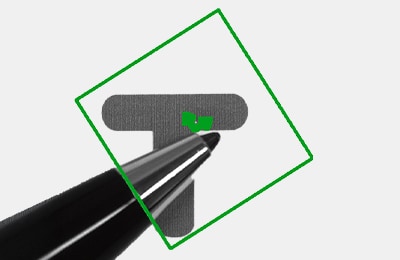
[Partially missing pattern (overlaid)]
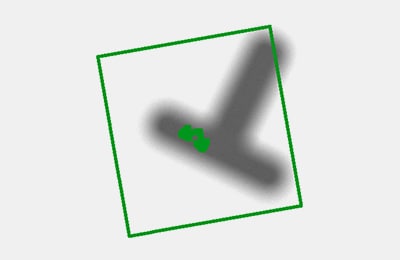
[Size/focus fluctuation]
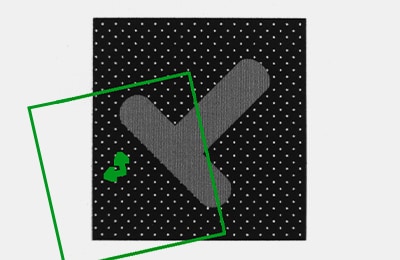
[Black/white inversion (negative image)]
Solved by ShapeTrax™3A
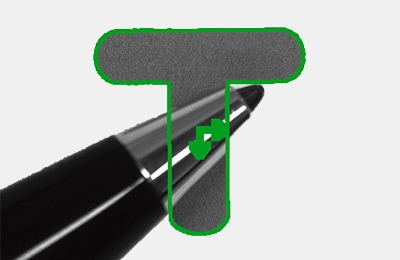
[Partially missing pattern (overlaid)]
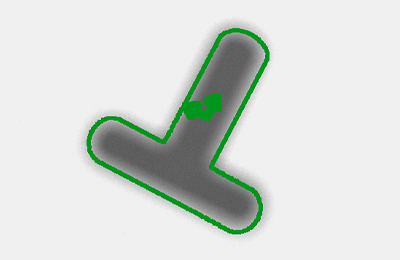
[Size/focus fluctuation]
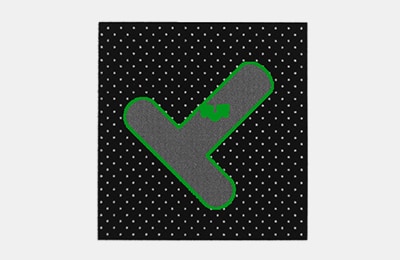
[Black/white inversion (negative image)]
Detection Using ShapeTrax™3A
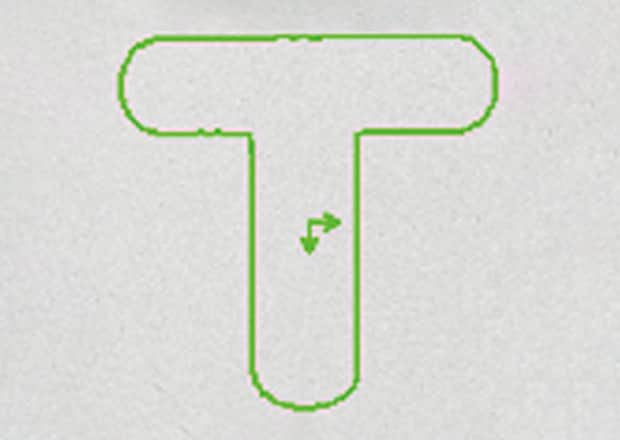
Edge information of the registered image
Search by using an extracted edge shape
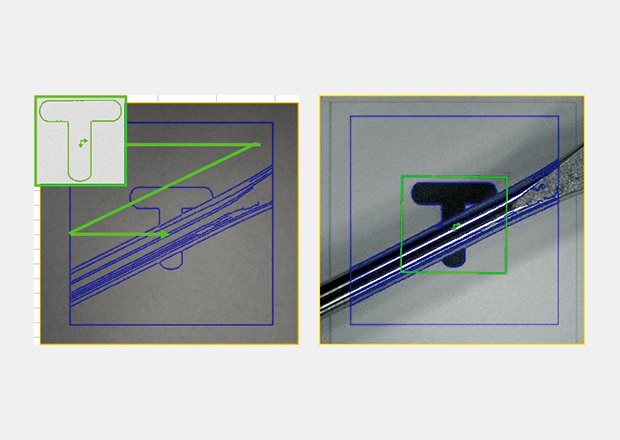
Search for a similar edge shape from the edges of the input image
Summary of Position Measurement (Search Mode)
Remember the following points to ensure stable search with machine vision.
- Knowledge of the search detection principle helps select the optimum mode and detailed settings.
- Changing the Search sensitivity is effective when the search deviates from the target.
- Changing the Search accuracy increases the accuracy of the final detection.
- Geometry search uses profile information according to the condition and shape of the target.
Advantages of Geometry Searching: A Next-Gen Solution for Precision Positioning
Traditional pattern-based detection relies on matching pixel data from a reference image to a captured image. While this is effective in testing and control scenarios, it can struggle when it comes to parts that vary slightly in appearance or when markings are partially obscured.
Geometry searches address these limitations by focusing on shape and edge information rather than on surface appearance. Even when the portions of the target are missing or visually altered (like surface finish, contrast inversion, or minor size difference), these vision systems can analyze structural features and detect geometry.
For precision position detection, this approach offers greater stability on real production lines where conditions are rarely consistent. Geometry searching creates consistent position measurements without having to constantly re-teach or adjust, making it a well-suited option for applications that demand repeatable uniformity while production lines run at speed.
How KEYENCE Position Detection Systems Overcome Common Detection Challenges
Position detection systems are expected to perform consistently, but in high-speed production, challenges come from factors like motion blur, background interference, and subtle visual differences between acceptable and unacceptable part positions.
KEYENCE systems that support position searches, like the VS, manage these conditions by allowing detection behavior to be tuned to the application rather than forcing a fixed inspection approach. Adjustable ‘search sensitivity’ controls how much image information is evaluated during initial detection, helping to limit false matches. Accuracy settings can also be fine-tuned for the final position calculations.
The VS Series also supports continuous capture methods that improve image stability when there is unexpected motion or vibrations present. The system evaluates multiple captures within the same event and can derive position data from the combined results.
Applications of Position Detection in Robotics and Assembly Lines
Position detection is widely used in robotics and assembly operations. This is especially true where parts must be aligned before they can be manipulated or joined. In robotic pick-and-place applications, vision systems locate parts on conveyors or fixtures and provide position and orientation data that guides robotic motion.
On assembly lines, precision position detection supports tasks like component joining, fastening, and bonding. Parts can be verified for alignment before any assembly begins, which helps reduce downstream errors and rework.
Across these applications and more, position detection links image-based recognition to motion control by supplying the necessary coordinate data used during part handling and alignment. Vision position systems help automation equipment operate consistently within defined tolerances, even as products and production demands change over time.
Improve your manufacturing precision with KEYENCE position detection systems. Get started today.

Related Products
Related Downloads
-
IMAGE PROCESSING USEFUL TIPS Compilation
This guide is a compilation of trivia pertaining to vision systems. Figures are used to provide easy-to-understand explanations of principles and characteristics for items ranging from lenses, image capturing, lighting, and color to communication and preprocessing. This guide is a must-read for anyone wanting to learn all about vision systems.