RPA (Robotic Process Automation)
What Is Robotic Process Automation (RPA)?
Key Takeaways
- RPA (Robotic Process Automation) automates repetitive, rules-based digital tasks using software “bots.”
- Best candidates: high volume, time consuming, predictable digital processes like invoice entry and reporting.
- Primary benefits: reduced manual work, faster processing, fewer data errors, and improved scalability.
- Modern RPA often uses no code/visual builders and integrates via existing UIs—start small for quick ROI.
- Deployment modes: attended (human triggered), unattended (background), and hybrid for exception handling.

You’ve probably heard the term “Robotic Process Automation” before — maybe in a vendor email, a LinkedIn post, or a conversation about automation and digital transformation.
And if your honest reaction was: “I’m not entirely sure what that actually means,” you’re not alone.
Despite the technical-sounding name, Robotic Process Automation (RPA) is actually a very practical business tool designed to solve a common problem:
People spending large amounts of time on repetitive computer work.
To understand why that matters, consider what that repetitive work looks like on a typical workday. Every day, employees manually:
- Copy information between systems
- Update spreadsheets
- Process invoices
- Move files
- Generate reports
- Send recurring emails
- Enter the same data multiple times
These tasks may not be difficult, but they consume time, create bottlenecks, and increase the risk of human error.
RPA is designed to automate that work.
And unlike many enterprise technologies, modern RPA platforms often do not require advanced coding skills or major infrastructure changes to get started.
What Is RPA? (Simple Definition)
Robotic Process Automation (RPA) is software technology that automates repetitive, rules-based digital tasks.
RPA uses software “bots” that mimic the actions a person performs on a computer. In practical terms, that means a bot can handle a wide range of routine digital work, including:
- Open applications
- Log into systems
- Copy and paste information
- Enter data into forms
- Move files
- Generate reports
- Send notifications
- Transfer data between systems
The term “robotic” refers to software — not physical robots.
There are no machines moving around a warehouse or assembly line. The automation happens entirely within your existing digital systems.
A simple way to think about RPA is this:
If a person can complete a task on a computer by following the same series of steps every time, there is a good chance RPA can automate it.
The Problem RPA Was Built to Solve
Most businesses have repetitive digital workflows hidden throughout their operations, and they often don’t realize how much time those workflows consume until they start looking.
Examples include:
- Manually entering invoice data into accounting systems
- Downloading and formatting recurring reports
- Updating customer records across multiple platforms
- Checking shipment statuses across vendor portals
- Transferring quality inspection data into spreadsheets
- Processing employee onboarding paperwork
Individually, these tasks may only take a few minutes.
But across teams, departments, and months of work, the time lost becomes significant.
RPA helps organizations reduce this manual workload by automating repetitive processes that follow predictable rules.
Examples of RPA in Everyday Business Operations
Many companies already perform tasks that are ideal candidates for automation — even if they have never used the term “RPA.”
| Manual Process | With RPA |
|---|---|
|
Manual Process
Employees manually enter invoice data
|
With RPA
Invoice information transfers automatically
|
|
Manual Process
Staff generate recurring reports manually
|
With RPA
Reports are created and distributed automatically
|
|
Manual Process
Teams move data between ERP and CRM systems
|
With RPA
Systems synchronize data automatically
|
|
Manual Process
Employees download and organize email attachments
|
With RPA
Files process automatically
|
|
Manual Process
Customer records are updated manually
|
With RPA
Customer information updates automatically
|
These workflows aren’t unique to one type of business. They’re common across a broad range of industries and functions, including:
- Finance
- Manufacturing
- Operations
- Logistics
- HR
- Customer service
- Quality management
How Does RPA Work?
RPA software follows predefined workflows and business rules.
A bot is configured to perform a sequence of digital actions automatically.
For example:
- Customer order received
- RPA bot extracts order information
- Data is entered into ERP software
- Inventory records update automatically
- Confirmation email is sent
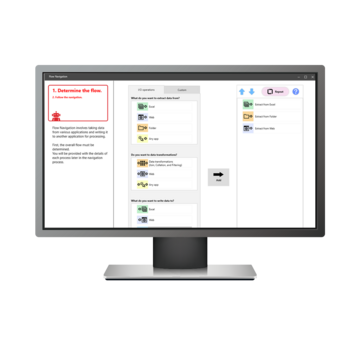
Modern RPA platforms often use visual, no-code interfaces that allow businesses to build workflows without extensive programming knowledge.
Because RPA works through the user interface of existing software, businesses can often automate workflows without replacing current systems.
This allows RPA to work across a wide range of tools organizations already rely on, including:
- ERP systems
- CRM platforms
- Accounting software
- MES systems
- QMS platforms
- Spreadsheets
- Web portals
- Legacy software
Signs Your Business May Benefit From RPA
Many organizations do not realize how much time is consumed by repetitive digital work until they begin evaluating workflows more closely.
Your business may benefit from RPA if:
- Employees repeatedly copy information between systems
- Teams spend hours updating spreadsheets
- Repetitive administrative work slows operations
- Manual processes create bottlenecks
- Employees perform the same digital tasks daily
- Data entry errors create downstream issues
- Reports take too long to generate manually
If a process is repetitive, predictable, and digitally driven, it may be a strong candidate for automation.
Benefits of Robotic Process Automation
Businesses adopt RPA because it improves efficiency while reducing repetitive manual work. Here’s what it looks like in practice.
Reduced Administrative Work
Employees spend less time on repetitive tasks and more time on work that requires communication, analysis, and decision-making.
Faster Processing
Tasks that once required hours of manual effort can often be completed in minutes.
Examples include:
- Invoice processing
- Report generation
- Shipment tracking updates
- Inventory synchronization
Fewer Human Errors
Manual data entry and repetitive workflows often create avoidable mistakes.
RPA follows predefined rules consistently, helping reduce errors and improve operational accuracy.
Better Scalability
As workloads increase, businesses can expand automation without proportionally increasing administrative labor.
Improved Operational Consistency
Bots follow the same workflow every time, helping standardize processes across departments and locations.
Works With Existing Systems
Many RPA tools integrate with existing software without requiring expensive infrastructure replacement projects.
This is especially valuable for organizations working with older or disconnected systems.
RPA vs AI: What’s the Difference?
Robotic Process Automation and Artificial Intelligence are often discussed together, but they are different technologies.
| RPA | AI |
|---|---|
|
RPA
Follows predefined rules
|
AI
Learns patterns from data
|
|
RPA
Automates repetitive tasks
|
AI
Makes predictions or decisions
|
|
RPA
Best for structured workflows
|
AI
Best for variable situations
|
|
RPA
Process-driven
|
AI
Data-driven
|
Example of RPA
- Generating recurring reports
- Transferring invoice data
- Routing files between systems
Example of AI
- Fraud detection
- Image recognition
- Natural language understanding
Many organizations combine AI and RPA together.
For example:
- AI extracts information from documents
- RPA transfers the data into business systems automatically
This combination is often called intelligent automation.
Types of RPA: Attended vs Unattended Automation
Different forms of RPA support different operational needs.
Attended Automation
Attended bots work alongside employees and are triggered by user actions.
Examples include:
- Customer service representatives retrieving order information
- HR teams processing onboarding workflows
- Operations staff generating reports
Attended automation is useful when workflows still require human review or approvals.
Unattended Automation
Unattended bots operate independently in the background without direct human involvement.
Examples include:
- Overnight reporting
- Scheduled invoice processing
- ERP reconciliations
- Inventory synchronization
These automations often run continuously and support high-volume administrative work.
Hybrid Automation
Hybrid automation combines attended and unattended workflows together.
For example:
- An unattended bot prepares shipping data overnight
- An attended bot assists staff when exceptions require review
Hybrid approaches are common in larger operational environments.
What Processes Are Best for RPA?
RPA is most effective for processes that are:
- Repetitive
- Rules-based
- High volume
- Digitally driven
- Time-consuming
- Prone to human error
Common automation candidates include:
- Invoice processing
- Order entry
- Payroll administration
- Employee onboarding
- Reporting workflows
- Inventory updates
- Customer data management
- Document routing
Processes requiring creativity, judgment, or highly variable decision-making are generally less suitable for traditional RPA alone.
Common RPA Use Cases by Department
RPA applies across virtually every department. While the specific tasks vary by function, the underlying pattern is consistent: repetitive digital work that follows predictable rules. Here are some of the most common examples by department.
Finance and Accounting
Finance teams deal with some of the highest volumes of rule-based digital work in any organization. Common automation targets include:
- Invoice processing
- Accounts payable
- Reconciliation workflows
- Expense reporting
Explore more:
KEYENCE RK in Finance and Accounting
Human Resources
HR departments manage a significant amount of administrative work tied to the employee lifecycle. Automation is commonly applied to:
- Onboarding workflows
- Payroll updates
- Benefits administration
- Employee record management
Explore more:
KEYENCE RK in Human Resources
Operations and Supply Chain
Operations and supply chain teams regularly coordinate data across multiple systems and platforms. Frequently automated tasks include:
- Shipment tracking
- Inventory synchronization
- ERP updates
- Order processing workflows
Explore more:
KEYENCE RK in Operations
Customer Service
Customer service teams often spend a significant portion of their time on administrative work that sits alongside their core responsibilities. Common automation applications include:
- Ticket routing
- Customer record updates
- Order status notifications
- Return processing
Manufacturing and Quality Operations
Manufacturers often use RPA to connect operational data with enterprise systems. This is particularly valuable in quality and compliance workflows, where both accuracy and speed matter.
Common examples include:
- Transferring inspection results into QMS software
- Generating quality documentation
- Updating production records
- Automating traceability workflows
- Synchronizing MES and ERP systems
This helps reduce manual transcription while improving reporting speed and accuracy.
Explore more:
KEYENCE RK in Manufacturing
How RPA Fits Into Industrial Automation
Many manufacturers already automate physical production processes using:
- Sensors
- Machine vision systems
- Barcode readers
- PLCs
- Inspection systems
However, many administrative workflows surrounding operational data remain manual.
RPA helps bridge the gap between:
- Shop-floor systems
- Enterprise software
- Reporting workflows
- Quality management systems
This allows organizations to automate the flow of operational information throughout the business.
Example: Automating Workflows With KEYENCE Systems
KEYENCE systems generate valuable operational and quality data that often requires manual handling.
RPA can automate how that information moves through business systems.
Examples include:
- Automatically transferring inspection results into QMS platforms
- Updating ERP systems using barcode scan data
- Generating certificates and quality reports
- Synchronizing measurement data across systems
- Automating traceability documentation
This reduces repetitive administrative work while improving speed, consistency, and data accuracy.
Who Is RPA For?
RPA isn’t limited to large enterprises or technology companies. Modern no-code automation platforms have significantly lowered the barrier to entry, making RPA a practical option for a wide range of organizations, including:
- Small and mid-sized businesses
- Operations teams
- Finance departments
- HR professionals
- Customer service teams
- Manufacturers
- Organizations with legacy systems
- Businesses without large IT departments
If employees repeatedly perform the same digital tasks every day, there is likely an automation opportunity.
How Businesses Get Started With RPA
Most successful RPA initiatives begin with a single workflow.
A common implementation approach includes:
- 1. Identify repetitive processes
- 2. Document the workflow steps
- 3. Select a high-impact automation opportunity
- 4. Build and test the automation
- 5. Deploy gradually
- 6. Expand automation over time
Organizations often achieve the fastest ROI by starting with repetitive administrative processes that consume significant employee time.
The Bottom Line
Robotic Process Automation is fundamentally about reducing the time people spend on repetitive digital work.
Whether in finance, manufacturing, logistics, HR, or operations, many organizations still rely heavily on manual administrative processes that consume valuable employee time.
RPA provides a practical way to automate those workflows using software bots that work across existing systems and applications.
And unlike many large-scale technology projects, businesses can often start small, demonstrate measurable value quickly, and expand automation over time.
If your organization is spending hours on repetitive digital tasks every week, RPA may be one of the most practical automation opportunities available.
Ready to Explore Automation Opportunities?
Explore how KEYENCE helps businesses automate repetitive workflows using no-code RPA software and workflow automation tools.
Explore KEYENCE RPA Software
Frequently Asked Questions About RPA
What Does RPA Stand for?
RPA stands for Robotic Process Automation.
Is RPA Difficult to Implement?
Modern no-code RPA platforms simplify implementation and allow businesses to start with smaller workflows before scaling automation initiatives.
Does RPA Require Coding?
Many modern RPA tools provide no-code or low-code workflow builders designed for non-technical users.
Is RPA the Same As AI?
No. RPA automates predefined workflows, while AI analyzes data and makes predictions or decisions.
What Types of Businesses Use RPA?
Businesses across manufacturing, healthcare, logistics, finance, retail, customer service, and operations use RPA to improve efficiency and reduce manual work.
Can RPA Work With Legacy Systems?
Yes. Because RPA interacts with software through the user interface, it can often work with older systems that do not support modern integrations.
What Are the Biggest Benefits of RPA?
The most common benefits include:
- Reduced manual work
- Faster workflows
- Fewer data entry errors
- Improved operational consistency
- Better scalability