Buyer's guide: how to choose an AI inspection system for QC
The right AI inspection system is the one that matches the defects, line speed, and support needs of a specific production line. It is not the one with the longest feature list. A sound choice follows a set order: define what must be caught, size the system to the line, pick the hardware format, confirm the optics and lighting, test with real parts, and compare long-term ownership.
This guide walks through that order in plain terms for quality control (QC) teams, and explains where a smart camera such as the KEYENCE VS Series fits compared with a controller-based system such as the VS-G Series.
Key Takeaways
- An AI inspection system uses software trained on example images to decide pass or fail. It is most useful where defects vary in appearance and are hard to describe with fixed rules.
- The selection starts with a defect catalog, not a product comparison. Photos and physical samples of good, bad, and borderline parts keep every vendor conversation specific.
- Line speed and camera count decide the hardware format. A VS Series smart camera suits stand-alone stations, while the VS-G Series suits high-speed lines, multiple cameras, and long-term image storage.
- Demos should run on real production parts. Results on clean sample parts rarely predict results on the floor.
- Total cost of ownership includes setup, integration, training, and ongoing tuning, not only the hardware. Systems that are quick to set up and easy to maintain keep that total lower.
What Is an AI Inspection System?
An AI inspection system is a machine vision system that learns what good and bad parts look like from example images. Instead of a person writing a rule for every possible flaw, the software compares each new image with what it has learned and returns a result.
Most modern systems combine two approaches. Rule-based tools measure, count, locate, and read codes with defined settings, and they work well when a feature can be described with clear numbers. AI tools handle variation, such as textured surfaces, molded parts, or defects that look different every time. The VS Series, for example, runs AI tools and rule-based tools on the same image, so a single station can use whichever fits each check.
Step 1: Define What the System Must Catch
Defect types behave differently under inspection. Scratches, dents, missing features, color shifts, and dimensional errors all need different imaging and different tools, and not every system handles all of them equally well.
A defect catalog is the most useful document in the selection process. It should include photos and physical samples of good parts, rejects, and borderline cases, along with a written standard that separates acceptable from rejectable product. It should also list the smallest defect that matters, since that size drives the camera and lens choice later.
The catalog also shows where AI is needed. Defects that can be measured, such as a gap or a position, usually suit rule-based tools. Defects that vary, such as cosmetic marks on a textured surface, are where AI tools tend to pay off. Many lines need both.
Step 2: Match the System to Line Speed and Volume
Line speed sets how much time the system has to capture an image, process it, and send a result. If processing takes longer than the gap between parts, the inspection station becomes a bottleneck.
Three numbers help size the system: the maximum parts per minute, the number of images needed per part, and the number of inspection points on the line. A part that needs several views or several stations needs more cameras and more processing. Planning should also look three to five years ahead, since a system sized only for today's volume may need early replacement.
Step 3: Choose the Hardware Format
AI inspection hardware generally comes in two formats, and the choice depends on scale and speed.
Smart camera
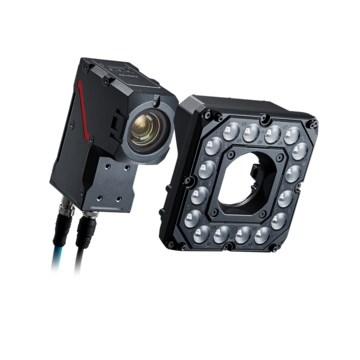
A smart camera combines the sensor, lens, lighting control, and processor in one unit. This reduces wiring and setup time and suits stand-alone stations. The KEYENCE VS Series is an example. It includes ZoomTrax, an optical zoom that manages 19 lenses inside an IP67 housing, so the field of view is set in software and one camera model can cover many applications.
Controller-based system
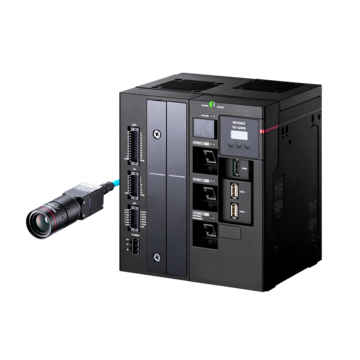
A controller-based system connects one or more cameras to a separate processing unit. This suits high-speed, heavy-duty inspections, multi-camera lines, and plants that want one platform across many stations. The KEYENCE VS-G Series pairs a controller with a 32-core processor and built-in AI engine, supports up to eight cameras on one controller, and offers a lineup of more than 30 area camera types.
Neither format is better in every case. The decision comes down to speed, camera count, and how much traceability the line needs.
Step 4: Check Optics, Resolution, and Lighting
The best AI tool cannot find a defect that the image does not show. Three factors decide what the camera captures.
Field of view and working distance
Field of view is the area the camera sees, and working distance is the space between the lens and the part. Together with the sensor, they set how many pixels land on the smallest defect. A defect should cover several pixels to be found reliably, and AI tools generally benefit from more pixels around a defect than simple rule-based tools do. For terms like these, see the machine vision glossary.
Resolution
Higher resolution helps with small defects or large fields of view, but it also increases processing load. The right resolution matches the smallest defect that matters, not the highest number available.
Lighting
Lighting controls contrast, and contrast decides how reliably any tool can see a defect. Backlighting suits silhouettes and dimensional checks. Low-angle lighting makes scratches and dents stand out. Diffuse lighting reduces glare on shiny flat parts, and dome lighting evens out curved surfaces. Lighting should be chosen at the design stage, because correcting it later usually means rework.
Step 5: Test With Real Production Parts
A system that performs well in a controlled demo may not hold up on the floor. Tests should use actual production parts, including real rejects and borderline cases, under the lighting and part presentation the line will have.
Three results matter most. The first is the false reject rate, where good parts fail. The second is the escape rate, where bad parts pass. The third is repeatability, meaning the same part gives the same answer each time. A false reject rate that is too high erodes operator trust, and a system that operators routinely override adds little value.
Training effort is another differentiator. Some AI systems need only a few dozen example images to learn, which keeps setup short. Teams should also ask how a new product or defect is added later, since that task repeats throughout the life of the system.
Many teams also run a new system in shadow mode first. It inspects parts alongside the existing process without acting on its results, which builds a validation record before the system goes live.
Step 6: Evaluate Ease of Use and Long-Term Support
The first inspection is the easy part. Products change, materials vary, and lighting drifts, so the system needs regular adjustment. Systems that depend on a specialist for every change create a long-term bottleneck.
Several capabilities reduce that dependence. Auto parameter tuning derives settings from selected example images instead of manual trial and error. Stored images let teams review the exact conditions of a failure after it happens. Settings verification replays stored images against a proposed change before it goes live, so the effect on earlier results is known in advance. The VS-G Series includes all three, with built-in image storage in the controller. The same functions are covered in more detail in the machine vision troubleshooting guide.
Support also matters. Buyers should confirm what training is offered, how software updates are delivered, and how quickly help is available when a line is down. KEYENCE supports customers from selection through line operation, including on-site operating instructions and after-sales support.
Step 7: Build the Total Cost of Ownership Case
The purchase price is only one part of the financial picture. A complete case covers the vision hardware, lighting and mounting, software, integration with PLCs and rejection mechanisms, training, validation time, and ongoing maintenance and retuning.
The benefits side usually comes from fewer escaped defects, fewer false rejects, less scrap and rework, and less manual inspection labor. Measuring a baseline before the project makes these benefits much easier to prove. The guide to AI inspection ROI and payback period shows how to build that case step by step.
Which Option Fits Which Situation
The choice follows the needs of the line:
- Single station, moderate speed, mixed part types: a smart camera with built-in lensing and AI tools, such as the VS Series, keeps setup and wiring simple.
- Several cameras or inspection points on one line: a controller-based system lets one unit run multiple cameras, as the VS-G Series does with up to eight.
- High-speed or heavy AI processing: a controller with a dedicated multi-core AI engine keeps processing time inside the cycle.
- Strong traceability or audit needs: built-in image storage that keeps every image, including good parts, supports review and root-cause work.
- Many similar lines in one plant: a single platform across lines allows settings and training to be reused.
Whichever option is chosen, the same rule applies. The system should be tested on real parts before the decision is final. KEYENCE offers demo and test options for this purpose, and other machine vision systems are available for applications that fall outside these two.
Frequently Asked Questions
Q What should be defined before choosing an AI inspection system?
A
The defects to catch, the smallest defect size that matters, the line speed, the number of inspection points, and the equipment the system must connect to. A defect catalog with photos and physical samples is the most useful starting document.
Q When is AI better than rule-based inspection?
A
AI is better when defects or parts vary in appearance, such as textured surfaces or cosmetic flaws, and are hard to describe with measurements. Rule-based tools are often enough for presence, position, measurement, and code-reading checks. Many systems offer both.
Q What is the difference between a smart camera and a controller-based vision system?
A
A smart camera combines the sensor, lens, lighting, and processor in one unit, which suits stand-alone stations. A controller-based system connects one or more cameras to a separate processor, which suits high-speed lines, multiple cameras, and large-scale standardization.
Q How many images does an AI inspection system need for training?
A
It depends on the tool and the application. Some systems learn from a few dozen images, but a varied, well-labeled set that includes borderline cases usually matters more than a large one.
Q How should an AI inspection system be tested before buying?
A
By running it on real production parts, including actual rejects and borderline cases, under real lighting and part presentation. The test should measure false rejects, escapes, and repeatability, and many teams add a shadow-mode period before going live.
Q What costs should be included when comparing systems?
A
Hardware, lighting and mounting, software, integration, training, validation, and ongoing maintenance and retuning. Integration and tuning effort are the categories most often underestimated.