Hands-Free Scanning at the Picking Station: Fixed-Mount Code Readers Instead of Handheld Scanners
At a picking and packing station, every hand movement counts. With a handheld scanner, each pick interrupts the workflow: put the item down, pick up the scanner, scan, put the scanner down, and move the item on. At high pick rates, those handling losses add up to real cycle time. A fixed-mount code reader is an alternative. The item is moved past the reader, so both hands stay on the item. This article shows how hands-free scanning works at a workstation, what matters for ergonomics and code selection, and when fixed readers can be combined with handheld devices.
Interest in hands-free scanning is growing, driven by rising performance pressure in picking and packing, especially in e-commerce fulfillment, where high volumes meet small order sizes. Once every item or carton has to be scanned, the scanning method itself becomes the bottleneck. A fixed reader moves scanning out of a deliberate, interrupting action and into the existing material flow, which cuts the interruptions.
Key Takeaways
- A handheld scanner forces a grip change on every item: put down, pick up, scan, put down again. At high pick rates, those handling losses add up.
- With hands-free scanning, the item is moved past a fixed-mount reader that reads continuously and suppresses duplicates, so both hands stay on the item.
- For picking stations, SR-5000 Series models designed for this use cut glare significantly and make it more comfortable to work directly in front of the reader.
- A shipping label can carry up to ten codes, so only the one you want should be booked. Filtering by code type and prefix, or using an approved list, keeps out stray and outer-packaging codes.
- Fixed readers cover the high-frequency, fixed-position stations, and handheld devices cover mobile tasks, with both connected to the WMS through a common interface.
The Pick-Up, Put-Down Problem With Handheld Scanners
A handheld scanner is flexible, but at a fixed workstation it is often inefficient:
- Every scan forces a grip change. Put the item down, grab the scanner, scan, put the scanner down. That sequence repeats for every single item.
- Handling losses add up. At high pick rates, a few seconds per grip change quickly turns into minutes per hour for each worker. That is where the room for improvement is.
- Ring scanners are only a partial fix. Ring scanners worn on the finger are an alternative, but they bring their own tradeoffs in ergonomics, battery life, and device management. For a fixed-position, high-frequency process, a fixed-mount reader is often the more robust choice.
There is also a quality issue. When a worker has to look for the scanner, grab it, and aim it, mistakes happen under time pressure: a skipped scan, an item scanned twice, a missed code. At a fixed workstation with the same routine every time, every movement is the same. That repeatability is the real lever. It lowers not only cycle time but also the gap between good shifts and bad ones.
Hands-Free Scanning in Presentation Mode
With hands-free scanning, the item is moved past a fixed-mounted reader instead of bringing the scanner to the item. The reader reads continuously, and the worker keeps both hands on the item. Two product lines are relevant for this mode at a manual workstation:
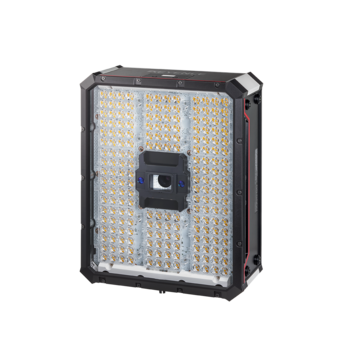
- SR-5000 Series models designed for picking stations. For fixed use at a workstation, there are SR-5000 Series models built for picking stations. Models with continuously lit LEDs reduce glare by changing the lighting frequency, and models with far-red LEDs use light the eye barely notices. That makes reading directly in front of the reader more comfortable.
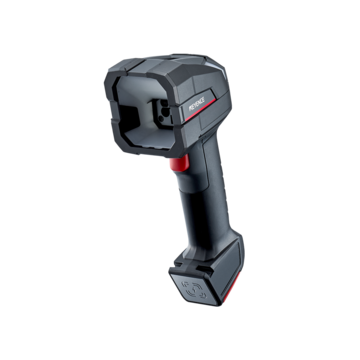
- The HR-X Series at the picking station. The AI-enhanced HR-X handheld code reader can be installed in a fixed position using the available stands. Its built-in time-of-flight sensor starts a read automatically when an object enters the field of view.
In practice, continuous reading without double bookings and a restriction to approved codes are common requirements at a workstation like this. The specific setup, such as continuous read mode, duplicate suppression, and read confirmation, is device-specific and should be configured and verified in a pretest.
Immediate read confirmation for the worker is more than a convenience. It closes the feedback loop that a handheld scanner normally covers with its display or a beep. The worker needs to see or hear that the item was captured reliably, without looking at a separate device, before putting it down. A clear visible or audible signal at the reading station does this without taking the worker's eyes off the item.
Not every picking station needs the same mode. At a plain packing station where a single shipping label is confirmed, simple presentation mode is often enough. At a kitting or sorting station where many small items are scanned one after another, duplicate suppression and code selection matter more, and the right setup decides whether the station really runs smoothly.
Ergonomics: Mounting Height, Glare, and Operator Comfort
A fixed reader will only be accepted if it fits into the worker's natural movement. Ergonomics decides whether it actually gets used:
- Mounting height. Mounting below eye level helps avoid glare from the lighting LEDs, which is a general ergonomic guideline. Where direct glare is still an issue, the SR-5000 Series models designed for picking stations are the right choice.
- Position in the movement. The reader should sit where the item is already being moved, not as an extra station but as part of the grip.
- Worker acceptance. Whether the solution saves cycle time only shows in operation. Ask workers for their feedback during the pilot and adjust height and angle. That is a success criterion, not a detail.
Only the Right Code Counts
A shipping label often carries many codes, up to ten different ones on a single label in some cases. At a hands-free workstation, only the intended code may be booked. Otherwise, neighboring codes or outer-packaging codes cause mis-bookings:
- Filtering by code type and prefix. Restricting the reader to certain symbologies or a defined content prefix means only the relevant code is processed.
- Matching against approved content. Alternatively, processing can be limited to predefined, approved code content, so everything else is ignored. Filtering is a common code reader function, and the exact configuration is device-specific.
- Excluding stray codes systematically. The goal is to rule out mis-bookings from the codes on neighboring items or old outer packaging before they ever reach the WMS.
Every Single Carton: Automating Manual Bulk Scanning
A common starting point in practice sounds like this: "Every single carton has to be scanned, and it's a hassle." This kind of high-frequency, fixed-position manual work is an ideal candidate for a fixed reader:
- A reading station instead of scanning by hand. Instead of picking up each carton and scanning it with a handheld scanner, you move it through the field of view of the fixed reader.
- Combining steps at the same workstation. The reading station can be paired with a scale, a volume measurement, or photo documentation, so identification and other data capture happen in a single motion. Pairing a code reader with a measurement system is a common modular setup.
This turns a tedious one-by-one scan into a smooth process step that lowers cycle time and reduces mis-bookings.
When to Combine Fixed Readers With Handheld and Wearable Devices
Fixed and mobile are not either/or. They cover different parts of the process:
- Fixed for high-frequency, fixed-position processes. At a packing or picking station where the same motion repeats, the fixed-mount reader plays to its strengths.
- Handheld for flexible and mobile tasks. For shelf picking, receiving, or loading, the handheld device remains the right choice. For more on this, see KEYENCE's guide to choosing the right mobile computer for your warehouse.
- A common data interface. What matters is that both device types book into the WMS through a consistent interface, so there are no data breaks.
- A decision matrix. Pick rate, location, item range, and the need for two-handed operation decide where fixed or mobile is the better fit.
In many warehouses, the answer isn't either/or but a targeted split: fixed reading stations at the few high-frequency fixed points in the flow of goods, and mobile computers for everything that stays in motion. Start the changeover at the workstation with the most scans, where the effect is largest and quickest to measure. What you learn at this pilot station lets you set the mounting height, filter logic, and feedback so that further workstations can be equipped to a proven standard. For more on matching scanner type to workflow, see KEYENCE's complete guide to barcode scanner integration, and for a look at what drives scanning speed on the dock, see what really drives warehouse scanning throughput.
Conclusion
At a high-frequency, fixed-position picking and packing station, switching from a handheld scanner to a fixed-mount code reader pays off. Both hands stay on the item, and the handling losses from picking up and putting down disappear. SR-5000 Series models and the HR-X Series with a stand and time-of-flight auto-trigger are suited to these stations. What matters is ergonomic mounting, reliable code filtering so only the right code is captured, and a clear split between fixed and mobile devices based on pick rate and location.
Frequently Asked Questions
Q Which code reader is best for hands-free scanning at a picking station?
A
For a fixed picking station, the SR-5000 Series models designed for this use are a good fit, since they cut glare significantly. The HR-X Series models can also be installed in a fixed position with a stand and a time-of-flight auto-trigger. The item is moved past the fixed reader, so both hands stay on the item and the repeated pick-up and put-down goes away.
Q Why is a fixed reader at a packing table faster than a handheld scanner?
A
A handheld scanner forces a grip change on every item: put the item down, grab the scanner, scan, put the scanner down. At high pick rates, those handling losses add up. With a fixed-mount reader, the grip change goes away, because the item is simply moved through the field of view.
Q How do I keep the wrong code from being booked?
A
A shipping label can carry several codes, sometimes up to ten on one label. By filtering by code type or content prefix, or by matching against a list of approved codes, only the intended code is processed. That reliably rules out mis-bookings from neighboring or outer-packaging codes.
Q Do the lighting LEDs bother the worker?
A
Glare can be avoided. Mounting the reader below eye level reduces it in general. In addition, the SR-5000 Series models designed for picking stations are built to cut glare significantly and make it comfortable to work directly in front of the reader.
Q Does a fixed reader replace handheld devices in the warehouse?
A
No, the two complement each other. Fixed readers are ideal for high-frequency, fixed-position processes at a packing or picking station. Handheld devices remain the right choice for flexible and mobile tasks such as shelf picking, receiving, and loading. A common data interface to the WMS keeps the bookings consistent.