
Machine Vision
Optical Character Reading (OCR) and 1D/2D Code Verification
Vision-based character and code reading drives reliable data capture at line speed. This page covers how OCR inspection, 1D barcode reading, 2D code reading, and combined tools support product traceability across manufacturing and logistics.
Character Inspection/OCR
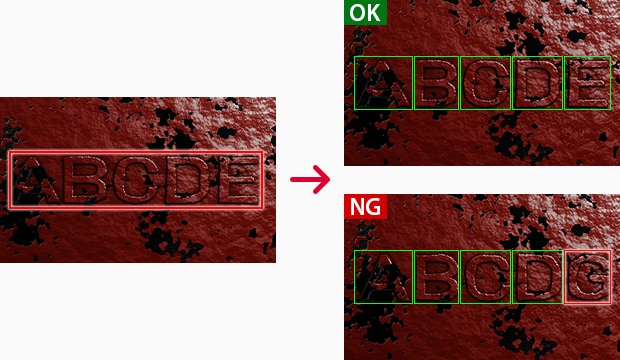
Simply specify the inspection area.
Character inspection is used to check, recognize or determine characters printed on parts or products. The technology is also called print inspection and is used in various tasks, such as:
- Reading QR codes (2D codes) stamped on metal parts
- Character inspection of part numbers or model numbers
- Checking expiration dates on food containers
Parts and products are marked with expiration dates or product numbers. However, this is not useful when this information cannot be read, recognized, judged, stored, and managed accurately. Character inspection has become widespread in recent years for recognition or judgment based on characters extracted from captured image data. This page describes basic information about OCR (Optical Character Recognition) and OCV (Optical Character Verification) and the basic principle of character inspection.
Basic Principle of Character Inspection/OCR for Reading Characters Such as Expiration Dates From Images
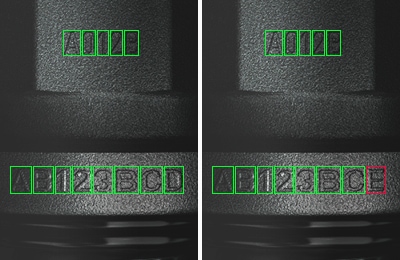
Marking inspection (OCR) on casted and forged products
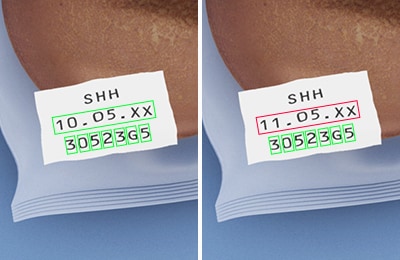
OCR inspection of printed text on product packages
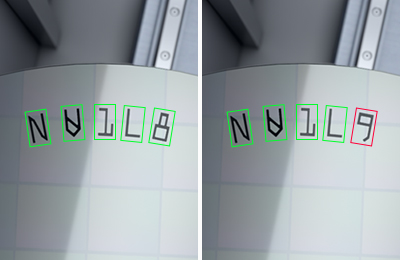
OCR inspection of marking on wafers
Advantages of Introducing Image Processing
Character strings are indispensable for showing information such as expiration dates for food/medicine and part numbers of assembly parts in manufacturing. They are also essential for sales order management. These strings are vitally important for management; however, management of characters can be a lot of trouble.
For example, assume that you manage orders and inventory on paper in handwriting. Management through handwriting may cause mistakes or omissions. If the book is lost, there might be no way to retrieve the orders and inventory.
In addition to preventing human errors, image processing is increasingly used to make management more reliable and reduce labor and costs. Replacing the recognition, checking and management of characters performed by human hands with an image processing system brings the following advantages:
Preventing mistakes and omissions in books
In character inspection, the captured characters are compared with those in the registered dictionary (character font groups), and each is recognized as the character with the closest shape. The recognized characters are compared with the judgment string, and the pass/fail output of the final inspection is produced. It is also possible to store the output judgment result on a server or other storage device. This type of reliable procedure prevents mistakes and omissions that may occur with management through handwriting.
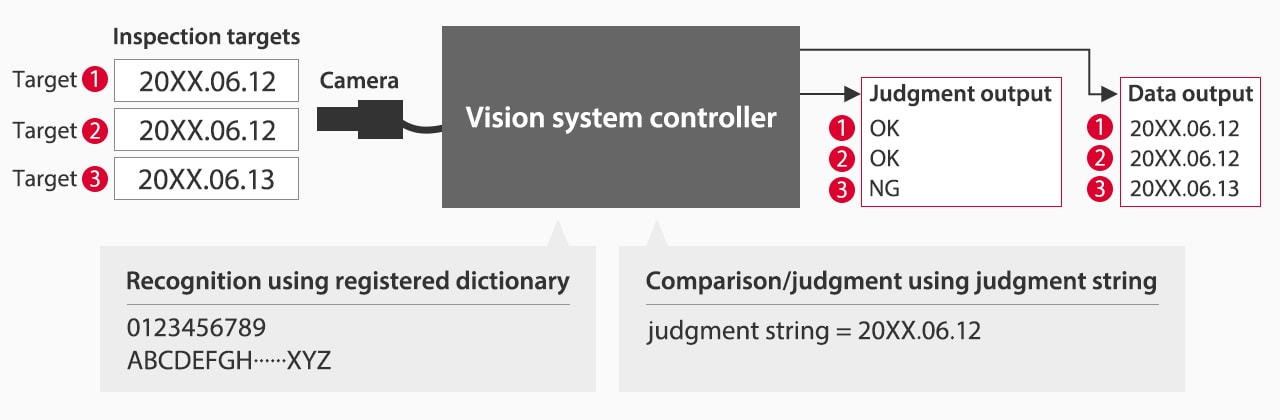
Reliable information management
Character inspection using image processing technology allows operators to upload the recognized character information to a server or other device, so there are no worries about mistakes, such as writing the wrong characters. Product numbers or other items that consist of many characters are often written incorrectly. Handling them as digital information can prevent problems.
Thorough management of product numbers and other information also allows tracking of parts or products and collecting them quickly in case of the outflow of defective products or a product recall. It is also possible to track problems upstream to identify a problematic process to improve operations. Reliable information management is also effective for ensuring traceability.
Simultaneous reading along with barcodes or 2D codes
In recent years, barcodes or 2D codes have been introduced for product management. To read barcodes or 2D codes only, you can use a barcode reader or a handheld mobile computer. In many cases, however, an expiration date is also marked on the label along with the barcode or 2D code. Character inspection can recognize both codes and characters simultaneously. This improves efficiency dramatically because you can read all data at once and manage it together instead of reading each type of data separately.
100% inspection with minimum labor
The most effective method for preventing the outflow of defective workpieces is 100% inspection. However, checking characters visually not only takes time and labor but also involves a risk of oversight. Using image processing enables reliable inline character inspection to achieve both quality assurance and reduced labor costs. It also improves the yield rate in the inspection process and is highly effective for increasing production efficiency.
Basics of Character Inspection
There are various types of character inspection: presence of marking, marking quality, optical character verification (OCV) and optical character recognition (OCR).
- Presence of marking:
- An inspection to detect the presence or absence of marking.
- Marking quality:
- An inspection to detect illegible characters.
- OCV:
- An inspection to compare marked characters and a judgment string, and make a pass/fail judgment.
- OCR:
- An inspection to read marked characters and output them for verification or control.
Although the purposes are different, the basic operation of character inspection is to extract characters one by one from a captured image, compare them with characters in the registered dictionary, and identify characters.
- 1. Character extraction
- Extract characters one by one from the captured data.
- 2. Comparison against dictionary
- Each of the extracted characters is compared with registered characters for identification.
How do OCR Systems Work?
In the context of date coding in manufacturing, OCR systems are specifically designed to recognize text entries on images captured by vision system sensors and compare them to predetermined values. Below is the breakdown of the working principle of OCR systems:
Image Acquisition
The first step in OCR verification involves capturing images of date coding printed on product packaging or labeling. This is usually done using high-resolution cameras and optical transducers integrated into the production line. These cameras are strategically placed to capture the images of the date coding regardless of product orientation.
Preprocessing
Once the camera captures the image, the data goes into preprocessing to enhance image quality and readability for the OCR verification software. This may involve contrast, brightness, and noise adjustments that could interfere with text recognition. After this, the image moves into the text detection phase.
Text Detection and Character Recognition
OCR verification systems rely on advanced algorithms to identify the regions containing text and distinguish date, lot, and batch codes from other printed elements. The system will isolate the text and break it down into individual characters using pattern recognition techniques for identification. Considering the system is used for date coding, the algorithms for pattern recognition are specifically tailored to recognize coding formats specific to the industry in which they operate.
Verification and Validation
After recognizing the characters, the OCR system will verify the information against the expected, previously set values and formats. This is an important step as it ensures the coding isn’t only legible but also accurate and compliant with regulations.
Feedback Loop
If the OCR verification detects discrepancies or printing errors, the system will trigger alerts for immediate corrections. Creating this feedback loop is crucial for quality control and quality assurance, as it enables the production team to address printing issues immediately and minimize their impact on the overall production.
Character and Code Inspection Tasks
1D Barcode Reading
Fixed cameras with tuned optics read linear codes such as UPC, EAN, Code 39, Code 128, Interleaved 2-of-5, Codabar, and Pharmacode at line speed. A 1D barcode reader tolerates skew, stretch, and moderate damage, while grading tools flag low-quality labels before they advance. Camera-based reading also adds unattended coverage where handhelds fall short.
2D Code Reading
2D tools decode compact symbols with high data density, such as Data Matrix (including ECC 200), QR and Micro QR, PDF417, and MaxiCode. Direct part marks on metal or molded parts are common in automotive and electronics. Vision-based decoders handle low contrast, curved surfaces, and glare through robust image formation and grading.
OCR of Text
With machine vision OCR, lot numbers, batch codes, and expiration dates can be read even when fonts, print quality, or surfaces vary. OCR inspection uses trained character sets along with AI-based tools to pick up faint ink, reflective packaging, or etched markings. Results feed directly into recipes, work orders, or PLC tags, creating reliable data records that support product traceability.
Combined Reading
Text and codes rarely travel alone. Combined tools read a 1D or 2D code and perform OCR inspection in the same acquisition. A single camera captures the label, verifies the barcode payload, and then matches it to lot and date fields. One station, one trigger, complete data capture.
Key Advantages
Eliminate Human Errors
Manual key-entry, visual checks, and spot audits create failure modes under pace and fatigue. Automated reading replaces subjective interpretation with deterministic tools. When the system finds a mismatch, it raises an output, stops a conveyor zone, or diverts a carton. Error paths shrink and repeatability rises.
Reliable Data Management
Character strings and code payloads post to MES, ERP, or historians with timestamps and image archives. That stream supports genealogy, WIP reporting, and targeted recalls. With combined reading in place, product traceability moves from paper to structured data without adding operators or slowing the cell.
100% Inline Inspection
Camera-based readers run continuously at production speed, including on small fonts and narrow bars. Inline verification moves checks from end-of-line audits to the moment data is created. That shift shortens feedback loops for printers and lasers, and it reduces rework because failures are caught at the source.
Combined Data Capture
By pairing machine vision OCR with code reading in the same job, facilities capture all identifiers in one frame. The system writes a single, consistent record containing the decoded barcode, OCR result, match status, grade, and image link. That record is easy to consume in dashboards and easy to trace when a quality event occurs.
Robust Code Verification
Readers can grade symbols against common standards and detect low contrast, module damage, quiet-zone violations, or print shift. For challenging backgrounds (clear film, glossy cartons, or etched marks), specialized lighting and filters heighten contrast so the tool can decide pass/fail with a wide process window.
Techniques for Improving Recognition Accuracy
Accurate reads start with stable inputs. The right field of view, distance, and lens need to be selected to resolve bar width and character height with a margin. Bright and even lighting reduces glare; filters and polarizers help on metal or film. For moving parts, short exposures freeze motion. Pose correction compensates for tilt and rotation.
In OCR inspection, train sub-patterns for expected fonts and apply pre-processing to cut background noise. AI-assisted OCR raises yield on distorted or engraved text without complex rule sets. Verification logic can include length checks, regex formats, and barcode cross-checks. If grades fall or mismatches appear, alarms halt the cell until corrected.
Sub-pattern Registration
Registering several patterns for one character improves recognition stability. By registering various fonts as sub-patterns, you can prevent failed recognition due to different font types.
Automatic Fitting
Automatic fitting is an automatic fine adjustment of characters to allow extraction in optimum conditions. Since slight variations in the status among characters are corrected individually before verification, the correlation level is increased.

Inspection of expiration dates on food containers
Image Enhance Filters
When the background of the marking has patterns or is made of metal or other reflective material, the accuracy of character inspection may decrease. Even when reading is difficult due to these or other reasons, applying image enhance filters enables stable character inspection.
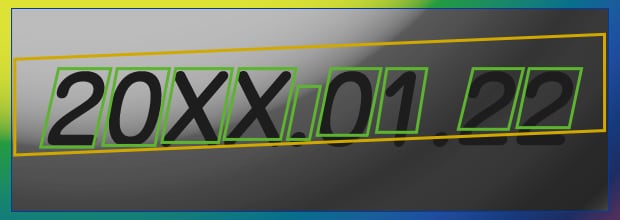
Normal gray processing image - Character extraction is unstable due to the influence of the background.
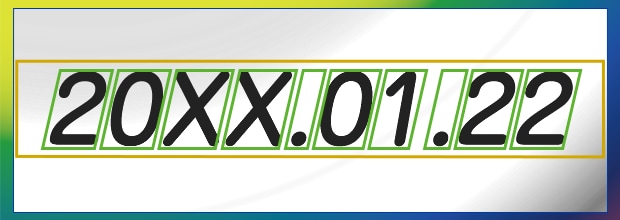
Color to gray processing with the CV-X400 - The contrast between the characters and background is sufficient to make the inspection stable.
Practical Applications
This section introduces practical examples of using image processing for character inspection not only to prevent the outflow of defective workpieces but also for quality improvement by building a thorough management system and ensuring traceability.
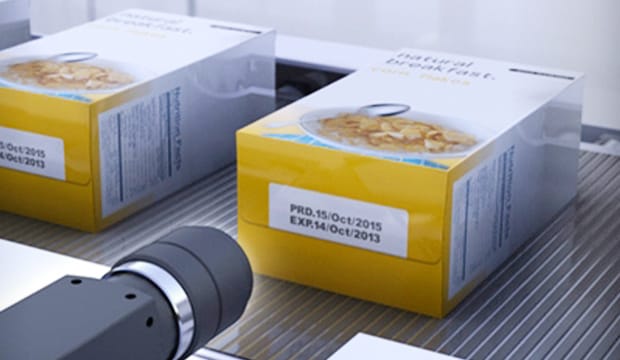
Character inspection of expiration dates
Character inspection is used often in the food and pharmaceutical industries. The most typical application is character inspection of expiration dates. Machine vision reads expiration dates to check for incorrect dates or omission. 100% inspection can prevent mixing of expired products.
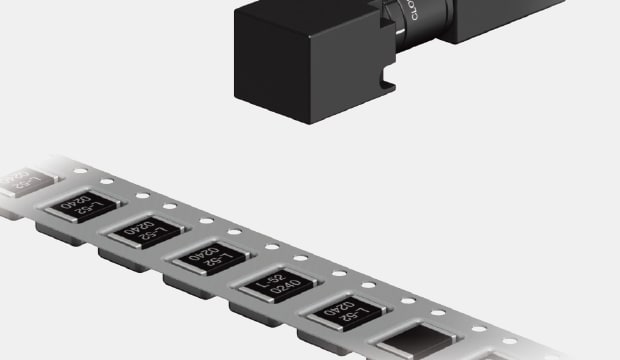
Checking the orientation and correctness of characters on parts in an embossed tape
Embossed tape is used as packing material for IC chips, connectors and LEDs. Character inspection of targets packed in embossed tape requires image capture through the cover tape. These inspections are affected by random halation generated by ambient lighting, resulting in incorrect recognition. Using an image enhance filter (shading correction filter) ensures reliable character detection without the negative effect of halation. This filter is also effective for targets such as containers, filters, and reflective metal parts.
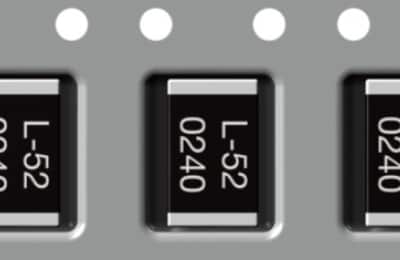
Inspection screen: OK
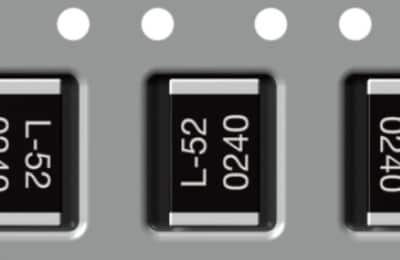
Inspection screen: NG (wrong orientation)
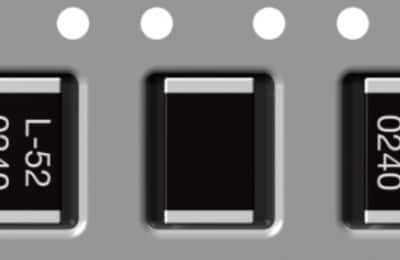
Inspection screen: NG (omission of marking)
Some further applications are:
- Food & Beverage: Read expiration dates with UPC or Data Matrix codes to prevent mixed lots.
- Pharmaceuticals: Tie lot, serial, and GS1 DataMatrix to item-level records, with OCR validating human-readable text.
- Automotive: Capture VINs and part numbers on castings and machined parts, even in oily or rough environments.
- Electronics: Read 2D codes and etched serials on boards and components for service traceability.
- Warehousing & Logistics: Log carton IDs while OCR checks printed labels for routing.
Preventing Manual Errors with OCR Inspections
Legacy workflows often relied on operators to read dates and type them into terminals, or to scan a barcode and assume the text matched. That model breaks under speed and variation. With machine vision OCR and code verification at the cell, every unit is checked in real time. Mismatched text and code payloads trigger a reject. Blurred ink or clogged nozzles are flagged within seconds, not after pallets accumulate. The difference shows up in fewer holds, fewer reprints, and cleaner audits.
KEYENCE offers comprehensive quality assurance and print inspection solutions for your business. If you’re thinking about upgrading, contact us, and we’ll gladly respond to all your inquiries regarding the integration of our products into your existing production line.

Applications and Examples
FAQs
What Types of Codes Can KEYENCE Vision Systems Read?
They cover UPC and EAN retail codes, industrial linear codes like Code 39, Code 128, Interleaved 2-of-5, and Pharmacode, stacked symbols such as PDF417, and 2D codes including Data Matrix (ECC 200), QR, and Micro QR. A 1D barcode reader handles linear formats, while 2D tools capture dense marks and direct part marks.
Can a Single Camera Read Both Text and Codes Simultaneously?
Yes. One smart camera decodes the barcode, performs OCR inspection on date and lot fields, and outputs a unified pass/fail, linking both results for stronger product traceability.
Do the Systems Handle Varying Fonts or Embossed/Engraved Markings?
Yes. Trainable dictionaries and AI-assisted machine vision OCR read varied fonts, etched or dot-peen marks, and low-contrast text on curved or reflective surfaces.
What Industries Benefit Most From OCR and 1D/2D Code Inspection?
Anything from food and beverage, pharmaceutical, automotive, electronics, consumer goods, to E-commerce logistics.
Can the System Detect Unreadable or Low-Quality Codes?
Yes. Verification tools grade contrast, damage, or quiet-zone errors. Faults trigger alerts for correction, and specialized lighting and filters recover codes on clear or glossy surfaces.

Related Downloads


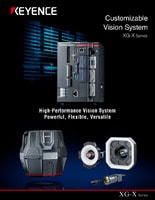
This guide is a compilation of trivia pertaining to vision systems. Figures are used to provide easy-to-understand explanations of principles and characteristics for items ranging from lenses, image capturing, lighting, and color to communication and preprocessing. This guide is a must-read for anyone wanting to learn all about vision systems.
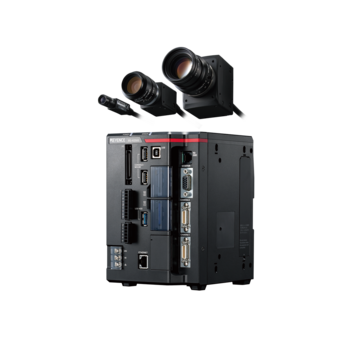
Related Products
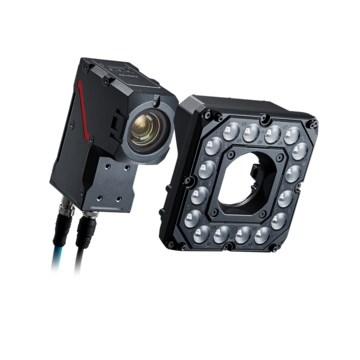
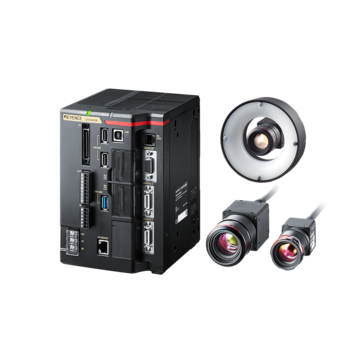
Industries
- Aerospace
- Automation Equipment/Machine Building
- Automotive
- Commodities
- Defense
- Electric Vehicles
- Electronic Device
- Fabric/Textile
- Food/Beverage Packaging
- Logistics
- Machine Tools
- Marine
- Medical Device Manufacturing
- Mining/Metals
- Paper Manufacturing
- Pharmaceuticals
- Printing
- Semiconductor/Manufacturing Electronics
- Solar
- Tobacco
- Vision-Guided Robotics

